

Apple’s ARKit vs. Eye Fatigue

In today’s world, digital devices dominate our daily lives, with significant time spent in front of screens – computers, smartphones, tablets, etc. While this lifestyle is an inevitable part of modern life, it also places substantial strain on our eyes. For many, eye fatigue has become a routine part of life, and if ignored, it can result in serious health issues. Key symptoms of the problem are: poor sleep, light sensitivity, reduced productivity
Obviously when having respective symptoms one should, first and foremost, reduce the screentime. However this is not always possible. Another way is to do Eye Exercises. An application which guides a person through a set of exercises would be beneficial. And that’s what we’re going to create today.
Eyes tracking
Key feature of an eye training app would be eye tracking. Eye movement tracking helps accurately assess exercise completion and ensures appropriate feedback for the user.
To implement the eye tracking function, we compared several potential solutions:
| Tracking Type | Vision | MLKit | ARKit |
| Process Time* | ±7.3 ms | ±14.25 ms | ±8.6 ms |
| Output Data Type | 2D | 2D | 3D |
| Individual Pupil Tracking | – | – | + |
| Setup Code | Small | Many | Small |
| Guides and Tutorials | Many | A little | Many |
| Multiplatform | – | + | – |
* – 1080p 60 fps iPhone 14 Pro, Front Camera, median
- Vision Framework: Provides extensive capabilities for 2D face tracking and keypoint detection, such as eye tracking. However, its accuracy and functionality when working with pupils are limited compared to ARKit.
- Google ML Kit: A cross-platform solution with basic face and eye area tracking capabilities. The main drawbacks include slower frame processing on iOS compared to native tools and challenges in working with pupil tracking.
- ARKit (ARFaceTracking): An Apple platform offering powerful tools for eye tracking in a 3D space. ARKit delivers precise data through the use of the TrueDepth camera and provides the best native implementation for pupil tracking.
Currently, there is no requirement for cross-platform implementation, as our focus is solely on iOS, where frame processing speed is critical. Additionally, ARKit’s output in a 3D format offers a more advanced implementation, providing deeper visualization options, better customization, and a more comprehensive picture of user actions.
Based on the above considerations, we have chosen ARKit (ARFaceTracking) to implement the eye tracking service.
First, we will define the ARSessionManager protocol and data models for processing results.
We will create the EyeTrackingData model to store data about the position of each eye in all expected states, enabling us to process the results from ARFaceAnchor and retain them:
final class EyeTrackingData {
    // MARK: - Properties
    var eyeLookInLeft: Float
    var eyeLookOutLeft: Float
    var eyeLookInRight: Float
    var eyeLookOutRight: Float
    var eyeLookUpLeft: Float
    var eyeLookDownLeft: Float
    var eyeLookUpRight: Float
    var eyeLookDownRight: Float
    var eyeBlinkLeft: Float
    var eyeBlinkRight: Float
    var eyeWideLeft: Float
    var eyeWideRight: Float

    // MARK: - Init
    init(...) { ... }
}
Now let’s describe the ARSessionManager protocol and the ARSessionManagerDelegate delegate, which will return the results for further use:
protocol ARSessionManager: AnyObject {
    // MARK: - Funcs
    func setDelegate(_ delegate: ARSessionManagerDelegate)
    func setupSession() -> ARSCNView
    func startSession()
    func pauseSession()
}

protocol ARSessionManagerDelegate: AnyObject {
    func didUpdateEyeTrackingData(_ data: EyeTrackingData)
}
When implementing ARSessionManager, it is important to consider the following configurations:
- Using arSessionQueue to isolate the service’s operation queue from the UI, preventing interface blocking;
- Using ARFaceTrackingConfiguration to explicitly specify the type of tracking.
final class ARSessionManagerImpl: NSObject, ARSessionManager {
    // MARK: - Delegate
    private var delegate: ARSessionManagerDelegate?

    // MARK: - Properties
    private var configurations: ARConfiguration?
    private let arSessionQueue = DispatchQueue(
        label: "ar-session-queue",
        qos: .userInitiated,
        attributes: [],
        autoreleaseFrequency: .workItem
    )

    // MARK: - ARSceneView
    private var sceneARView = ARSCNView()

    // MARK: - Set
    func setDelegate(_ delegate: ARSessionManagerDelegate) {
        self.delegate = delegate
    }

    func setupSession() -> ARSCNView {
        configurations = ARFaceTrackingConfiguration()
        sceneARView.delegate = self
        return sceneARView
    }
}
The methods startSession() and pauseSession() are provided for session management:
// MARK: - Controls
extension ARSessionManagerImpl {
    func startSession() {
        arSessionQueue.async {
            guard let config = self.configurations else { return }
            self.sceneARView.session.run(config, options: [
                .resetTracking, .removeExistingAnchors
            ])
        }
    }

    func pauseSession() {
        arSessionQueue.async {
            self.sceneARView.session.pause()
        }
    }
}
To accomplish the primary function – tracking the user’s eye state and transmitting the relevant data – it is necessary to utilize the appropriate method from ARSCNViewDelegate. This method enables the retrieval of ARFaceAnchor and the associated data set, ensuring accurate and efficient processing of the required information.
One of the key components returned by ARFaceAnchor is blendShapes. These are a set of parameters that describe specific facial positions and states, such as blinking, eye movements, or changes in mouth shape. Each of these positions is represented as a numeric value ranging from 0.0 to 1.0, indicating the intensity of a particular action or position.
BlendShapes are crucial for accurately determining the user’s eye state. For instance, the parameters eyeBlinkLeft and eyeBlinkRight indicate the blinking level of the left and right eyes, while eyeLookUpLeft or eyeLookOutRight show the gaze direction. Apple provides visualizations and documentation for these parameters, which greatly simplifies their integration into application development.

// MARK: - ARSCNViewDelegate
extension ARSessionManagerImpl: ARSCNViewDelegate {
    func renderer(
        _ renderer: SCNSceneRenderer,
        didUpdate node: SCNNode,
        for anchor: ARAnchor
    ) {
        guard let faceAnchor = anchor as? ARFaceAnchor else { return }
        let blendShapes = faceAnchor.blendShapes

        let eyeTrackingData = EyeTrackingData(
            eyeLookInLeft: blendShapes[.eyeLookInLeft]?.floatValue,
            eyeLookOutLeft: blendShapes[.eyeLookOutLeft]?.floatValue,
            eyeLookInRight: blendShapes[.eyeLookInRight]?.floatValue,
            eyeLookOutRight: blendShapes[.eyeLookOutRight]?.floatValue,
            eyeLookUpLeft: blendShapes[.eyeLookUpLeft]?.floatValue,
            eyeLookDownLeft: blendShapes[.eyeLookDownLeft]?.floatValue,
            eyeLookUpRight: blendShapes[.eyeLookUpRight]?.floatValue,
            eyeLookDownRight: blendShapes[.eyeLookDownRight]?.floatValue,
            eyeBlinkLeft: blendShapes[.eyeBlinkLeft]?.floatValue,
            eyeBlinkRight: blendShapes[.eyeBlinkRight]?.floatValue,
            eyeWideLeft: blendShapes[.eyeWideLeft]?.floatValue,
            eyeWideRight: blendShapes[.eyeWideRight]?.floatValue
        )

        delegate?.didUpdateEyeTrackingData(eyeTrackingData)
    }
}
We have created the EyeTrackingData model and defined the complete logic for ARSessionManager, which works with ARFaceTrackingConfiguration and provides the expected data. Now, we will focus on implementing the service that will process the results and determine whether the selected exercises have been completed.
To begin, it is necessary to create appropriate working models to describe the exercises and the criteria for their completion, such as eye positions. In our case, exercises will define the direction of the gaze relative to the center, meaning that the exercise name and the eye position can match:
enum EyeExercise: CaseIterable {
    case right
    case left
    case up
    case down
    case topLeft
    case topRight
    case bottomLeft
    case bottomRight
    case blink
}
Next, we need to define the criteria for the ExerciseService, i.e., its protocol. In our case, it will have combined functionality, meaning it will both create the training sequence and verify whether the current exercise is completed, then switch to the next one.
protocol ExerciseService {
    func regenerateExercises(type: TrainingSetType)
    func isCurrentExerciseCompleted(
        inputData: EyeTrackingData,
        user: UserData?
    ) -> Bool
}
The implementation of the isCurrentExerciseCompleted() method is critical to the functionality of our app, as this method determines whether the current exercise has been successfully completed:
func isCurrentExerciseCompleted(
    inputData: EyeTrackingData,
    user: UserData?
) -> Bool {
    /// We’ll check the input data value of each eye separately and determine
    /// its position to make sure that the exercise is being completed.
    /// For blinks, we will check whether the eyes were closed
    /// (i.e., no pupils are visible)
}
In our specific case, we employ the MVP architectural pattern, where data from ARSessionManager is returned via a delegate to the Presenter. In the Presenter, the data is processed using the ExerciseService class, which is responsible for structuring the training sequence and verifying the completion of the current exercise. These results are then processed to provide the user with appropriate feedback.
Calibration: A Crucial Step
Before a user begins using the app regularly, it is critical to perform a calibration process. Each individual is unique, with different eye positions, varying limits on rotation and movement, varying eye depth in the skull, and other physiological differences.
To ensure the comprehensive and high-quality functionality of our app, we must include a dedicated calibration feature. This involves creating a specific training sequence — a set of exercises that accounts for a maximum number of positions and states.
Additionally, an informational Best Practices screen should be implemented to educate and guide the user effectively.
At the end of the calibration (as with every workout), it’s worth adding a rewards screen to highlight the end of the workout and give the user a sense of accomplishment.
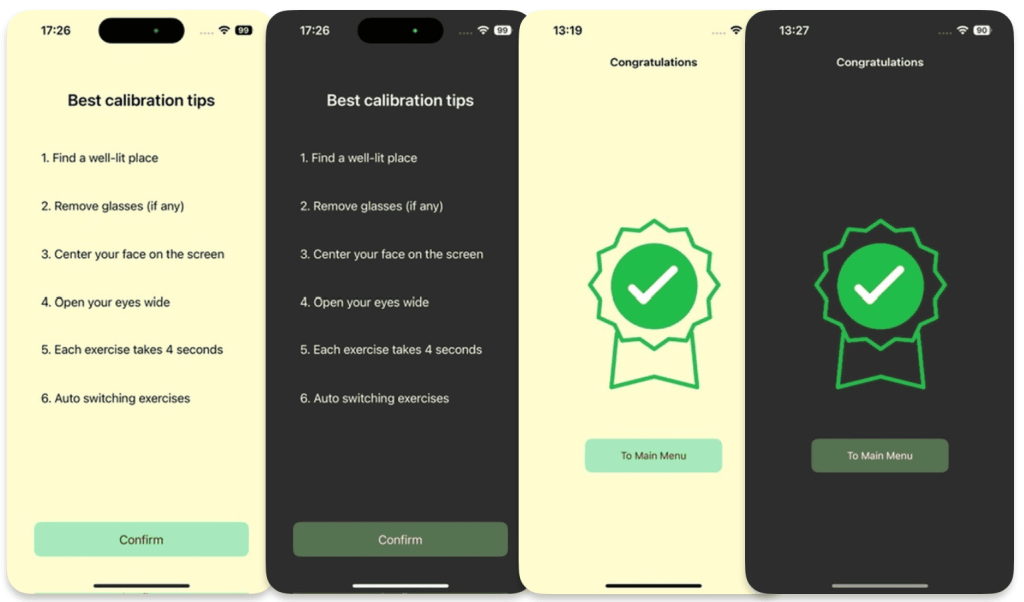
To achieve this, we will proceed with the following steps:
- Perform two cycles of EyeExercise with a pause of 5-10 seconds between each exercise. This will allow us to determine typical eye deviations and their positions for each exercise.
- Save these results in the corresponding values of UserData with a coefficient of 0.8. This adjustment will account for the natural imperfections in human movements and the variability of results.
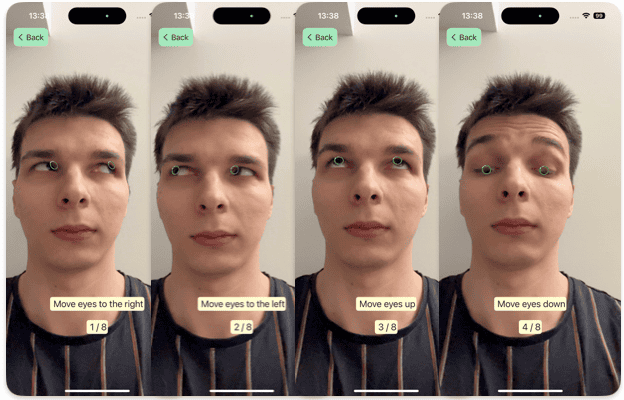
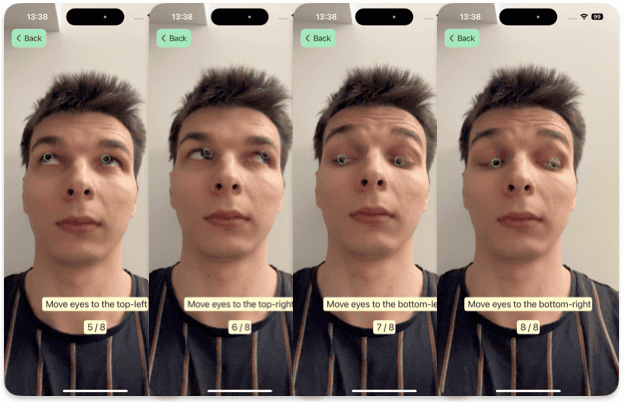
And after this user is guided to do a set of various exercises where they have to move their eyes in all directions.
More about application
Data Input Form and Its Purpose
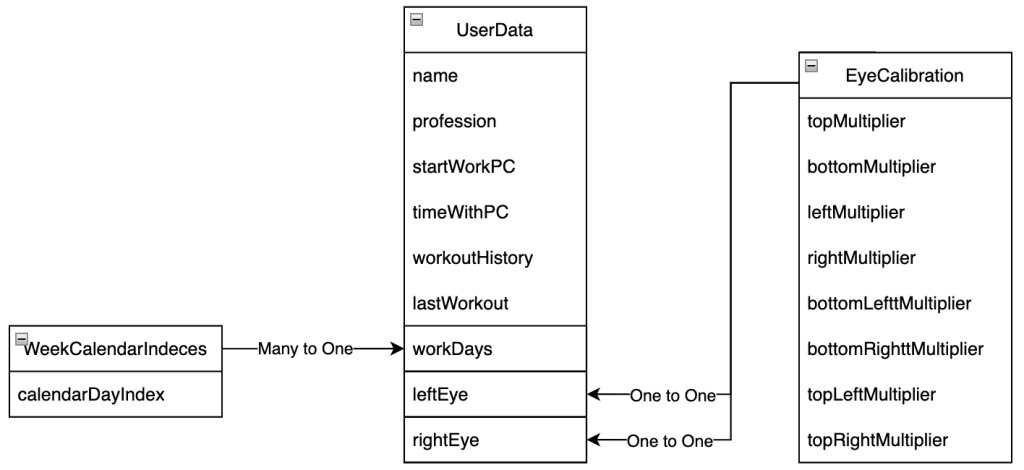
For personalized user interaction and efficient data storage and management, we utilize Apple’s CoreData framework. This allows for seamless operation with a local database and offers flexibility in handling data.
We create a UserData models to store essential user information and its child entities to manage and track exercises (look at relationship diagram bellow):
During the initial setup (onboarding), the user is prompted to enter the following information:
- Working hours: Start time and duration of the workday spent at the computer;
- Working days: The days of the week when the user is actively working.
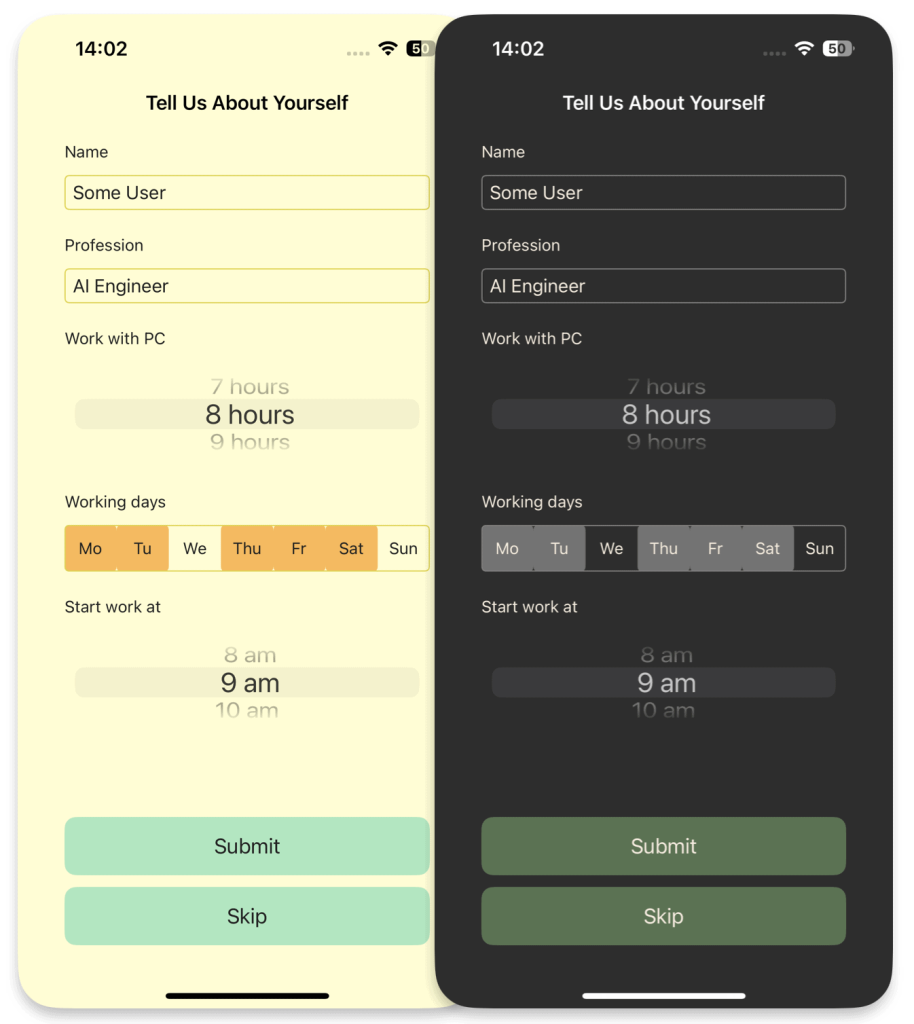
This data is essential for personalizing notifications to align with the user’s work schedule and ensure they are not intrusive during non-working hours.
Notifications
Regularity of breaks and exercises is really important. So a simple function like scheduled reminders throughout the day is a must.
To handle notification creation and management, we first define a protocol NotificationService, where we outline the required functionality:
protocol NotificationService: AnyObject {
    func scheduleNotifications(user: UserData, timeReminder: Int)
    func rescheduleNotifications(user: UserData)
}
Next, we will implement the methods scheduleNotifications() and rescheduleNotifications(), which will handle creating notifications based on the user’s onboarding questionnaire and updating them if the user completes eye exercises between reminders.
func scheduleNotifications(
    user: UserData,
    timeReminder: Int   /// numbers of hours between notifications
) {
    let workingHours = Int(user.workingTime)
    let startHour = Calendar.current.component(.hour, from: lastWorkout)
    UNUserNotificationCenter.current().removeAllPendingNotificationRequests()

    for day in workDays {
        for hour in stride(
            from: startHour + timeReminder,
            to: startHour + workingHours,
            by: timeReminder
        ) {
            addNotification(day: day, hour: hour, lastWorkout: lastWorkout)
        }
    }
}
A private method addNotification() has been added to create a request. This method provides the context and trigger for the notification and adds it to the general notification pool.
private func addNotification(day: Int, hour: Int, lastWorkout: Date) {
    var dateComponents = DateComponents()
    dateComponents.weekday = day
    dateComponents.hour = hour

    if let notificationDate = Calendar.current.nextDate(
        after: lastWorkout,
        matching: dateComponents,
        matchingPolicy: .nextTime
    ) {
        /// Set notification content
        let content = UNMutableNotificationContent()
        content.title = Strings.NotificationService.title
        content.body = Strings.NotificationService.body

        /// Set notification trigger
        let trigger = UNCalendarNotificationTrigger(
            dateMatching: Calendar.current.dateComponents(
                [.year, .month, .day, .hour, .minute, .second],
                from: notificationDate
            ),
            repeats: false
        )

        let request = UNNotificationRequest(
            identifier: UUID().uuidString,
            content: content,
            trigger: trigger
        )

        UNUserNotificationCenter.current().add(request) { (error) in
            if let error = error {
                /// handling the error
            }
        }
    }
}
The implementation of rescheduleNotifications() remains similar, with the consideration that current notifications will be recreated for the remainder of the workday.
For example, if a user works from 9:00 AM to 5:00 PM with a reminder interval of every 2 hours, notifications will be sent at 11:00 AM, 1:00 PM, and 3:00 PM. Notifications will not be sent during non-working hours or days, ensuring they are non-intrusive and aligned with the user’s personal schedule.
Colors
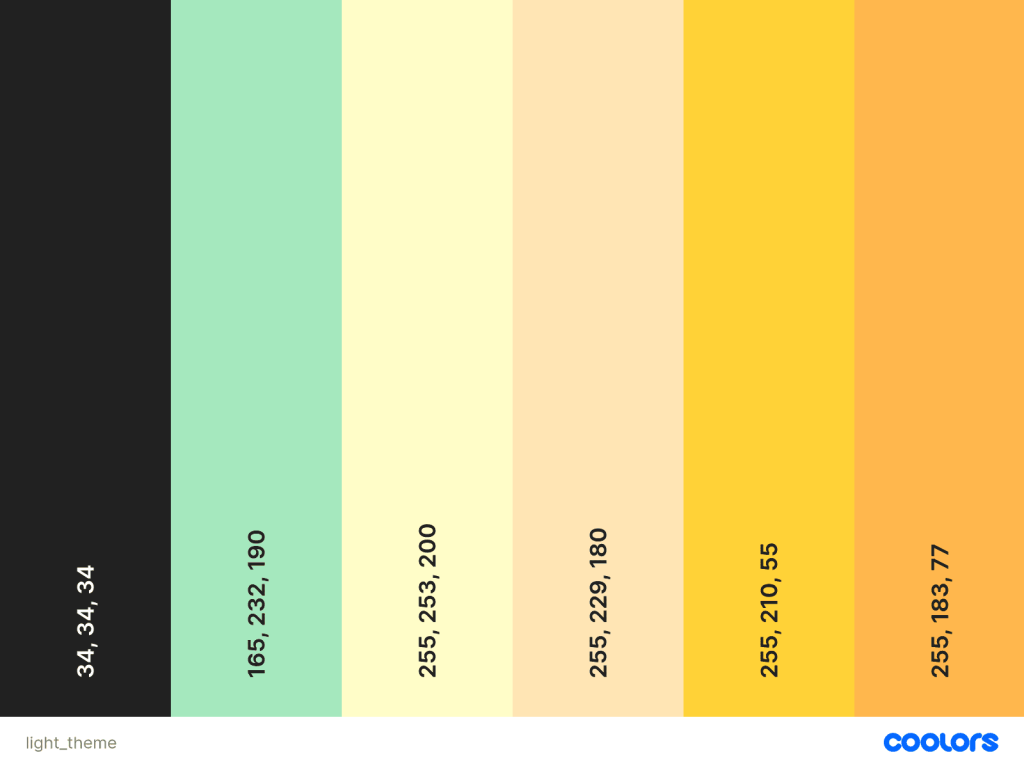
Last but not the least is the UI color scheme. User interface design and user experience are critical for eye health applications, as the right color scheme can reduce eye strain and enhance user perception (DevTo). UI colors for the app were chosen based on the principles of color psychology and their impact on users (MockFlow, HappyDesign).
Conclusion
In today’s world, digital devices dominate our lives, yet we often overlook the long-term impact of prolonged screen time on our eyes. Symptoms like migraines, disrupted sleep, light sensitivity, and reduced productivity may begin subtly but can escalate into significant health issues. Apps like ours aim to address these challenges proactively, promoting better eye health and well-being.
Building an app to combat eye fatigue requires more than technical expertise; it demands thoughtful design. Eye-tracking technology must balance performance, accuracy, and platform compatibility for seamless integration. Equally vital is the user experience – interfaces should reduce eye strain with adaptive color schemes and feel intuitive to use. Notifications play a key role in encouraging regular breaks, fostering healthier habits.
Challenges remain, such as hardware limitations (e.g., TrueDepth camera availability) and the need for robust onboarding and calibration processes to personalize the experience. User education is also critical, ensuring awareness of the importance of eye care and exercises.
Our app leverages ARKit with ARFaceTracking for precise, efficient three-dimensional eye tracking. The ARSessionManager isolates session handling, ensuring smooth data flow to the Presenter, where exercises are monitored. Adaptive color schemes reduce strain, while smart notifications remind users to take breaks, tailored to their schedules.
This demonstrates how technology can address real-world health issues. However, opportunities abound – whether through integrating third-party platforms or enhancing functionality with machine learning for greater precision and personalization.
How would you implement eye tracking in your app?
Perhaps it’s time to explore the possibilities that machine learning could bring to the table. After all, the future of eye tracking is only limited by the scope of our imagination.
