

Barcode Safari: Exploring the iOS Scan Frontier

Recently, we encountered a task in one of our projects involving the development of a product management system for a large warehouse. The system needed accurate and efficient barcode detection to streamline inventory tracking, reduce human errors, and optimize workflows.
We have different options to tackle this problem. Should we use a dedicated barcode detection technology, or integrate barcode detection within an Optical Character Recognition (OCR) framework? Let’s try both and find out!
After thorough investigation, we selected four libraries for detailed research: Vision, MLKit, ZXingObjC, and SwiftyTesseract. The main challenge was ensuring that the system could scan and identify multiple types of barcodes quickly and with high accuracy. Given the scale of the warehouse operations, performance and reliability were critical factors.
During our investigation, we faced several challenges, including:
- Accurately identifying different types of barcodes
- Determining the position of barcodes in photos
- Handling scenarios where multiple barcodes appear in the same frame
- Achieving high performance with minimal lag during scanning
- Ensuring that the selected solution is well-supported and actively maintained for compatibility with future Swift and iOS updates
- Considering cross-platform compatibility for potential future Android implementation
Picking the right barcode detection solution is key. Every project has its own needs, and by understanding them, we can decide on the best technology for barcode detection in iOS.
Vision
The Vision framework, provided by Apple, offers built-in support for barcode detection, allowing easy implementation with minimal code and no additional dependencies. It integrates seamlessly with AVCaptureSession, making it straightforward to add barcode scanning capabilities to iOS apps.
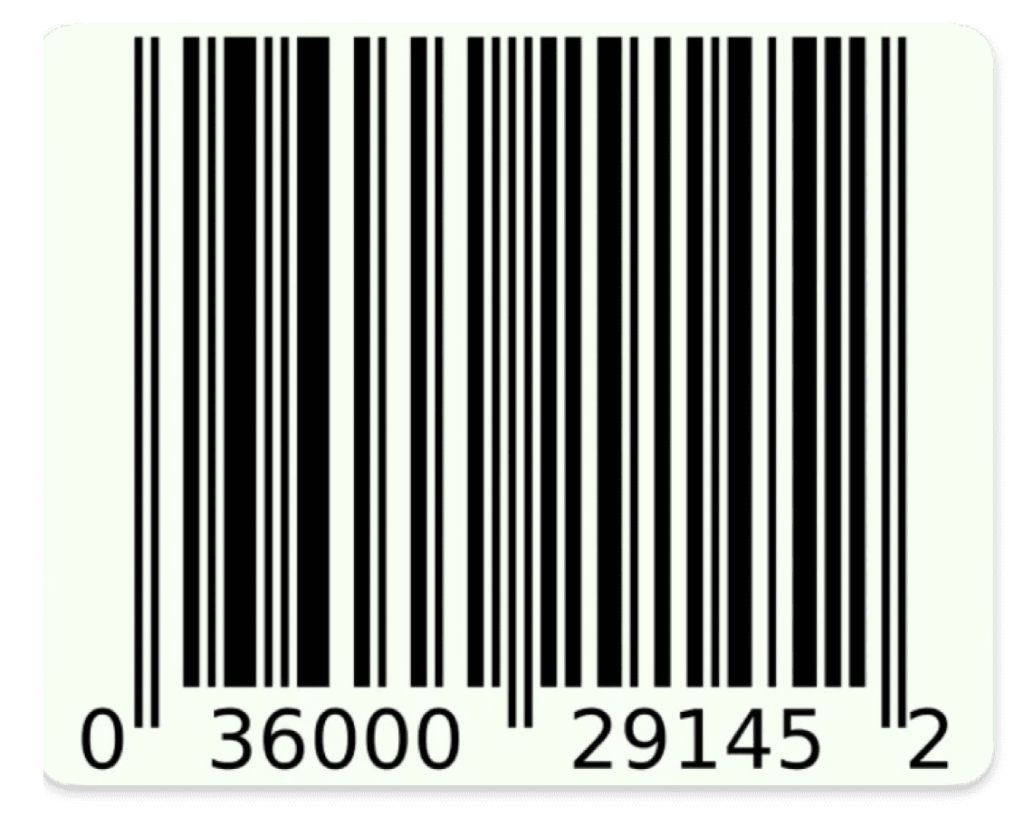
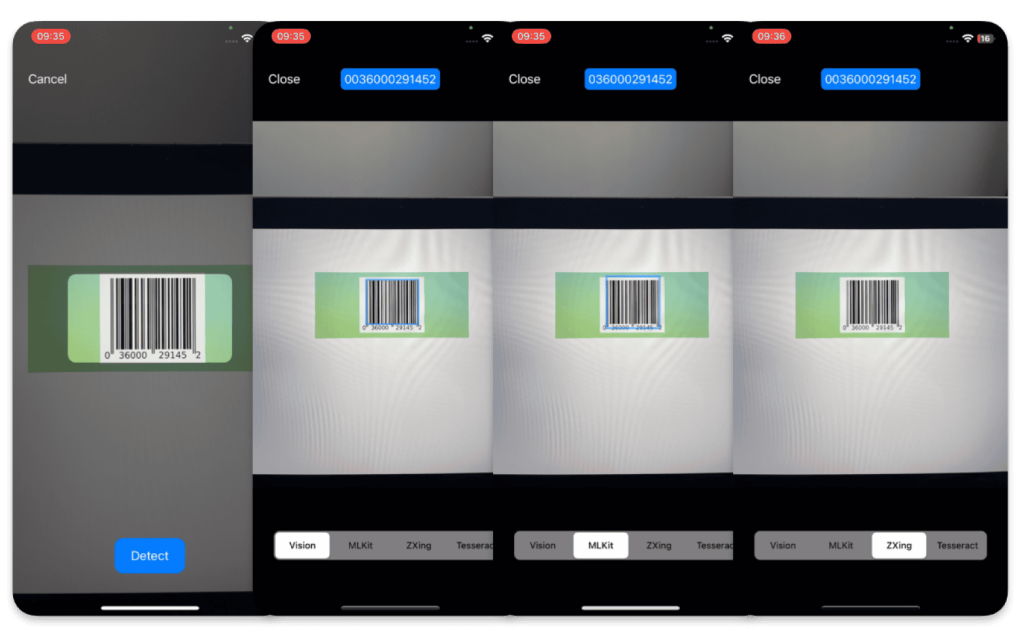
One of the major advantages of Vision is its seamless integration with the Apple ecosystem, ensuring that you don’t need to rely on external libraries or frameworks. It also provides high performance, with an average barcode detection processing time of just 0.07 seconds, which makes it highly efficient. Additionally, it generally offers high accuracy in barcode detection. However, in some cases, Vision may add a leading zero to barcodes, especially when the barcode starts with zero, so it becomes two zeros. This behavior could require additional handling to account for such scenarios.
Such a barcode, for example, will be detected as 0036000291452 in the picture below.
For the demo app, we created a minimalist UI with a choice of recognition modes and a display of results or errors on the tether for instant feedback.
The framework supports a wide variety of barcode formats, including both linear and 2D barcodes, and provides useful extra details, such as the bounding box and symbology of detected barcodes.
Another benefit is that Vision allows the detection of multiple barcodes within the same frame, which can be crucial for scanning large volumes of barcodes. Furthermore, Vision gives you the ability to specify a region of interest for barcode detection, which removes the need to crop the image beforehand.
You can also customize the barcode detection to focus on specific barcode symbologies or image orientation, which helps reduce unnecessary processing and false positives. With abundant resources like tutorials and official documentation available, integration and troubleshooting are made easier.
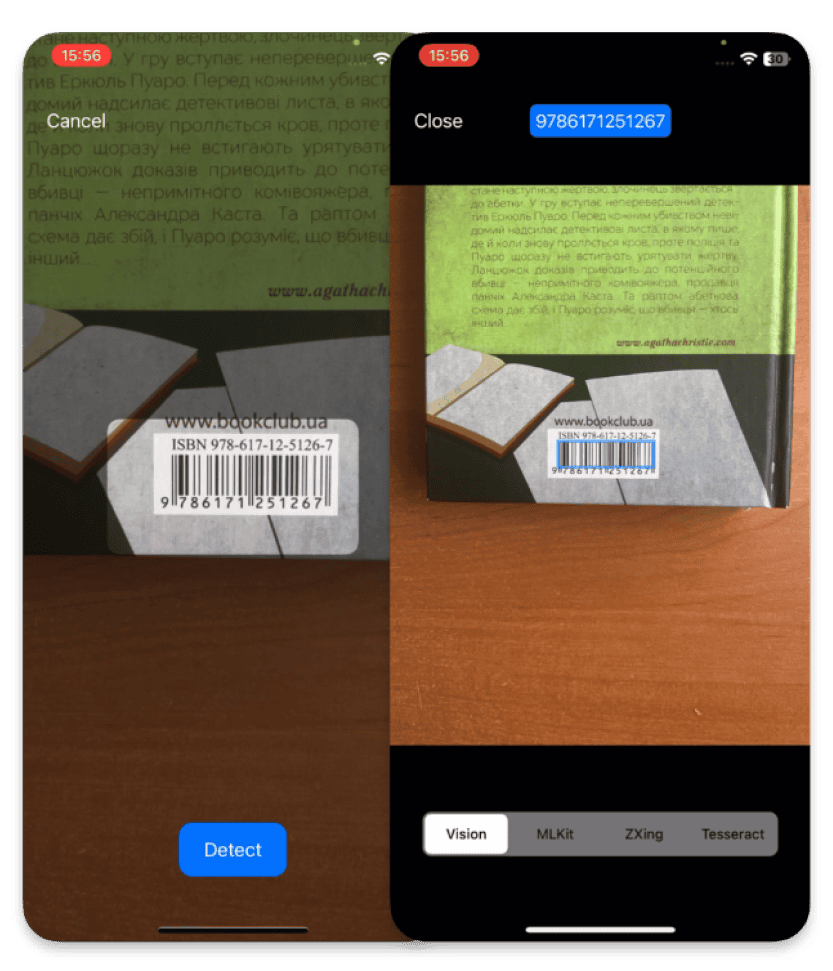
However, Vision does come with some limitations. It is exclusive to iOS, so if you’re aiming for cross-platform compatibility, it may not be the best fit. Additionally, handling edge cases, such as damaged barcodes, can be challenging. Also the issue of handling leading zeros in certain barcodes might require extra coding effort to ensure accuracy in all cases.
To use barcode detection in your app, you only need to import Vision framework and add the code for barcode detection.
Here’s a simple example that demonstrates how to implement barcode detection with Vision.
func detectWithVision(
        photo: URL,
        completion: @escaping ((String, CGRect)?) -> ()
    ) {
        guard
            let image = UIImage(contentsOfFile: photo.path),
            let cgImage = image.cgImage
        else {
            completion(nil)
            return
        }

        let request = VNDetectBarcodesRequest { (request, error) in
            guard
                let results = request.results as? [VNBarcodeObservation],
                error == nil
            else {
                completion(nil)
                return
            }

            let detectedBarcodes: [(String, CGRect)] = results.compactMap {
                guard let payloadStringValue = $0.payloadStringValue else {
                    return nil
                }
                return (payloadStringValue, $0.boundingBox)
            }

            completion(detectedBarcodes.first)
        }

        let handler = VNImageRequestHandler(
            cgImage: cgImage,
            orientation: image.cgImagePropertyOrientation
        )
        try? handler.perform([request])
    }
MLKit
MLKit, developed by Google, provides robust barcode detection for both iOS and Android, offering a cross-platform solution that supports multiple barcode formats.
One of its standout features is the ability to handle multiple barcodes in a single frame, making it ideal for scanning several items at once.
In addition to detecting barcodes, MLKit also provides detailed information for each result, including the barcode’s frame, format, and any specific data it contains – such as URLs, phone numbers, emails, or Wi-Fi credentials. It supports a wide range of barcode formats, covering both linear and 2D types.
The framework provides solid performance with an average processing time of around 0.16 seconds, which is still relatively fast. It has high accuracy and, unlike Vision, does not add extra leading zeros to barcodes. Additionally, it performs well in detecting damaged barcodes, making it a versatile choice for real-world scenarios. MLKit also offers comprehensive documentation and is regularly updated by Google. You can also specify the specific barcode formats you’re interested in, helping optimize performance and reduce unnecessary processing.
For example, with damaged barcodes like those shown below, MLKit still works reliably, whereas other solutions might struggle.
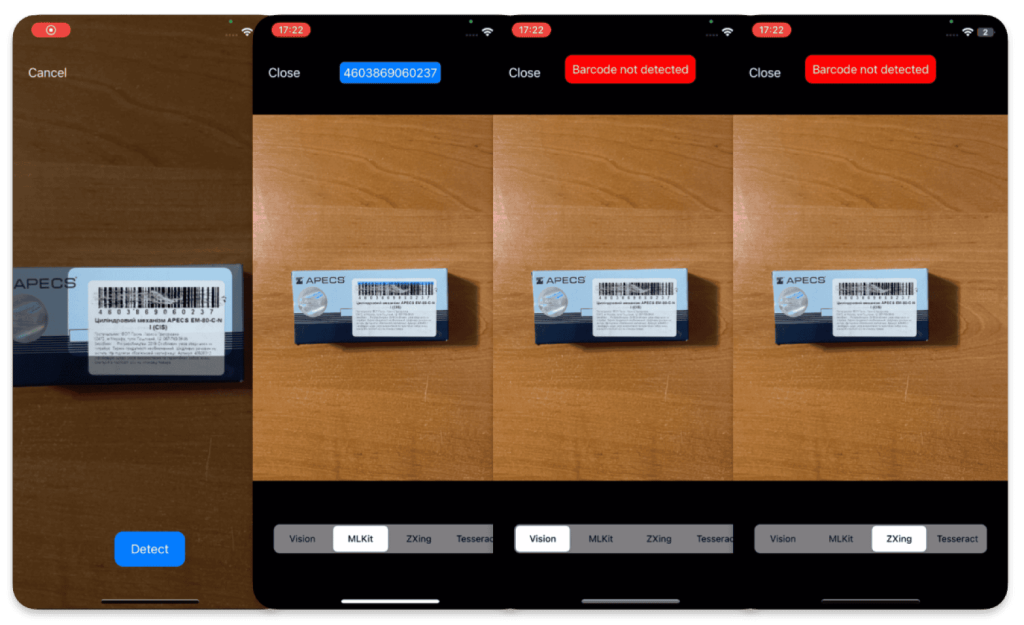
However, MLKit does come with some drawbacks. For iOS, integration requires using Cocoapods, as it is not available through Swift Package Manager (SPM), which can make the initial setup more complicated.
Additionally, while it supports multiple barcode detections, if you need to specify a region of interest, you will either have to crop the image beforehand to focus on that area or implement additional filtering logic after detection. This extra step can increase the complexity of the handling process.
To integrate MLKit into your iOS project follow official documentation. Once MLKit is integrated into your project, you can implement barcode detection using the following code example.
func detectWithMLKit(
        photo: URL,
        completion: @escaping ((String, CGRect)?) -> ()
    ) {
        guard let image = UIImage(contentsOfFile: photo.path) else {
            completion(nil)
            return
        }

        let visionImage = VisionImage(image: image)
        visionImage.orientation = imageOrientation

        let barcodeScanner = BarcodeScanner.barcodeScanner()

        barcodeScanner.process(visionImage) { (barcodes, error) in
            guard let barcodes = barcodes, error == nil else {
                completion(nil)
                return
            }

            var detectedBarcodes: [(String, CGRect)] = []
            detectedBarcodes = barcodes.compactMap {
                guard let value = $0.displayValue else {
                    return nil
                }
                return (value, $0.frame)
            }

            completion(detectedBarcodes.first)
        }
    }
ZXingObjC
ZXingObjC is an open-source library for barcode scanning on iOS, and it’s part of the broader ZXing (Zebra Crossing) project. It supports a wide range of barcode formats – including some not covered by Vision or MLKit – such as RSS14 and Maxicode, making it a good fit for projects that need specialized or legacy barcode support.
To integrate ZXingObjC, you can use CocoaPods or Carthage. For barcode-focused apps, the ZXCapture class offers a straightforward way to implement real-time scanning without setting up your own AVCapture session.
However, the integration process is more complex compared to other solutions. ZXingObjC can also add leading zeros to barcodes and struggles with detecting damaged barcodes. Its performance is slower than Vision and MLKit, with an average processing time of 0.3 seconds. Additionally, the accuracy of barcode detection can be inconsistent, especially when the barcode is at a non-optimal angle. This can make scanning barcodes challenging, as it may require the user to adjust the angle for detection. ZXingObjC does not support multiple barcode detection simultaneously, and it lacks the ability to specify image rotation. Furthermore, while it can provide the coordinates of a detected barcode, it only returns two points, meaning you don’t get the full bounding box or frame of the barcode. Another downside is that ZXingObjC is no longer actively maintained, and there have been no updates for some time, which raises concerns about its long-term reliability.
Another concern is that ZXingObjC is no longer actively maintained, raising questions about future compatibility. As shown in the example below, the detection results can vary depending on the angle, lighting, and visibility of smaller elements.
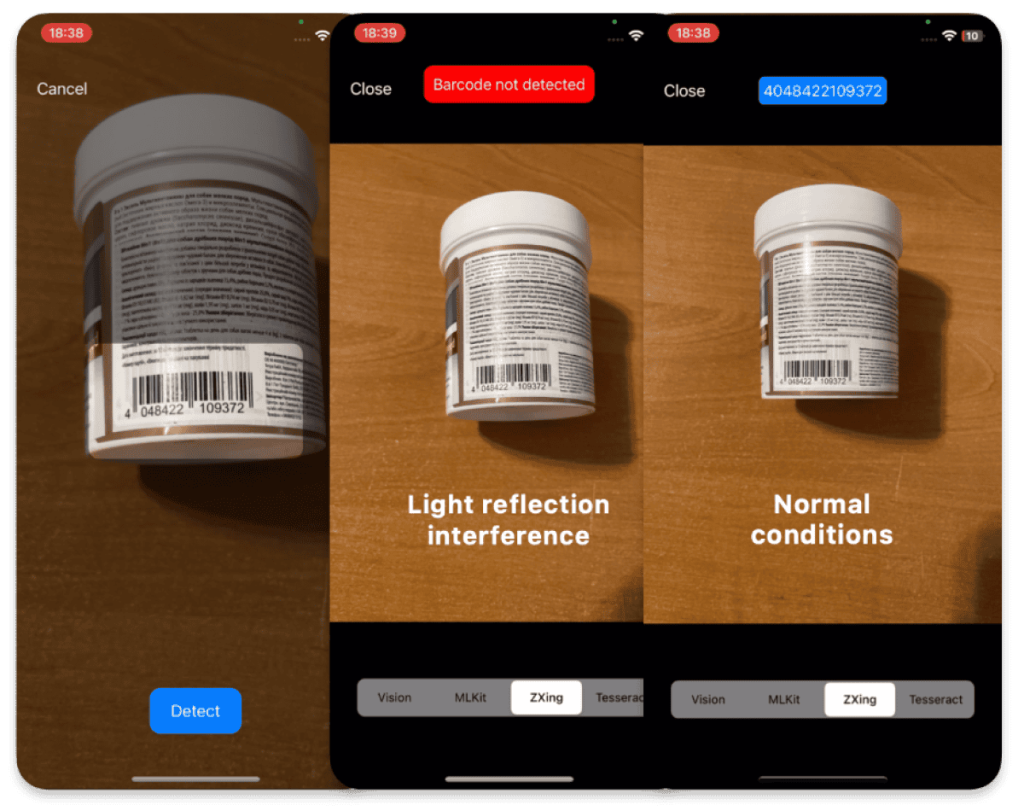
To add ZXingObjC to your project the instructions in the GitHub repository. Once you have ZXingObjC integrated into your project, you can use the following code example to implement barcode detection.
func detectWithZXing(
        photo: URL,
        completion: @escaping ((String, CGRect)?) -> ()
    ) {
        guard
            let image = UIImage(contentsOfFile: photo.path),
            let cgImage = image.cgImage else {
            completion(nil)
            return
        }

        DispatchQueue.global().async {
            let source = ZXCGImageLuminanceSource(cgImage: cgImage)
            let binarizer = ZXHybridBinarizer(source: source)
            let bitmap = ZXBinaryBitmap(binarizer: binarizer)
            let reader = ZXMultiFormatReader()

            let hints = ZXDecodeHints()
            hints.tryHarder = true
            hints.addPossibleFormat(kBarcodeFormatEan13)

            reader.hints = hints

            do {
                let result = try reader.decode(bitmap, hints: hints)
                if let value = result?.text {
                    completion((value, .null))
                } else {
                    completion(nil)
                }
            } catch {
                log.error(error: error)
                completion(nil)
            }
        }
    }
SwiftyTesseract
SwiftyTesseract, built on Google’s Tesseract OCR, is primarily designed for optical character recognition (OCR), but it can be adapted for extracting barcode numbers when that is the main goal. It integrates easily with Swift Package Manager (SPM), but it requires additional setup, such as downloading the appropriate language training files and adding them to your project. Since SwiftyTesseract is not specifically tailored for barcode detection, its capabilities are quite limited in this context. To achieve optimal results, the image must first be cropped to the region containing the barcode, and it should be free of additional text. Furthermore, the image quality must be high otherwise, the results may be inconsistent or inaccurate.
However, even when the image is cropped properly and of good quality, it may still miss some numbers or produce completely inaccurate results. Its performance is also a major concern, with an average processing time of around 2 seconds for a cropped image and approximately 12 seconds for the original image, making it unsuitable for real-time or high-performance barcode detection.
Additionally, it cannot be used for non-text-based barcodes. The library is quite old and is no longer actively maintained, further limiting its reliability and support.
In the example below, it sometimes reads a text-based barcode correctly, but other times it produces an entirely incorrect result.
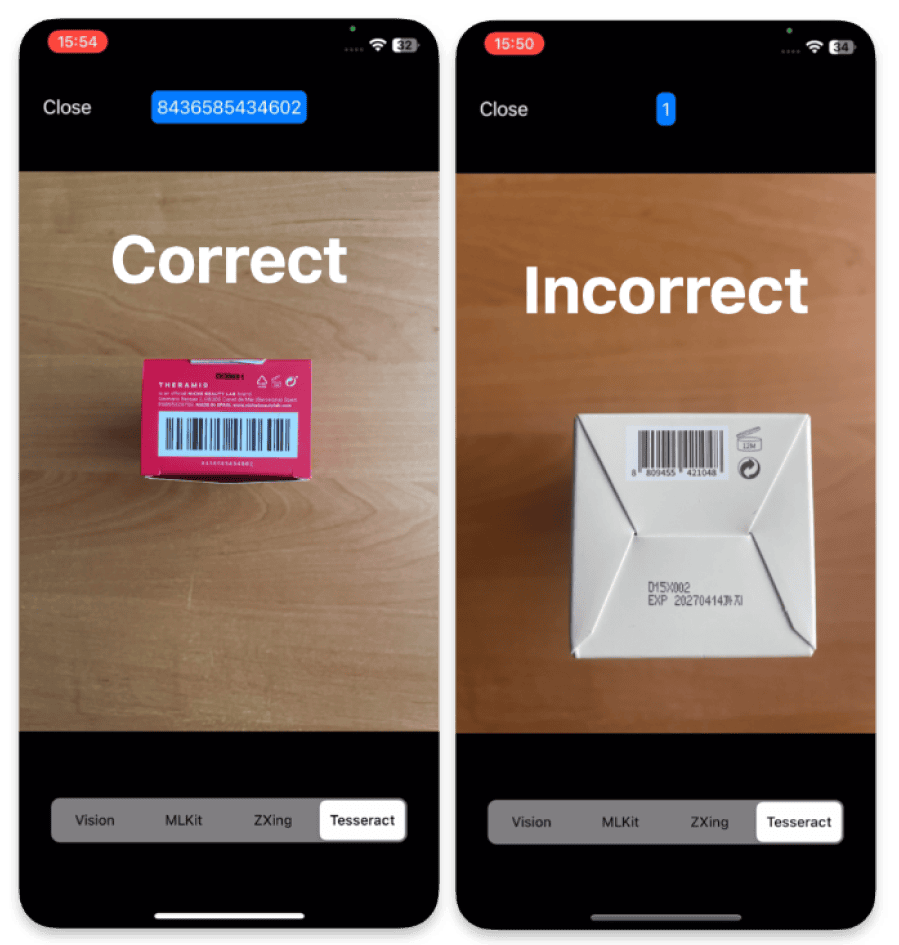
To integrate this library into your project follow the steps outlined in GitHub repository. Be sure to pay attention to the “Additional configuration” section, as you will need to add language training files to your project.
After completing the setup, you can use the following code example to implement barcode detection.
func detectWithTesseract(
        photo: URL,
        rectOfInterest: CGRect,
        completion: @escaping ((String, CGRect)?) -> ()
    ) {
        guard
            let image = UIImage(contentsOfFile: photo.path),
            let croppedImage = image.cropping(to: rectOfInterest)
        else {
            completion(nil)
            return
        }

        let tesseract = Tesseract(
            language: .english,
            dataSource: Bundle.main
        )
        tesseract.allowList = "0123456789"

        DispatchQueue.global().async {
            let result = tesseract.performOCR(on: croppedImage)
            switch result {
            case .success(let text):
                completion((text, .null))
            case .failure(let error):
                log.error(error: error)
                completion(nil)
            }
        }
    }
Final Comparison
Based on the challenges we faced and the requirements for our barcode detection system, we developed a list of criteria to compare each technology.
After researching and testing the selected technologies, we are able to conduct a comparative analysis of their performance.
Let’s do this in the form of a bar chart, with the horizontal axis showing the time taken to process the image, and the vertical axis showing the selected technologies and their results:
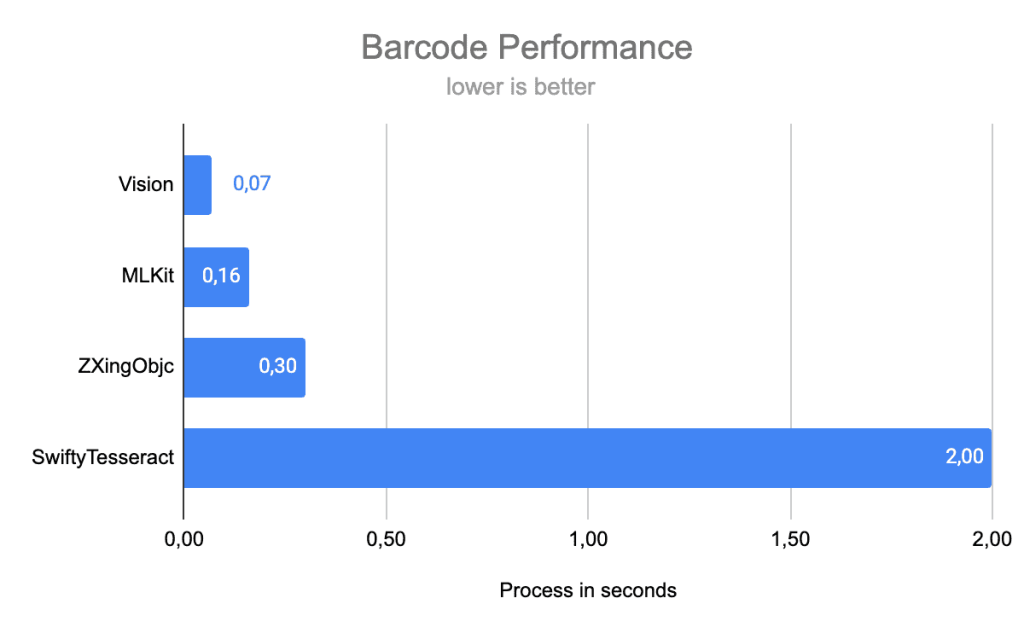
The difference between the results is significant and, in some cases, critical.
If we project these results to the user experience, we can accurately indicate that Vision and MLKit show high performance and can definitely be offered for inclusion in a project. Instead, ZXingObjC offers processing in 300 ms, which is significantly longer than its predecessors, but can still provide a comfortable user experience when working in real time.
SwiftyTesseract shows the worst performance in terms of frame processing time, so it definitely cannot be used in real-time processing applications, but it can be used with photos or for background tasks if available. This is also due to the peculiarities of the general OCR approach to recognize all characters and then process the ones we have selected.
Below is a detailed comparison of Vision, MLKit, ZXingObjC, and SwiftyTesseract based on key factors:
| Criteria | Vision | MLKit | ZXingObjc | SwiftyTesseract |
| Ease of integration | High | Medium | Medium | Medium |
| Supported formats | Codabar
Code 39 Code 93 Code 128 EAN-8 EAN-13 ITF UPC-E Aztec Data Matrix PDF417 QR-code |
Codabar
Code 39 Code 93 Code 128 EAN-8 EAN-13 ITF UPC-E Aztec Data Matrix PDF417 QR-code Maxicode RSS-14
|
Only text-based | |
| Performance | 0.07 sec | 0.16 sec | 0.3 sec | 2 sec |
| Accuracy | High | High | Medium | Low |
| Cross-platform | No | Yes | Yes | Yes |
| Additional info |
Barcode format
+ frame |
Barcode format
+ frame |
Only
barcode format |
None |
| Multiple detection |
Yes | Yes | No | No |
| Tutorials / docs |
High | High | Low | Medium |
| Library support and updates | Yes | Yes | No | No |
Barcodes Recognition on iOS: Conclusion
Each barcode detection library for iOS has its advantages and disadvantages, making the choice dependent on specific project requirements.
Vision: Ideal for projects that prioritize ease of integration, high performance, and simplicity over cross-platform support and ultra-high accuracy. It offers a seamless experience with good results, making it the best choice for applications that don’t require support for multiple platforms and where barcode detection is essential but not necessarily perfect.
MLKit: The go-to solution for cross-platform applications, especially when accuracy is critical and the ability to detect even damaged barcodes is required. It is highly supported with comprehensive documentation and frequent updates, making it an excellent choice for applications that need reliable performance across both iOS and Android.
ZXingObjC: A solid option for projects needing support for barcode formats not available in Vision or MLKit, such as Maxicode and RSS-14. However, the integration is more complex, and the lack of ongoing support could lead to issues in the future. It is a good option for projects with specific barcode format requirements but less ideal for projects requiring long-term stability and maintenance.
SwiftyTesseract: Not recommended for traditional barcode detection. It’s more suitable for projects where OCR is the primary focus, with barcode detection as a secondary task. It can handle only text-based barcodes and has slower performance, making it unsuitable for high-performance barcode scanning.
Ultimately, the choice depends on your project’s goals and constraints. Will you opt for the simplicity and speed of Vision, the cross-platform power of MLKit, the extended format support of ZXingObjC, or the OCR focus of SwiftyTesseract? The decision is yours.
This exploration has been a real challenge, showing us that a seemingly simple question can lead to complex answers. Which solution would you choose?
