
Extended Reality Project: Code Samples & Demos

Extended Reality – XR: A Gateway to Spatial Interfaces
The Augmented Reality (AR), Mixed Reality (MR), and Virtual Reality (XR) markets continue to evolve and grow rapidly. Once the stuff of science fiction, it is now part of the future reality.
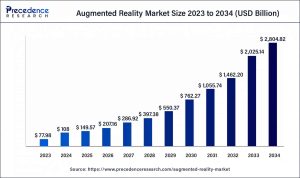
Precedence Research predicts rapid growth in the AR and VR market over the next decade, as illustrated in the graph below.
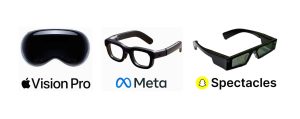
Users are increasingly interested in portable XR devices, driven by the emergence of spatial devices such as Apple Vision Pro and Meta Glasses. These platforms have normalized gesture-based interaction, especially the pinch gesture, as a natural way to control virtual content.
At It-Jim, we’re inspired by the vision of a world where physical and virtual environments are seamlessly blended, and interaction with them is intuitive and unified.
In this small project, we aimed to determine if XR-type gestures can be achieved on a regular iPhone before XR glasses become widely adopted.
A key stage of the project involved technical research, where the task was to evaluate the feasibility of implementing such a system using only built-in iOS tools.
While third-party solutions were considered, deeper analysis revealed that all the necessary mechanisms are already available natively through Apple’s Vision Framework, ARKit, and RealityKit.
We already have experience with and existing solutions that utilize Hand Pose Detection, including the demo featured in this article. input in admin panel/ example to use:

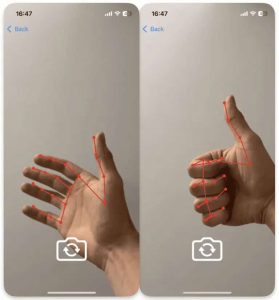
Let’s define the key aspects of our task: tracking stability, recognition accuracy, minimal latency during video stream processing, and the ability to integrate this data into the AR scene.
Chosen Approach for Extended Reality Project Implementation
Based on the results of our research, we formulated the hypothesis that building a gesture-first AR application is entirely feasible, even without the use of large-scale ML models or external SDKs.
Instead of complex or multilayered solutions, it is sufficient to correctly combine the Vision Framework as a source of hand motion data with ARKit as the tool for rendering and handling the spatial scene.
This combination forms the foundation of the application. We defined the working scheme of future services and their communication flow.
Responsibilities are divided into dedicated services:
- AR-related operations service: handles ARKit operations, manages the 3D scene, and provides ARFrame output at a defined FPS.
- Hand tracking within provided frames: processes ARFrame data to analyze finger positions and send back control signals.
For gesture control, we focused on gestures that are both easy to track and naturally understood by users.

Communication Flow in the Extended Reality Project
During the initialization phase, the following sequence takes place.
First, a session is created (once), and the corresponding ARView is obtained to render the scene to the user.
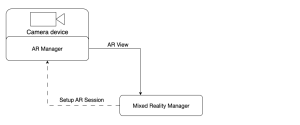
A continuous processing loop begins, where the AR Manager sends AR Frame data to the MixedRealityManager.
From there, it is forwarded to the Hand Tracking Manager for analysis. The results are then returned to the MixedRealityManager, which determines the appropriate changes to apply within the AR session.
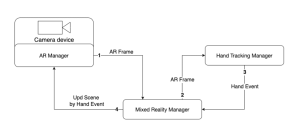
With the idea, hypothesis, and signal flow defined, we are ready to begin building the actual implementation.
The Art of Control AR Scene
To manage the AR scene within the application, we defined a dedicated service that implements the ARManager protocol. Its primary purpose is to provide the MixedRealityManager with abstract access to the required ARKit capabilities without coupling it to the framework’s internal details or any additional nested logic.
protocol ARManager {
    // MARK: - Publishers
    var eventPublisher: AnyPublisher<ARManagerEvents, Never> { get }

    // MARK: - Session Control
    func setupSession() -> ARView
    func startSession()
    func resetSession()
    func pauseSession()

    // MARK: - Scene Control
    func toggleSceneMeshPreview()

    // MARK: - Gestures Control
    func addPrimitiveObject(type: GeometricPrimitiveType)
    func moveObjectByPinch(screenPoint: CGPoint)
    func resetPinchGesture()
}

enum ARManagerEvents {
    case newARFrameForTracking(ARFrame)
}
One of the key communication channels is a Combine publisher that emits the newARFrameForTracking event. This allows ARManager to transmit each new ARFrame to other modules, primarily the MixedRealityManager, for further analysis by the HandTrackingManager.
Extended Reality Project: Session Setup
The ARConfiguration and ARView must be properly configured to ensure that objects remain anchored in the scene, physics simulation works correctly, and Person Segmentation is explicitly enabled. This allows for accurate depth layering of virtual content relative to real-world people, both visually and during interaction.
func setupSession() -> ARView {
    // Setup ARView with options
    arView.session.delegate = self
    arView.environment.sceneUnderstanding.options = []
    arView.environment.sceneUnderstanding.options.insert(.occlusion)
    arView.environment.sceneUnderstanding.options.insert(.physics)
    arView.debugOptions.insert(.showSceneUnderstanding)
    arView.renderOptions = [.disableDepthOfField, .disableMotionBlur]
    arView.automaticallyConfigureSession = false

    // Setup ARConfiguration with options
    configuration.environmentTexturing = .automatic
    configuration.sceneReconstruction = .meshWithClassification
    configuration.frameSemantics.insert(.personSegmentationWithDepth)
    configuration.planeDetection = [.horizontal, .horizontal]

    return arView
}
Person Segmentation Feature
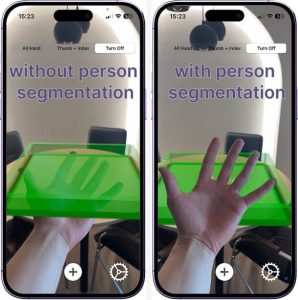
Below is the visual difference when using personSegmentationWithDepth.
By analyzing each ARFrame from the ARSession, the system automatically utilizes depth data and the associated depth map to determine the relative position of the user’s limbs within the scene.
As a result, the user is not visually occluded by overlapping scene objects, allowing for clearer orientation and smoother interaction with virtual elements.
Scene Understanding Feature
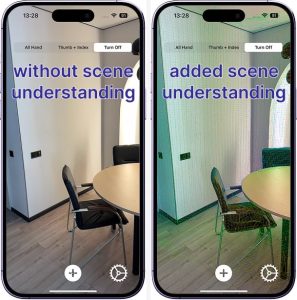
By enabling scene understanding through showSceneUnderstanding for the user preview and using sceneReconstruction as part of the session configuration, we provide additional environmental data and gain the ability to treat real-world surfaces as physical elements.
This allows 3D objects to interact with the physical environment when physics is enabled, deepening the overall experience. There is no need for rigid constraints or artificial boundaries; the real-world floor or tabletop becomes a natural constraint.
For the user, scene understanding is visually represented as a polygonal mesh with color gradients that reflect the depth map relative to the device.
Each camera frame is received through the ARKit session via the didUpdate method.
In real-world conditions, processing all 60 FPS provided by the ARSession on devices like the iPhone 14 Pro is highly demanding and places a significant load on the CPU.
Therefore, we limit the target frame rate to 30 FPS to maintain performance and reduce system strain.
func session(
    _ session: ARSession,
    didUpdate frame: ARFrame
) {
    // Get the current timestamp
    let currentTime = Date()
    // Calculate interval between frames based on the desired FPS
    let fpsTime: Double = 1 / handTrackFps

    // Send ARFrame for hand tracking if enough time has passed
    if currentTime.timeIntervalSince(lastObservationTime) > fpsTime {
        lastObservationTime = currentTime
        self.eventSubject.send(.newARFrameForTracking(frame))
    }
}
Gestures Control Feature
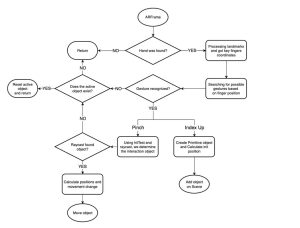
The flowchart below illustrates the whole logic of gesture-based interaction in our AR application. Starting from each incoming ARFrame, the system detects hands, analyzes finger positions, and identifies gestures.
Based on the recognized gesture, either “Pinch” or “Index Up”, it either creates a new object or initiates the movement of an existing one.
Hand Tracking Using Vision
For gesture-driven AR control, the key component is the hand detector provided via VNDetectHumanHandPoseRequest. This request can identify up to two hands in the frame and returns landmark points for each, including the position of every finger joint.
This enables the development of real-time finger tracking without the need for external sensors or depth hardware. Vision automatically normalizes the coordinates, allowing seamless use within UIView or ARKit environments.
To implement this functionality, we define our service using the HandTrackingManager protocol. This service handles incoming ARFrames from the ARSession, generates corresponding gesture events, and provides a UIView overlay for visualization.
protocol HandTrackingManager {
    // MARK: - Publisher
    var eventPublisher: AnyPublisher<HandTrackingManagerEvents, Never> { get }

    // MARK: - Funcs
    func getHandOverlayView() -> UIView
    func processHands(_ frame: ARFrame)
}

enum HandTrackingManagerEvents {
    case indexFingerGestureActive
    case pinchGestureActive(onScreenPoint: CGPoint)
    case pinchGestureInactive
}
Its main entry point is the processHands function, which takes an ARFrame as input. Each time processHands is called, the frame is processed and passed through a VNDetectHumanHandPoseRequest. The results of this request are then handled by the processObservation() method.
func processHands(_ frame: ARFrame) {
    // Extract pixel buffer from the AR frame
    let pixelBuffer = frame.capturedImage
    // Create Vision request handler with set orientation
    // ARKit provides camera feed in .right orientation
    let imageRequestHandler = VNImageRequestHandler(
        cvPixelBuffer: pixelBuffer,
        orientation: .right,
        options: [:]
    )

    // Perform the hand pose detection request
    try? imageRequestHandler.perform([handPoseRequest])

    // Check if at least one hand was detected
    guard
        let results = handPoseRequest.results,
        let observation = results.first
    else {
        return
    }

    // Process the detected hand observation
    processObservation(observation)
}
The processObservation() call follows a straightforward structure. After retrieving the keypoints for the hands, it triggers the visualization overlay and checks for recognized gestures.
Since we selected simple and intuitive gestures, such as a “pinch” (similar to VisionOS) and an “index finger up” gesture; it’s enough to check for these in a prioritized sequence.
func processObservation(_ observation: VNHumanHandPoseObservation) {
    // Try to extract all landmarks from detected observation
    guard
       let recognizedPoints = try? observation.recognizedPoints(.all)
    else {
       return
    }

    handVisualize(points: recognizedPoints)

    // Check for pinch gesture and emit corresponding event if detected
    if checkPinchGesture(recognizedPoints: recognizedPoints) {
        return
    }
    // Check for index finger pointing gesture and emit event if detected
    else if indexFingerGesture(recognizedPoints: recognizedPoints) {
        return
    }
}
It’s worth noting that the visualization layer supports multiple display modes, which we will use throughout the application. For preview purposes, we include three options: All Hand, Thumb + Index Fingers, and Turn Off (disable overview).
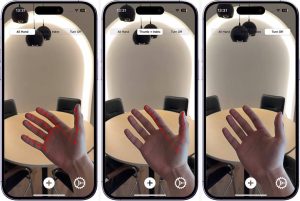
Gesture recognition is based on analyzing the key joint points of the hand. For the “pinch” gesture, we specifically check the distance between the tips of the index finger and the thumb.
Since these coordinates are provided in a 2D screen coordinate system, we must define a trigger threshold, meaning the distance at which the gesture is considered active.
func checkPinchGesture(
   recognizedPoints: [VNHumanHandPoseObservation.JointName: VNRecognizedPoint]
) -> Bool {
    // Try to get positions and confident
    // of the thumb and index finger tips
    guard
        let thumbPoint = recognizedPoints[.thumbTip],
        let indexPoint = recognizedPoints[.indexTip],
        // Check confidences
    else {
        // If any point is missing or not confident enough,
        // consider pinch inactive
        self.eventSubject.send(.pinchGestureInactive)
        return false
    }

    // Calculate distance between thumb and index finger tips
    let dx = thumbPoint.location.x - indexPoint.location.x
    let dy = thumbPoint.location.y - indexPoint.location.y
    let distance = sqrt(dx * dx + dy * dy)

    // If the distance is small enough, consider it a pinch gesture
    if distance < expectedDistance {
        // Convert the thumb tip point to screen coordinates
        let screenPoint = convertToScreenSpace(indexPoint.location)
        // Notify system that pinch gesture is active
        self.eventSubject.send(
            .pinchGestureActive(onScreenPoint: screenPoint)
        )
        return true
    } else {
        // Otherwise, treat it as inactive
        self.eventSubject.send(.pinchGestureInactive)
        return false
    }
}
The processing for indexFingerGesture() is even simpler. It only requires checking the alignment of three consecutive joint points along the index finger to determine if the finger is extended and pointing.
func indexFingerGesture(
    recognizedPoints: [VNHumanHandPoseObservation.JointName: VNRecognizedPoint]
) -> Bool {
    // Try to get the required index finger joints
    guard
        let indexTip = recognizedPoints[.indexTip],
        let indexDIP = recognizedPoints[.indexDIP],
        let indexPIP = recognizedPoints[.indexPIP],
        // Check confidences
    else {
        // If any point is missing or not confident enough,
        // gesture is not valid
        return false
    }

    // Collect horizontal x-values of index finger joints
    let xValues: [CGFloat] = [  get index’s X locations ]

    // Ensure we can compute the spread of x-values
    guard let maxX = xValues.max(), let minX = xValues.min() else {
        return false
    }

    // If finger is mostly vertically aligned (x spread is small),
    // it's considered an active index finger gesture
    if maxX - minX <= expectedRange {
        self.eventSubject.send(.indexFingerGestureActive)
        return true
    } else {
        return false
    }
}
This solution fully isolates the gesture recognition logic from the rest of the application. The ARManager simply provides frames, while the HandTrackingManager is responsible for analyzing them and making decisions based on finger tracking.
Extended Reality: Combination of Elements
It’s time to bring together the services we’ve built into a complete solution that enables real-time gesture-based interaction with the AR scene.
Let’s recall the signal flow diagram shown below.
At the center is the MixedRealityManager, which acts as the coordinating layer. Using Combine, we can subscribe to event updates from our services and organize the desired sequence of operations accordingly.
Step 1: Obtain the ARFrame
The first step is obtaining the ARFrame. ARKit automatically generates ARFrame objects during each session update.
The ARManager intercepts these frames via the session(_:didUpdate:) delegate method described earlier and sends them through a Combine stream to the MixedRealityManager at a defined FPS. These frames serve as the foundation for gesture detection.
Step 2: Pass the Frame
The second step is to pass the frame to the HandTrackingManager. The MixedRealityManager calls the processHands() method and provides the latest ARFrame.
Step 3: Recognize the Gesture
The third step is gesture recognition. If the HandTrackingManager detects one of the expected gestures (such as pinch or index finger), it publishes an event through the Combine stream.
The MixedRealityManager, which is subscribed to these events, executes the corresponding logic, such as adding a new object or activating sandbox movement.
Final Step: Issue the Command
The final step is issuing a command to change the AR scene. Depending on the recognized gesture, the MixedRealityManager triggers the appropriate function to interact with the scene.
A key aspect of the implementation is that all scene control events are routed back to the ARManager. For instance, during a pinch gesture, the screen coordinates are converted into 3D space, and the object’s position is updated accordingly.
The MixedRealityManager does not contain any direct logic for modifying the scene, as that responsibility lies entirely with the ARManager. This separation of layers makes it easy to adjust behavior, introduce new gesture types, or update the UI without affecting the low-level logic.
Extended Reality Project Results: Demos
Below are the final demos showcasing the selected gestures and deeper scene interaction, where the entire surrounding environment becomes part of the AR scene, enabling physical interaction with virtual objects.
It’s worth highlighting the accuracy of the visualization provided to the user through ARView. In addition to generating a polygonal mesh at the start of the ARSession, the mesh is dynamically updated as the device or real-world objects move. This enables the system to avoid phantom boundaries, resulting in a smoother and more immersive experience.
This is a truly exceptional and unique experience today. The ideas demonstrated above represent not just a step, but a new direction in the evolution of user experience. With modern processing power, high-quality camera sensors, lightweight models, and rapidly advancing tools, we can now create experiences that were once considered science fiction.
Final Word on the Extended Reality Project
Gesture-based interaction in AR is no longer just a technical challenge; it is a real step beyond traditional UX thinking.
This project successfully combined the power of computer vision, via the Vision Framework, with the spatial capabilities of ARKit to create a path toward XR experiences that are free of physical interfaces.
From a business perspective, such solutions introduce new interface models for AR apps, especially in the emerging market of wearable consumer tech. This isn’t innovation for its own sake; it’s a new entry point into digital interaction, a bridge to expanded toolsets and digital learning.
The scalability of these approaches extends beyond B2C, offering tremendous potential in the B2B sector.
- In manufacturing, a mechanic assembling a vehicle can visualize a 3D part model directly in their workspace.
- In healthcare, surgeons can navigate pre-op environments without physical contact.
- In logistics, workers can manage alerts, cargo, and automation without being tethered to a console. The full potential is yet to be uncovered.
Technically, this project delivers a working foundation that is modular, scalable, and reliable. With clearly separated services, multithreaded execution, and architecture built for extension, it enables both experimentation and product development.
Our prototype is not just a showcase. It’s a foundation. A step, not sideways, but forward on a path that leads into a new market and a new interface paradigm. We’re already here, and we’re moving ahead.
What kind of experience are you expecting from personal MR devices?
Your idea could be the next stage in this journey.
