
Segmentation Guide for iOS: Top 4 Models in 2026

Segmentation has quietly become one of the most useful tools in modern tech. Whether it’s helping doctors analyze medical images, powering AR effects, tracking objects, or making photo editing smarter, segmentation plays a key role behind the scenes.
By identifying and isolating objects or regions within an image, it unlocks powerful capabilities that enhance user experiences across industries.
Businesses leverage segmentation in a variety of ways: beauty and fashion apps use it for virtual try-ons, fitness apps analyze body posture, e-commerce platforms enable interactive product previews, and accessibility tools detect and describe visual content for users with impairments.
With the growing performance of mobile devices and the support of Core ML, segmentation is no longer limited to server-side processing. iOS developers can now integrate advanced segmentation models directly into their apps.
This article explores segmentation for iOS development, covering how it works, the best models for integration, their limitations, and implementation tips.
Segmentation on iOS: How It Works
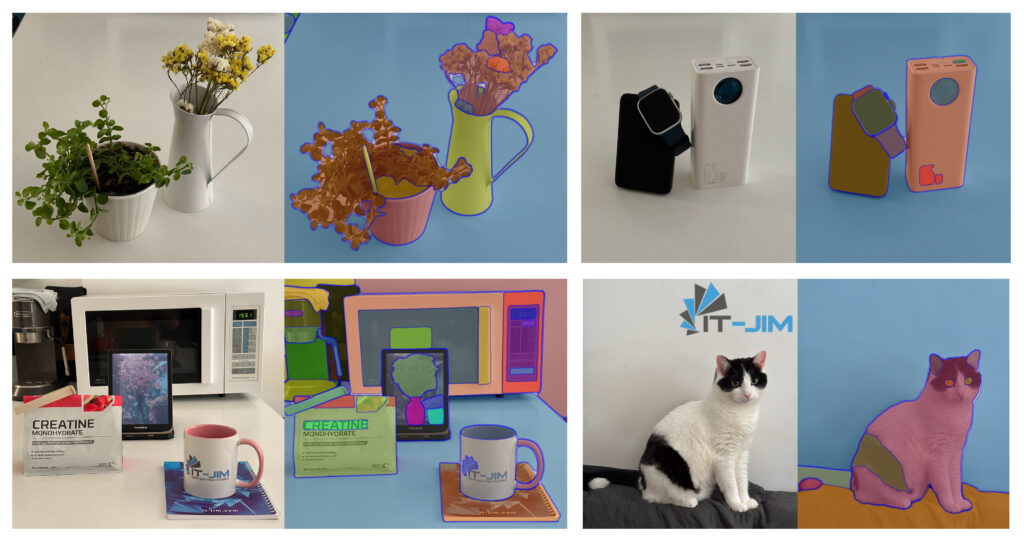
Segmentation involves partitioning an image into multiple segments or regions, each representing meaningful areas such as objects, backgrounds, or boundaries.
Unlike simple object detection, which only provides bounding boxes, segmentation offers pixel-level understanding of the scene. This fine-grained information is crucial for applications where precision and context matter.
The main types of segmentation are:
- Semantic segmentation: Assigns each pixel to a class (e.g., road, sky, car). It treats all objects of the same class as identical, without distinguishing between individual instances.
- Instance segmentation: Goes further by distinguishing separate objects within the same class. For example, it can identify two different cars instead of labeling them both simply as “car.”
- Panoptic segmentation: Combines semantic and instance segmentation, providing a complete view where every pixel is labeled with both a class and an instance ID.
- Interactive segmentation: Allows user input, such as clicks or strokes, to refine segmentation results, useful in photo editing and annotation tasks.

iOS offers developers a broad range of options for implementing segmentation:
- CoreML – allows developers to integrate custom or pre-trained models optimized for iOS hardware. Many segmentation models, including DeepLab and YOLO variants, can be converted to Core ML format.
- Vision framework – offers high-level APIs for tasks such as object detection and person segmentation.
- ARKit provides built-in segmentation for AR applications, specifically, people occlusion.
Apart from native solutions, there are several popular segmentation architectures used today, such as DeepLab, Mask R-CNN, U-Net and its variants, HRNet, YOLO models with segmentation heads, SAM (Segment Anything Model), and FastSAM.
Segmentation on iOS: Top 4 Models
With this variety, choosing the right segmentation approach depends on accuracy requirements, model size, inference speed, and integration complexity for iOS.
For our comparison, we have selected four representative models that are widely used and relevant for mobile development:
- SAM (Segment Anything Model) – a universal, prompt-based model.
- DeepLab – a leading semantic segmentation architecture.
- YOLOv11 – a fast real-time instance segmentation model.
- FastSAM – a lightweight prompt-based segmentation model.
Let’s start examining these options for segmentation on iOS in greater detail.
1. DeepLabV3
DeepLab, developed by Google, is one of the most established and widely used models for semantic image segmentation. Over multiple versions, the model has progressively improved in accuracy and efficiency, making it a reliable choice for many applications, including on-device use.
DeepLab is effective at labeling each pixel in an image with a class label, making it ideal for applications where precise object outlines aren’t necessary but pixel-wise classification is critical. The model has been extensively studied and optimized.
On iOS devices, DeepLab models optimized for mobile deliver near real-time performance. However, DeepLab’s semantic segmentation output treats all objects of the same class as a single entity, which can be limiting for apps that require distinguishing individual objects.
Additionally, its accuracy is not always reliable, and it can produce poor-quality masks.

DeepLab Segmentation Model: Pros & Cons
Let’s look at the advantages and disadvantages of using the DeepLab model:
Advantages of the model include:
- Mature and well-supported, making it easier to integrate.
- Good balance of speed, ease of integration, and accuracy.
- The model is widely applicable.
Disadvantages of the DeepLabV3 model are as follows:
- No instance-level segmentation. It does not differentiate between multiple objects of the same class.
- Performs poorly on rotated images.
- Not suited for interactive or prompt-based segmentation. It does not support user-guided segmentation, limiting its use in applications needing dynamic, user-driven mask refinement.
- Limited generalization outside trained classes. It performs best on categories seen during training and may struggle with novel or unusual objects.
Integration of DeepLab into iOS
To use DeepLab in your project, you need to add a Core ML version of the DeepLab model. You can find an already converted version of the DeepLab model on the Apple Developer website.
Then you can initialize the model as follows:
func initDeepLab() {
        processingQueue.async { [weak self] in
            do {
                let configuration = MLModelConfiguration()
                configuration.computeUnits = .all

                self?.deepLabModel = try DeepLabV3(configuration: configuration)
            } catch {
                log.error(error: error)
            }
        }
}
After initialization, you can perform predictions on images. To get a correct mask from the received multi-array output, create a CGImage mask and resize it to match the original image size.
func maskWithDeepLab(image: URL) {
        guard
            let deepLabModel,
            let inputImage = CIImage(
                contentsOf: image,
                options: [.colorSpace: NSNull()]
            ),
            let vnModel = try? VNCoreMLModel(for: deepLabModel.model)
        else {
            return
        }
        let request = VNCoreMLRequest(model: vnModel) { [weak self] request, _ in
            guard
                let self,
                let result = request.results?.first as? VNCoreMLFeatureValueObservation,
                let arrayValue = result.featureValue.multiArrayValue,
                let maskCGImage = arrayValue.cgImage(min: 0, max: 1),
                let ciImage = CIImage(
                    cgImage: maskCGImage,
                    options: [.colorSpace: NSNull()]
                ).resized(to: inputImage.extent.size)
            else {
                self?.processing = false
                self?.eventSubject.send(.failed(error: .maskingFailed))
                return
            }

            self.processingStage = .processingMask

            self.finalizeMask(input: image, mask: ciImage)
        }
        request.imageCropAndScaleOption = .scaleFill

        operationQueue.addOperation {
            try? VNImageRequestHandler(ciImage: inputImage).perform([request])
        }
}
2. YOLOv11
Recent versions of YOLO, including YOLOv11, introduce segmentation alongside detection capabilities, making it a versatile choice for real-time instance segmentation on mobile devices such as iPhones and iPads.
YOLOv11 is optimized for high-speed performance, capable of processing images and video streams at frame rates suitable for interactive applications.
This model uses instance segmentation and, unlike semantic segmentation models, YOLOv11 can detect and segment multiple individual objects within the same class, providing pixel-precise masks for each instance.
It also combines detection and segmentation in a single forward pass, allowing you to obtain masks along with bounding boxes. YOLO delivers quite good accuracy in both detection and segmentation tasks.

However, YOLOv11’s instance segmentation requires careful tuning of confidence thresholds and post-processing steps to ensure quality masks. Integration demands more code and additional time.
Fortunately, Ultralytics provides a YOLO Swift Package that simplifies integrating the YOLO model. With minimal code, it is possible to get all the necessary data, like an array of masks, a combined mask, bounding boxes, etc. Although the package simplifies integration, the extra processing causes a notable increase in processing time.
YOLOv11 Segmentation Model: Pros & Cons
When using the YOLOv11 model for segmentation, it’s important to consider both advantages and disadvantages.
Advantages of the model include:
- Fast detection.
- Instance segmentation allows for detecting and segmenting multiple individual objects of the same class, which is crucial for tasks like object counting, tracking, and interaction.
- Unified detection and segmentation.
- Pre-trained and widely supported.
- Good accuracy-to-speed ratio, balancing precision and inference speed.
Disadvantages of the YOLOv11 model for segmentation:
- Integration overhead. Handling the outputs (bounding boxes, masks, class probabilities) and converting them can be more complex than other segmentation models, or it requires external dependencies like the YOLO package.
- The system’s performance is lower when all post-processing steps are included compared to some other segmentation solutions.
Integration of YOLOv11 into iOS
To perform segmentation with the YOLOv11 model, you need to export it in CoreML format and add the YOLO Swift Package to your project. Follow the steps in the “Export” section of the Ultralytics documentation.
Then, initialize the model as follows:
func initYOLO(modelName: String) {
        yolo = YOLO(modelName, task: .segment) { [weak self] result in
          switch result {
          case .success(_):
              self?.mlLoaded = true

          case .failure(let error):
              log.error(error: error)
          }
        }
}
With minimal code, you can then perform predictions on images. The model returns an array of masks along with a combined mask (which already contains all masks and their bounding boxes).
To get a mask that satisfies your requirements, you need to create a CGImage mask from the masks array and then resize it to the input image size.
func maskWithYOLO(image: URL) {
        guard
            let inputImage = CIImage(
                contentsOf: image,
                options: [.colorSpace: NSNull()]
            )
        else {
            return
        }
        operationQueue.addOperation { [weak self] in
            guard let self else {
                return
            }
            let result = self.yolo?(inputImage)
            guard
                let masks = result?.masks?.masks,
                let maskCGImage = getMask(from: masks),
                let ciImage = CIImage(
                    cgImage: maskCGImage,
                    options: [.colorSpace: NSNull()]
                ).resized(to: inputImage.extent.size)
            else {
                return
            }

            self.finalizeMask(input: image, mask: ciImage)
        }
}
3. SAM
The Segment Anything Model (SAM), developed by Meta AI, represents a major step forward in image segmentation.
Unlike traditional segmentation models that require training for specific classes or datasets, SAM is designed as a general-purpose, promptable segmentation model. It can generate segmentation masks for virtually any object in an image, even for categories it has never seen before, making it exceptionally versatile.
The model also supports interactive segmentation: users can refine the result by adding or removing prompts, enabling precise control. By providing points and boxes, users can obtain accurate segmentation masks quickly, making it ideal for interactive tools.
SAM is composed of three primary components that work together to produce high-quality masks:
- Image Encoder
It is a Vision Transformer (ViT) trained to convert the input image into a rich, high-dimensional embedding. This embedding captures spatial and semantic features at multiple levels of abstraction. The encoded image serves as the foundation for subsequent segmentation and remains unchanged regardless of prompts.
- Prompt Encoder
It transforms user input – such as points, bounding boxes – into an embedding space that can be combined with the image representation. These embeddings are spatially aligned with the image embeddings, enabling the model to understand where segmentation should occur.
- Mask Decoder
The Mask Decoder is a lightweight neural network responsible for predicting segmentation masks. It combines information from both the image embedding and the prompt embedding to generate accurate masks.

However, SAM is a large model by design, initially intended for cloud or desktop inference. Its standard versions are computationally intensive and require significant memory, which can be a challenge for direct on-device deployment.
To address this, lighter, optimized versions and distilled implementations have been developed, allowing SAM to run on devices like the iPhone and iPad with acceptable performance, especially when combined with Core ML optimization.
SAM consistently delivers high-quality masks across diverse domains. Its ability to generalize to unseen categories is a standout advantage, enabling robust performance even when objects are not part of the training data.

SAM: Advantages & Disadvantages of SAM
Now let’s take a closer look at the advantages and disadvantages of using SAM in iOS applications.
Advantages:
- Universal applicability. SAM’s architecture enables segmentation of virtually any object, even categories unseen during training.
- Prompt-based interaction. Users can guide the model with simple prompts, such as points or boxes.
- Zero-shot performance. No additional training or fine-tuning is required.
- High accuracy and detail. It produces fine-grained masks that closely follow object boundaries.
Disadvantages:
- Long model loading time. Loading all three components (image encoder, prompt encoder, mask decoder) takes noticeably more time than other models.
- High resource consumption
- Over-generalization. While flexible, SAM may misinterpret complex or unusual shapes, requiring manual corrections.
Integration of SAM into iOS
To integrate SAM into an iOS project, you need to add 3 CoreML models, such as SAMImageEncoder, SAMPromptEncoder, and SAMMaskDecoder.
You can find and download already converted models of different sizes in this GitHub repository.
Initially, the SAM models must be loaded. This process is asynchronous and time-consuming due to the model sizes.
func initMLModels() {
        let startTime = CACurrentMediaTime()
        Task { [weak self] in
            let configuration = MLModelConfiguration()
            configuration.computeUnits = .all

            let (imageEncoder, promptEncoder, maskDecoder) = try await Task.detached(priority: .userInitiated) {
                let imageEncoder = try SAMImageEncoder(configuration: configuration)
                let promptEncoder = try SAMPromptEncoder(configuration: configuration)
                let maskDecoder = try SAMMaskDecoder(configuration: configuration)
                return (imageEncoder, promptEncoder, maskDecoder)
            }.value

            let endTime = CACurrentMediaTime()
            let processingTime = endTime - startTime
            log.debug(message: "Model loading time for SAM - \(processingTime)")

            self?.imageEncoderModel = imageEncoder
            self?.promptEncoderModel = promptEncoder
            self?.maskDecoderModel = maskDecoder

            self?.eventSubject.send(.modelsLoaded)
        }
    }
To generate a mask, the input image must be resized to 512×512 and converted into a CVPixelBuffer.
func prepareInput(
        input: URL,
        completion: @escaping (CIImage?, CVPixelBuffer?, MaskingError?) -> Void
    ) {
        processingQueue.async { [weak self] in
            guard
                let self,
                let inputImage = CIImage(
                    contentsOf: input,
                    options: [.colorSpace: NSNull()]
                )
            else {
                completion(nil, nil, .maskingFailed)
                return
            }

            let resizedImage = inputImage.resizedAndTranslated(to: MaskingConstants.inputSize)

            guard let pixelBuffer = self.context.render(resizedImage, pixelFormat: kCVPixelFormatType_32ARGB) else {
                completion(nil, nil, .maskingFailed)
                return
            }

            completion(inputImage, pixelBuffer, nil)
        }
    }
Next, the user-selected points must be encoded using SAMPromptEncoder to produce embeddings compatible with the model.
func getPromptEncoding(
        from allPoints: [SAMProcessingPoint],
        with size: CGSize
    ) async throws -> SAMPromptEncoderOutput {
        guard let model = promptEncoderModel else {
            throw MaskingError.modelNotLoaded
        }

        let transformedCoords = transformCoords(
            allPoints.map { $0.coordinates },
            normalize: false,
            origHW: size
        )
        let pointsMultiArray = try MLMultiArray(
            shape: [1, NSNumber(value: allPoints.count), 2],
            dataType: .float32
        )
        let labelsMultiArray = try MLMultiArray(
            shape: [1, NSNumber(value: allPoints.count)],
            dataType: .int32
        )

        for (index, point) in transformedCoords.enumerated() {
            pointsMultiArray[[0, index, 0] as [NSNumber]] = NSNumber(value: Float(point.x))
            pointsMultiArray[[0, index, 1] as [NSNumber]] = NSNumber(value: Float(point.y))
            labelsMultiArray[[0, index] as [NSNumber]] = NSNumber(value: allPoints[index].category.type.rawValue)
        }

        return try model.prediction(points: pointsMultiArray, labels: labelsMultiArray)
    }
After that, using the image and prompt encodings, we can now generate the segmentation mask.
func prepareMask(
        inputImage: CIImage,
        pixelBuffer: CVPixelBuffer,
        points: [CGPoint],
        completion: @escaping (CIImage?, MaskingError?) -> Void
    ) {
        Task {
            guard
                let imageEncoderModel,
                let imageEncoding = try? imageEncoderModel.prediction(image: pixelBuffer)
            else {
                completion(nil, .modelNotLoaded)
                return
            }
            let processingPoints = points.map { SAMProcessingPoint(coordinates: $0, category: .foreground) }

            let promptEncoding = try await getPromptEncoding(
                from: processingPoints,
                with: inputImage.extent.size
            )
            guard
                let maskImage = try await getCIMask(
                    originalSize: inputImage.extent.size,
                    imageEncoding: imageEncoding,
                    promptEncoding: promptEncoding
                )
            else {
                completion(nil, .maskingFailed)
                return
            }

            completion(maskImage, nil)
        }
    }
SAMMaskDecoder processes both encodings and produces a low-resolution mask.
func getMaskPredictions(
        imageEncoding: SAMImageEncoderOutput,
        promptEncoding: SAMPromptEncoderOutput
    ) async throws -> MLMultiArray {
        guard let model = maskDecoderModel else {
            throw MaskingError.modelNotLoaded
        }

        let image_embedding = imageEncoding.image_embedding
        let feats0 = imageEncoding.feats_s0
        let feats1 = imageEncoding.feats_s1
        let sparse_embedding = promptEncoding.sparse_embeddings
        let dense_embedding = promptEncoding.dense_embeddings

        let output = try model.prediction(
            image_embedding: image_embedding,
            sparse_embedding: sparse_embedding,
            dense_embedding: dense_embedding,
            feats_s0: feats0,
            feats_s1: feats1
        )
        return MLMultiArray(output.low_res_masksShapedArray[0, 0])
    }
Finally, when we have a multi-array output, we need to generate a mask and resize it to match the input image size.
func getCIMask(
        originalSize: CGSize,
        imageEncoding: SAMImageEncoderOutput,
        promptEncoding: SAMPromptEncoderOutput
    ) async throws -> CIImage? {
        let maskArray = try await getMaskPredictions(
            imageEncoding: imageEncoding,
            promptEncoding: promptEncoding
        )

        var minValue: Double = 9999
        var maxValue: Double = -9999

        for i in 0..<maskArray.count {
            let v = maskArray[i].doubleValue
            if v > maxValue { maxValue = v }
            if v < minValue { minValue = v }
        }
        let threshold = -minValue / (maxValue - minValue) - 0.05

        if let maskCGImage = maskArray.cgImage(min: minValue, max: maxValue) {
            let ciImage = CIImage(cgImage: maskCGImage, options: [.colorSpace: NSNull()])
            let resizedImage = ciImage.resized(
                to: originalSize,
                applyingThreshold: Float(threshold)
            )
            return resizedImage
        }
        return nil
    }
4. FastSAM
FastSAM is a lightweight and efficient version of Meta’s original Segment Anything Model (SAM). It is designed by Ultralytics to bring powerful segmentation capabilities to environments with limited computing resources, such as mobile and edge devices.
It aims to deliver the flexibility and accuracy of SAM’s promptable segmentation while significantly reducing inference time and computational cost, making it a strong candidate for mobile applications requiring near real-time performance.
While FastSAM retains SAM’s core strength – segmenting arbitrary objects in images – it currently does not offer a fully promptable Core ML model out of the box.
However, it is possible to export FastSAM into a Core ML format and use it like a standard segmentation model without prompts. Developers can then apply post-processing logic to filter masks based on specific regions of interest or user-defined points, simulating prompt-based behavior.
Thanks to its efficiency, FastSAM is suited for segmentation tasks on iOS, making it a practical alternative to other segmentation solutions.
While accuracy is suitable for main objects, it often produces many incorrect small masks – such as background textures, reflections, or shadows – which require additional filtering.

FastSAM Segmentation Model: Pros & Cons
Here we describe the advantages and disadvantages of using FastSAM for segmentation on iOS. Advantages include:
- Lightweight and fast.
- Low resource consumption.
- Decent accuracy for masks of the main detected objects.
Disadvantages of the model are as follows:
- Produces many incorrect small masks. Requires additional filtering.
- Not widely tested or supported.
- No prompatable CoreML model.
- Requires post-processing.
Integration of FastSAM into iOS
To perform segmentation with the FastSAM model, you need to export it to Core ML format and add the YOLO Swift Package to your project. After that, predictions are made in the same way as with the YOLOv11 model.
Comparing Segmentation Models for iOS
The following table summarizes the key differences between the models to help you choose the most suitable option.
| Criteria | DeepLab | YOLOv11 | SAM | FastSAM |
| Model type | Semantic segmentation | Instance segmentation | Promptable general segmentation | Lightweight promptable segmentation, on iOS instance segmentation only |
| Accuracy | Moderate (Not always accurate) | Moderate-High | Very high | Moderate–High(good for main objects, but includes many false-positive masks) |
| Speed | Moderate(300 ms) | Slow if using YOLO package(1 s) | Moderate(300 ms) | Slow if using YOLO package(1 s) |
| Model Initialization Speed | Fast(1.4 s) | Fast(1.8 s) | Slow(40 s) | Fast(1.6 s) |
| Model size | Small (8.6 MB) | Small (6 MB) | Large (34 MB) | Moderate (23.8 MB) |
| Resource Usage | Moderate (RAM up to 650 MB,
CPU up to 110%) |
Moderate (RAM up to 700 MB,
CPU up to 110%) |
High (RAM up to 1000 MB,
CPU up to 110%) |
Moderate (RAM up to 750 MB, CPU up to 100%) |
| Ease of Integration | Easy | Difficult( requires handling complex outputs) /
Easy(using YOLO package) |
Moderate | Difficult( requires handling complex outputs) /
Easy(using YOLO package) |
| User Interaction | No | No | Supports prompt-based interactive segmentation | No interactive prompt support in the Core ML version |
In Conclusion: Segmentation on iOS
Choosing the right image segmentation model for your iOS application depends on your specific needs and constraints.
Each model offers a different balance of accuracy, performance, integration complexity, and post-processing effort. Understanding these trade-offs is essential for delivering a smooth and effective user experience on mobile devices.
For example, choose SAM if your app benefits from user-guided segmentation or needs flexibility to segment arbitrary objects without retraining. Alternatively, DeepLab is a good choice when you need reliable semantic segmentation, efficient integration, and a stable, well-established model.
At the same time, YOLOv11 is ideal when instance segmentation with multi-object detection and multitasking is essential. And FastSAM, while not offering user prompts out of the box for iOS, can still be used effectively, for instance, for segmentation – producing reasonably accurate masks for detected objects. However, keep in mind that it requires additional post-processing.
By understanding each model’s strengths and limitations, you can make an informed decision that best supports your app’s goals.