
Training and Fine-Tuning GPT-2 and GPT-3 Models Using Hugging Face Transformers and OpenAI API

At the moment this article appears, generative large language models (LLMs) are discussed a lot in the media. After the release of OpenAI ChatGPT and later GPT-4, GPT became the “word of the day”. In this blog post, we’ll cover the following questions:
- What are GPT models, and how do they work?
- Can I run GPT on my computer locally?
- Can I train or fine-tune GPT models myself?
This article is generally beginner-level but requires elementary knowledge of Python and Deep Learning. We’ll gently introduce you to both Hugging Face transformers and OpenAI GPT-3 (Python and CLI) API.
Language models like GPT belong to the branch of computer science called Natural Language Processing (NLP). By the way, in case you didn’t know, the acronym “GPT” stands for “generative pre-training” (in the original GPT-1 paper, which actually never used the acronym), or sometimes “generative pre-trained transformer” nowadays.
Can I Run GPT locally? Hugging Face Transformers and GPT-2
Let's start with the second question. The short answer is: You can run GPT-2 (and many other language models) easily on your local computer, cloud, or google colab. You cannot run GPT-3, ChatGPT, or GPT-4 on your computer. These models are not open and available only via OpenAI paid subscription, via OpenAI API, or via the website. Obviously, any software using this API has to pay OpenAI and rely on a stable internet connection.
The easiest way to run GPT-2 is by using Hugging Face transformers, a modern Deep Learning framework for Python from Hugging Face, a French company. It is mainly based on PyTorch but also supports TensorFlow and FLAX (JAX) models. Before we start, you need a functional Python 3.x environment (either vanilla Python or Anaconda, we use the former). Follow the installation instructions here. Namely, for the vanilla Python with PIP, type in your terminal:
pip3 install torch 'transformers[torch]'
For Anaconda, type:
conda install -c huggingface transformers
Now we are ready to start coding. The complete code for the Hugging Face part of the article can be found here. What do we need to know about the transformers framework? First, it does not implement neural networks from scratch but relies on lower-level frameworks PyTorch, TensorFlow, and FLAX. Second, it heavily uses Hugging Face Hub, another Hugging Face project, a hub for downloadable neural networks for various frameworks. Its use is very simple: go here, find a model you like, and view its page (called Model Card), see the screenshot.
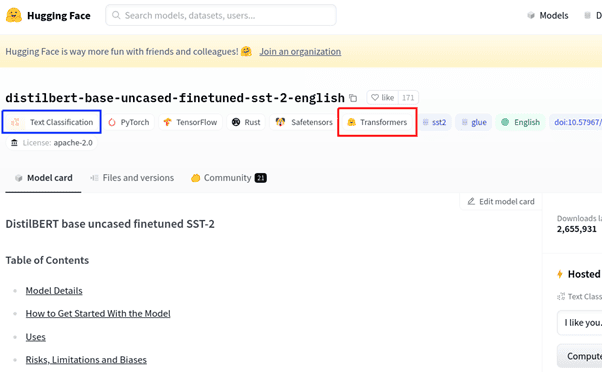
What information do we see here?
- Model name distilbert-base-uncased-finetuned-sst-2-english on top.
- Framework (the red box is ours): transformers
- Task (the blue box is ours): Text Classification
- Supported underlying frameworks: PyTorch + TensorFlow
- Files and Versions tab, which contains model file sizes etc.
- Other things: online demo, usage code example, etc.

Now let’s try GPT-2 in Python. It is pretty simple. For our first example, we use the pipelines, the highest-level entity of the transformers framework. Our full code is in fun_gpt2_1.py in our repo. First, we create the pipeline object:
MODEL_NAME = 'gpt2'
pipe = transformers.pipeline(task='text-generation', model=MODEL_NAME, device='cpu')
On the first run, it downloads the model gpt2 from the Hugging Face Hub and caches it locally in the cache directory (~/.cache/huggingface on Linux). On the subsequent runs, the cached model is loaded, and the internet connection is not required. Now, we generate text from a prompt:
print(pipe('The elf queen'))
The output we had was:
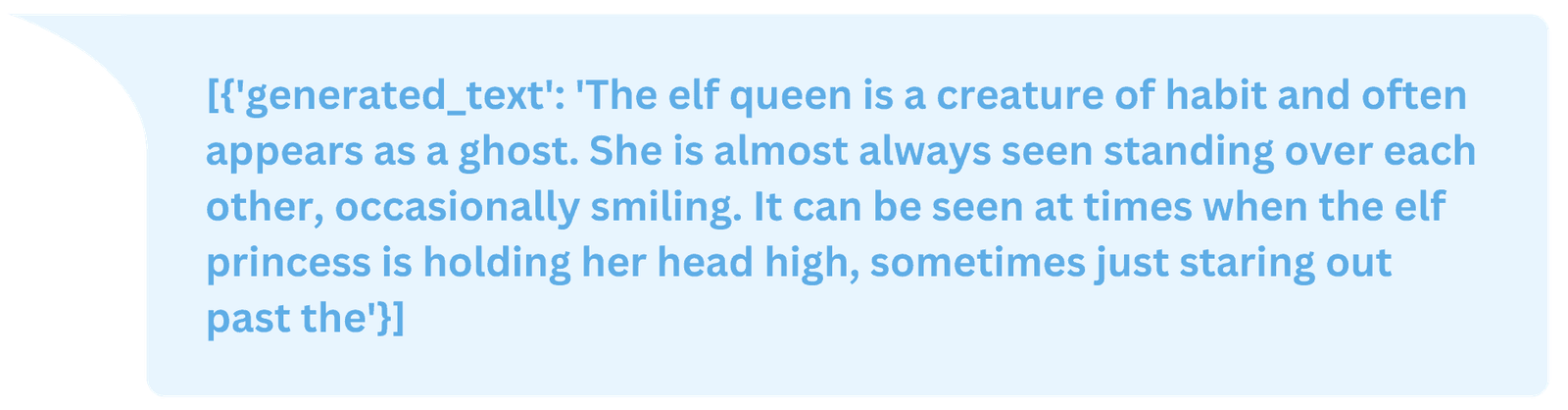
However, if you run the code, the result will be different. Why? Because the GPT text generation is random, every time you run the code, the result will be different. This randomness is regulated by the parameter called temperature. Note that the result is actually a Python dict with a single key generated_text. In fact, we will see dicts and dict-like objects again and again, the transformers framework uses them a lot.
Note that in transformers, “pipeline” is very different from “model”. “Model” is the thing we download from the Hub, gpt2 in our case, which is, in fact, a valid PyTorch model with some additional restrictions and naming conventions introduced by the transformers framework. “Pipeline” is the object which runs the model under the hood to perform a certain high-level task, e.g. text-generation. The correspondence is not one-to-one, you can use various models for text-generation: gpt2, gtp2-medium, gpt2-large, fine-tuned GPT-2 versions, and custom user models. But you cannot use models with no generation capabilities, such as Bert, in this pipeline.
While pipelines are what Hugging Face newbies typically start with, for us, they are not very interesting. Pipelines perform a lot of steps under the hood, which are hard to understand and even harder to reproduce. They are hard to customize and totally useless for model training or fine-tuning, custom models, performing custom tasks, or in general, everything the developers in Hugging Face did not plan in advance. You only really know the transformers framework if you can do things in a pipeline-free way.
Let’s try to reproduce the text generation example without pipelines. First, we create the model and tokenizer objects by downloading their weights from the Hugging Face Hub.
model = transformers.GPT2LMHeadModel.from_pretrained(MODEL_NAME)
tokenizer = transformers.AutoTokenizer.from_pretrained(MODEL_NAME)
Note that only the trained model weights are downloaded from the Hub, while the PyTorch models themselves are Python classes defined in the transformers framework code. GPT2LMHeadModel is the GPT-2 model with the generation head.
But what on Earth is a tokenizer? Neural networks are not able to work with raw text; they only understand numbers. We need a tokenizer to convert a text string into a list of numbers. But first, it breaks the string up into individual tokens, which most often means “words”, although some models can use word parts or even individual characters. Tokenization is a classical natural language processing task. Once the text is broken into tokens, each token is replaced by an integer number called encoding from a fixed dictionary. Note that a tokenizer, and especially its dictionary, is model-dependent: you cannot use Bert tokenizer with GPT-2, at least not unless you train the model from scratch. Some models, especially of the Bert family, like to use special tokens, such as [PAD], [CLS], [SEP], etc. GPT-2, in contrast, uses them very sparingly.
Next, we tokenize our prompt.
enc = tokenizer(['The elf queen'], return_tensors='pt')
print('enc =', enc)
print(tokenizer.batch_decode(enc['input_ids']))
The output is:
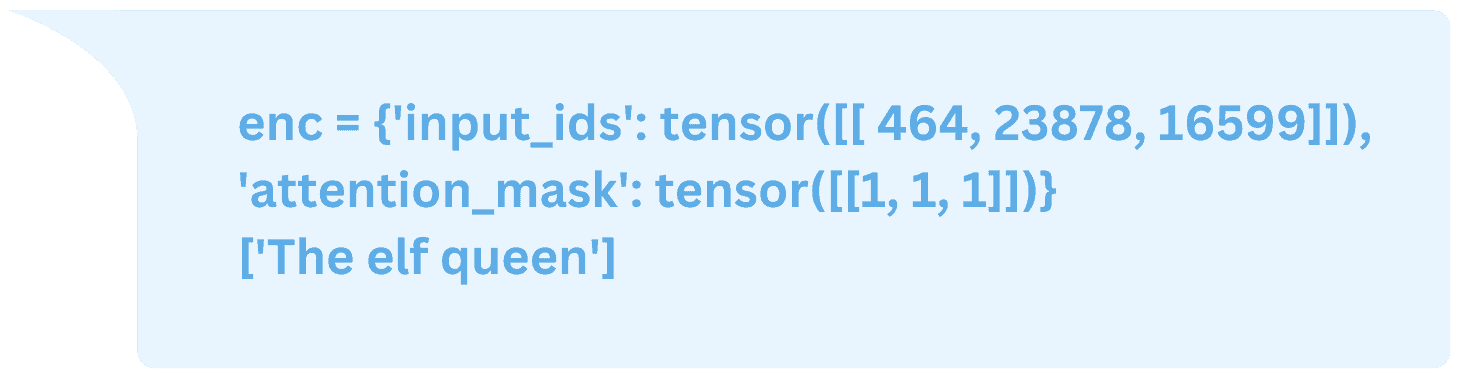
The result is a dict-like object with two keys: input_ids (tokens), and attention_mask (an array of ones in all our experiments). The return_tensors='pt' option means returning PyTorch tensors; lists are returned otherwise. The batch_decode() method decodes tokens back to the string “The elf queen”. Finally, we generate the text using the generate() method of our model, then decode the new tokens.
out = model.generate(input_ids=enc['input_ids'],attention_mask=enc['attention_mask'], max_length=20)print('out=', out)print(tokenizer.batch_decode(out))
We’ll get the result:
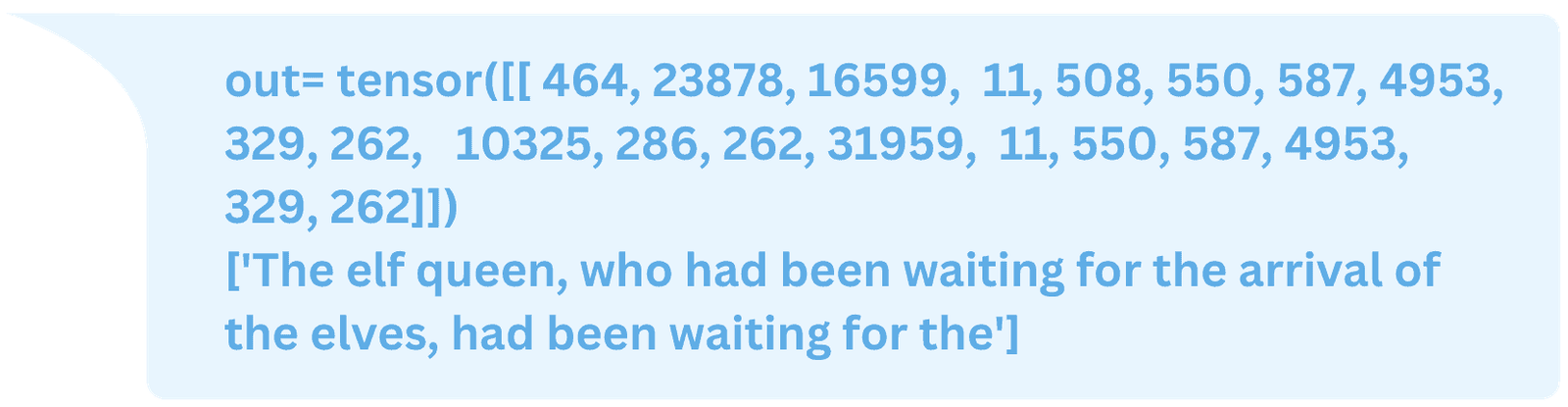
This is perfect! Or is it? If we run this code several times, we’ll see that something is wrong. The result is always the same! Why is that? Because the pipeline tweaks the model config while we use the default one. Let’s look at the config.
config = transformers.GPT2Config.from_pretrained(MODEL_NAME)
It’s not a dict, but a Python class with numerous fields:
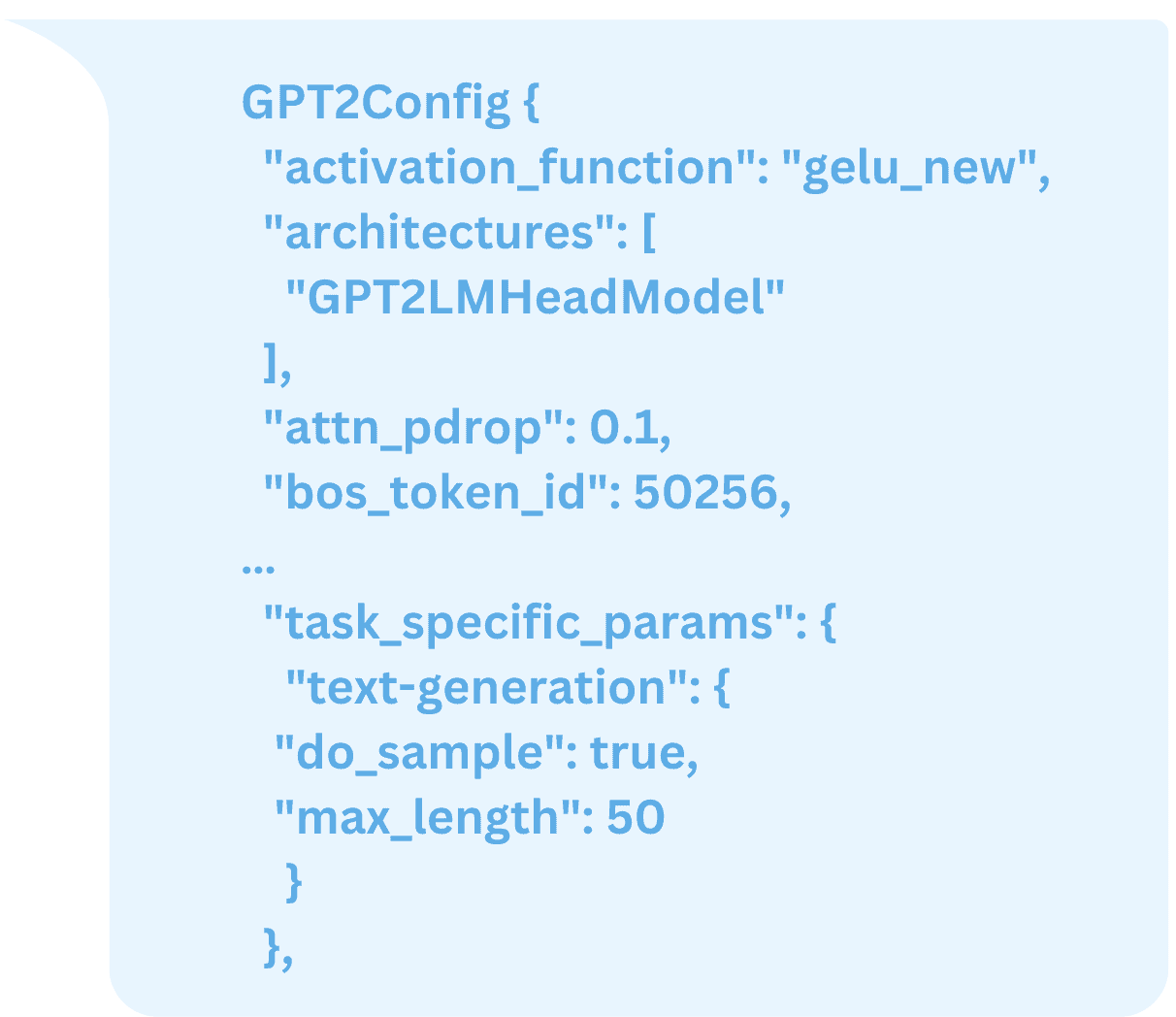
There are tons of parameters here, most of which we probably do not want to modify, such as model size. The dict task_specific_params contains parameter adjustments for pipeline tasks, in this case text-generation. To activate these parameters, we copy them by hand to the object proper:
config.do_sample = \config.task_specific_params['text-generation']['do_sample']config.max_length = \config.task_specific_params['text-generation']['max_length']
Now we create the model from pretrained weights, but with a modified config
model = transformers.GPT2LMHeadModel.from_pretrained(MODEL_NAME,config=config)
Voila, now the model generates random results (with the default temperature of 1.0 in the config). But how exactly does the generation work? We’ll explain it in the next chapter.
How Does GPT Work? Transformer Encoders, Decoders, Auto-Regressive Models
GPT-2 is a transformer decoder model (here, the word “transformer” stands for network architecture and not the Hugging Face transformers framework). “Transformers and attention” is a very interesting topic, which I don’t have time to go into detail in this article. If you look for introductory-level articles on transformers, we will often find a picture like this:
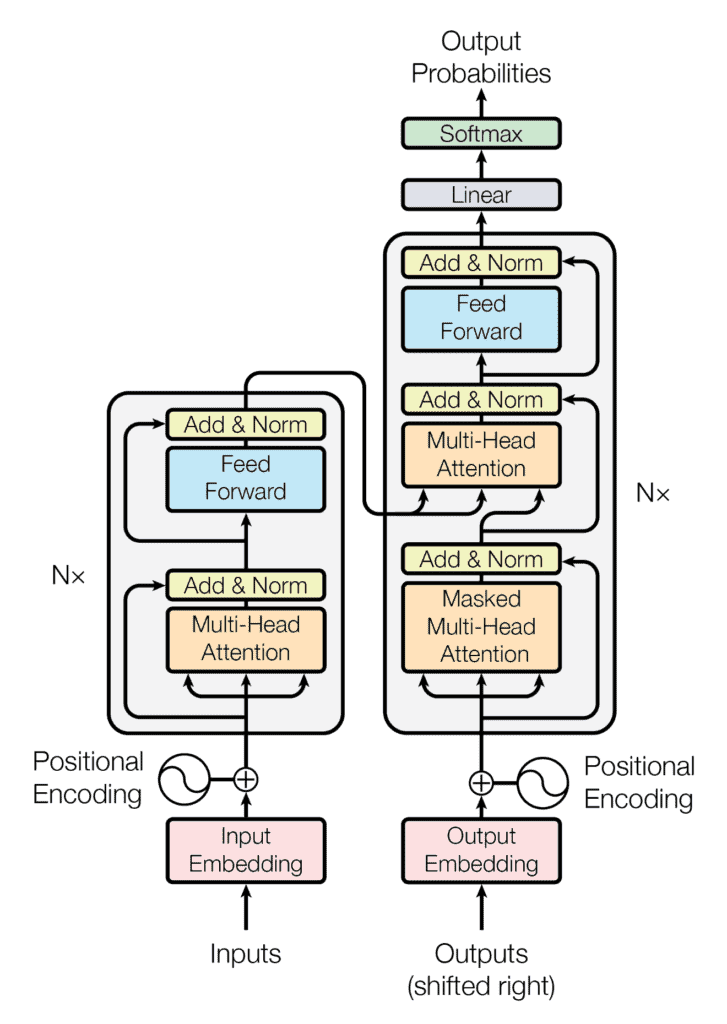
This “classical transformer” architecture has two blocks: encoder on the left and decoder on the right. This “encoder-decoder” architecture is rather arbitrary, and that is not how most transformer models work today. Typically, a modern transformer is either an encoder (Bert family) or a decoder (GPT family). So, GPT architecture looks more like this:
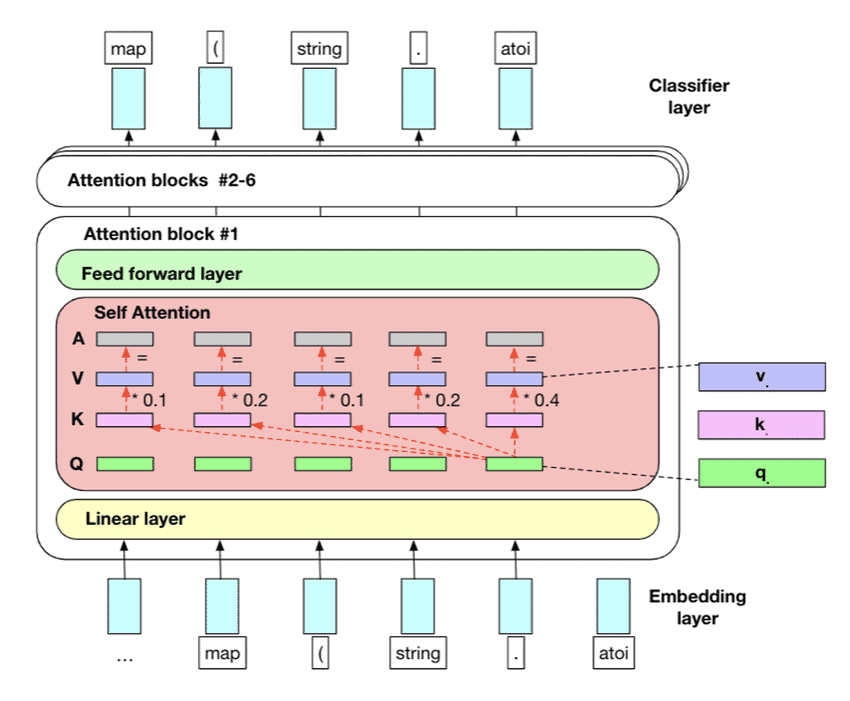
The only difference between encoder and decoder is that the latter is causal, i.e., it cannot go back in time. By “time” here, we mean the position t=1..T of the token (word) in the sequence. Only decoders can be used for text generation. GPT models are pretty much your garden variety transformer decoders, and different GPT versions differ pretty much only in size, minor details, and the dataset+training regime. If you understand how GPT-2 or even GPT-1 works, you can, to a large extent, understand GPT-4 also. For our purposes, we drew our own simplified GPT-2 diagram with explicit tensor dimensions. Don’t worry if it confuses you, we’ll explain it step by step in a moment.
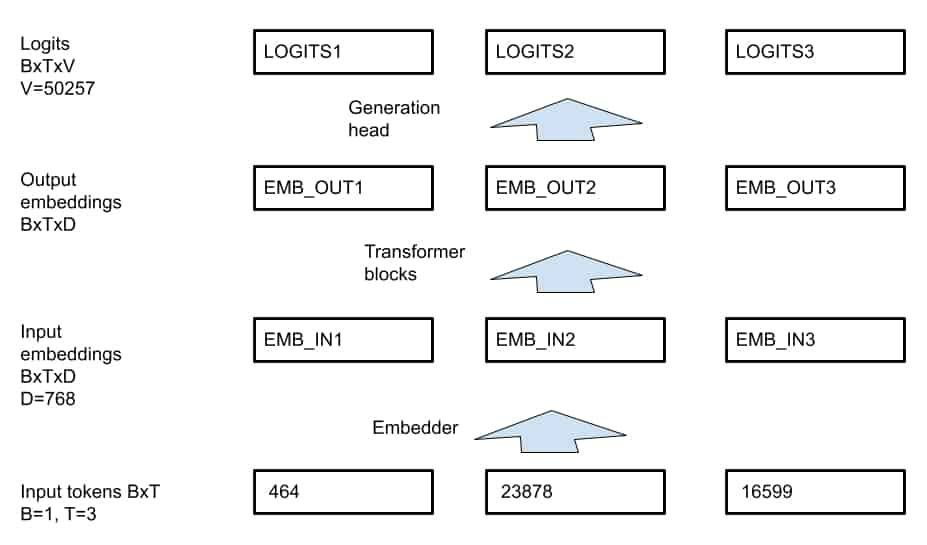
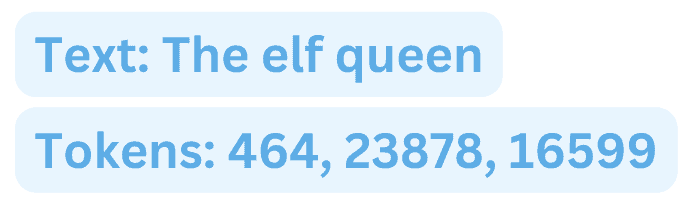
Previously, we transformed the text “The elf queen” into a sequence of tokens [464, 23878, 16599]. This integer tensor has the size BxT, where B is the batch size (B=1 for us), and T is the sequence length (T=3). Most transformers are able to receive sequences of variable length without re-training, however all sequences in the batch must be of the same length (or padded). The transformer itself works with a D-dimensional vector at every position, for GPT-2 D=768. The total dimension of transformer data at each transformer layer is thus BXTxD, and the data is floating-point. This is different from the integer BxT encodings from the tokenizer. Thus every integer token has to be transformed to a D-dimensional floating point vector input_embeddings in the embedder. Unlike the tokenizer, the embedder is a part of the GPT-2 model itself (class GPT2LMHeadModel), so we don't have to worry about it.
The output of the transformer blocks is of the same size as its input, BxTxD, or a D-dimensional vector output_embeddings at each position. If we use a headless GPT-2, class GPT2Model, this is exactly its output called last_hidden_state, which can be used for downstream NLP tasks. However, we want to use GPT2LMHeadModel, the model with a generation head. In order to understand the generation, let’s try to generate a text without using the generate() method. If we run the model inference:
out = model(input_ids=input_ids, attention_mask=attention_mask)
we get a dict-like object out containing a BxTxV tensor logits, where V=50257 is the GPT-2 dictionary size. How does the generation work? GPT-2 is trained so that the generation head predicts the next token at each position. If ztj is the logits tensor (t=1..T, j=1..V, we skip batch for simplicity), then the token t+1 is predicted as argmaxj (ztj). It is an integer token which can be decoded by the tokenizer.
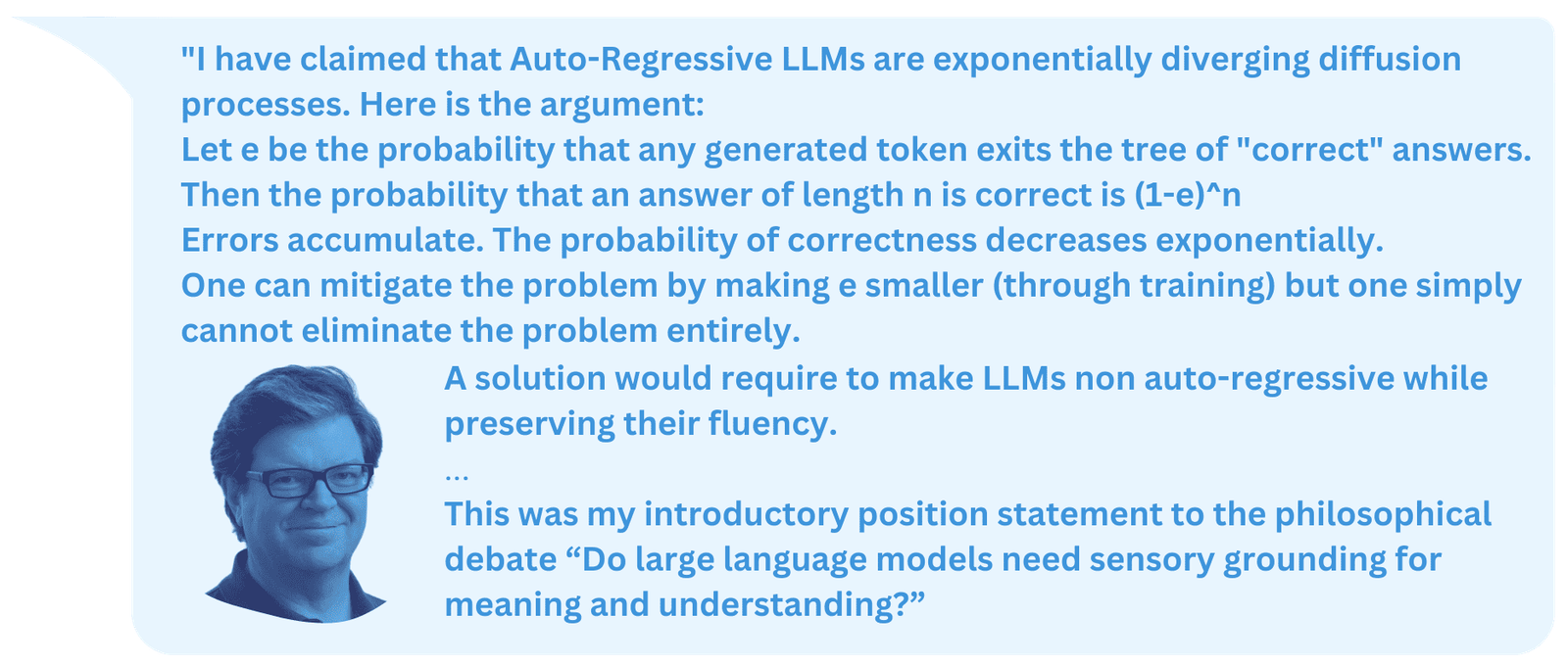
But what is the meaning of logits at position T (the last position)? It is the prediction of the next token after the current T-sequence. We can add it to the end of the sequence, then repeat the process to generate as many tokens as we want. The important thing is that tokens are generated one at a time, so that in order to generate N tokens we need to run the model N times. Such models (which generate new data one step at a time) are called auto-regressive models.
Let’s see what Yann Lecun, one of Deep Learning's founding fathers, says about them:
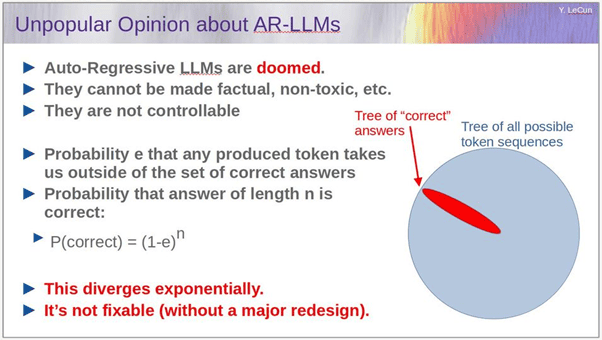
The full slide deck is here
Do you find his arguments persuasive?
The code for sequence generation is the following:
input_ids = enc['input_ids']for i in range(20):attention_mask = torch.ones(input_ids.shape, dtype=torch.int64)logits = model(input_ids=input_ids,attention_mask=attention_mask)['logits']new_id = logits[:, -1, :].argmax(dim=1) # Generate new IDinput_ids = torch.cat([input_ids, new_id.unsqueeze(0)], dim=1)print(tokenizer.batch_decode(input_ids))
And it generates the sequence one word at a time.
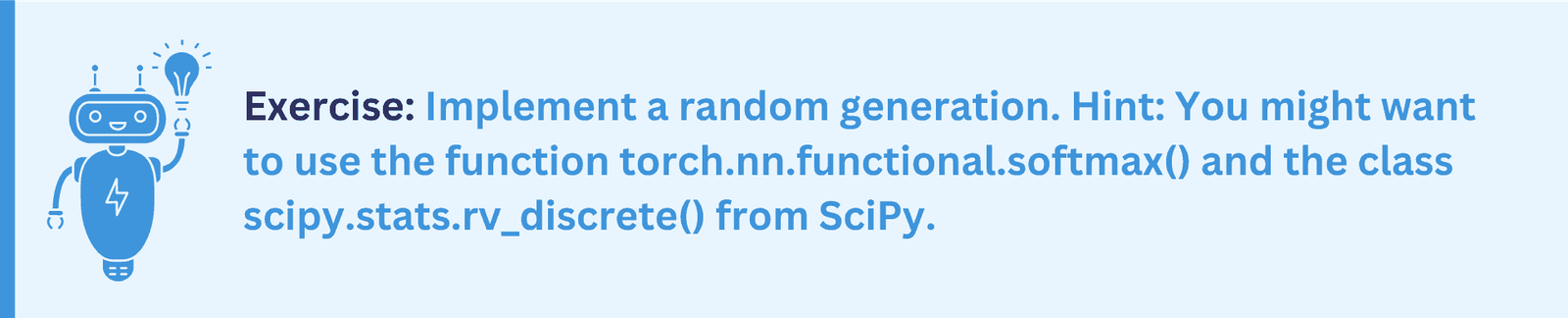
This was a non-random generation. The random generation differs in the way it generates each next token from logits. Instead of the argmaxj (ztj), we randomly sample probability distribution pj of generating token j=1..V:
pj = 1/Z exp( zTj / Θ) = softmax(zTj / Θ) , where Z = 𝛴k exp( zTk / Θ),
zTj are logits at the last position, and Θ is the temperature.
How to Train and Fine-Tune GPT-2 with Hugging Face Transformers Trainer?
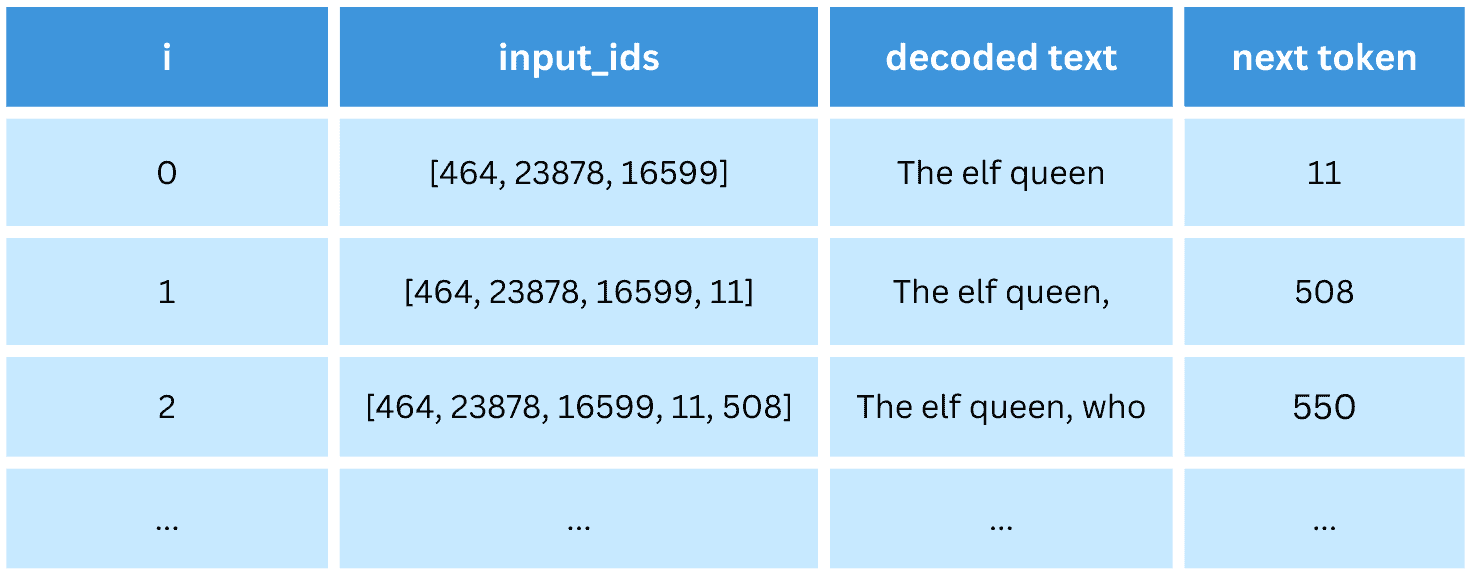
GPT models are trained in an unsupervised way on a large amount of text (or text corpus). The corpus is broken into sequences, usually of uniform size (e.g., 1024 tokens each). The model is trained to predict the next token (word) at each step of the sequence. For example (here, we write words instead of integer encodings for clarity) :

The labels are identical to input_ids, but shifted to one position to the left. Note that for GPT-2 in Hugging Face transformers this shift happens automatically when the loss is calculated, so from the user perspective, the tensor labels should be identical to input_ids. The training is demonstrated in the code train_gpt2_trainer1.py on a rather small toy corpus.
In function break_text_to_pieces() we load the corpus gpt1_paper.txt from the disk, tokenize it and break it into 511-token pieces plus the [END] token, which brings the sequence length to 512. Next, we split the data into train and validation sets in train_val_split() and in prepare_dsets() wrap them in the PyTorch datasets. The dataset class we use looks like this:
class MyDset(torch.utils.data.Dataset):"""A custom dataset"""def __init__(self, data: list[list[int]]):self.data = []for d in data:input_ids = torch.tensor(d, dtype=torch.int64)attention_mask = torch.ones(len(d), dtype=torch.int64)self.data.append({'input_ids': input_ids,'attention_mask': attention_mask, 'labels': input_ids})def __len__(self):return len(self.data)def __getitem__(self, idx: int):return self.data[idx]
In the constructor, it preprocesses the tokenized data into a dict with keys input_ids, attention_mask and labels for each data sequence, with tensor labels being equivalent to input_ids as explained above. The method __getitem__() simply serves the element idx in the dataset. As all sequences are of the same length T=512, they can be collated into a batch by the standard PyTorch collator (which understands such dicts just fine), there is no need for a custom collator with padding.
There are two ways to train Hugging Face transformers models: with the Trainer class or with a standard PyTorch training loop. We start with Trainer. After loading our model, tokenizer and two datasets, we create the training config.
training_args = transformers.TrainingArguments(output_dir="idiot_save/",learning_rate=1e-3,per_device_train_batch_size=1,per_device_eval_batch_size=1,num_train_epochs=20,evaluation_strategy='epoch',save_strategy='no',)
There are tons of customizable parameters here, see the docs. The only reason we use batch sizes of 1 is because our dataset is so small. For larger datasets, we would use larger batch sizes, as much as fits into the GPU RAM. Now, we create the trainer and train.
trainer = transformers.Trainer(model=model,args=training_args,train_dataset=dset_train,eval_dataset=dset_val,)trainer.train()
Pretty simple, isn’t it?
Once our model is trained, we can save it to disk if we want.
model.save_pretrained('./trained_model/')tokenizer.save_pretrained('./trained_model/')
We can also use it for text generation to test the trained model in action.
While the Trainer class is “nice” for beginners, if you try to use it “in real life”, questions arise, such as:
- How exactly does it work?
- Where is the loss function?
- Validation loss is printed at each epoch, but where is the training loss?
- What device (CPU or GPU) is training running on and how to change that?
- (and many many other questions)
Following the usual pattern we see again and again in software development, dumbed-down tools for beginners actually become inconvenient for serious use. In fact, if we run the code train_gpt2_trainer1.py, does the validation loss actually increase at each epoch? Is something wrong, or is the model just overfitting to the tiny training set? Who knows. In the next section, we’ll show how to train this model in a much more controllable way.
How to Train and Fine-Tune GPT-2 with PyTorch Training Loop?
Note: this section requires minimal knowledge of PyTorch. If you don’t know any PyTorch, then you will have to believe us. In PyTorch, there is no equivalent to transformers.Trainer or the fit() method of Keras or scikit-learn. Instead, you are supposed to write a training loop yourself in order to have complete control over it. Don’t worry, it’s just a few lines of code. The typical PyTorch training loop looks like this (rather schematically):
for i_epoch in range(n_epochs):for x, y in loader_train:optimizer.zero_grad()out = model(x)loss = my_loss_function(out, y)loss.backward()optimizer.step()
In train_gpt2_torch1.py, we implement this approach for the training of GPT-2. The model, tokenizer, and two datasets are created identically to the previous chapter. Then we create the two data loaders. PyTorch data loaders compose individual dataset elements into batches.
loader_train = torch.utils.data.DataLoader(dset_train, batch_size=1)loader_val = torch.utils.data.DataLoader(dset_val, batch_size=1)
Next, we move the model to the requested device (GPU); in PyTorch, such operations are always performed explicitly by the user, and we create the Adam optimizer.
DEVICE = 'cuda' # or 'cpu'model.to(DEVICE)optimizer = torch.optim.Adam(model.parameters(), lr=1e-3)
The training loop itself is
for i_epoch in range(20):loss_train = train_one(model, loader_train, optimizer)loss_val = val_one(model, loader_val)print(f'{i_epoch} : loss_train={loss_train}, loss_val={loss_val}')
Here we run training and validation for each epoch and print both training and validation losses. The function train_one() is:
def train_one(model, loader, optimizer):"""Standard PyTorch training, one epoch"""model.train()losses = []for batch in tqdm.tqdm(loader):for k, v in batch.items():batch[k] = v.to(DEVICE)optimizer.zero_grad()out = model(input_ids=batch['input_ids'],attention_mask=batch['attention_mask'],labels=batch['labels'])loss = out['loss']loss.backward()optimizer.step()losses.append(loss.item())
return np.mean(losses)
This is very similar to the “generic” PyTorch training loop, but note a couple of things:
- Our batch is now a dict containing both input tensors and labels
- Every tensor in this dict must be moved to the DEVICE (e.g., GPU) by hand
- The loss is calculated by the model itself when labels are provided and returned in out[‘loss’]. This is a convention of transformers and not the typical behavior of PyTorch models. The loss itself is the cross-entropy loss (a standard classification loss) over V=50257 classes, averaged over T positions.
The validation function val_one() is similar but with no backpropagation. If we run the code, we can clearly see that the training loss decreases while the validation loss increases, which means we are indeed overfitting to the tiny training corpus (far too small for a relatively large GPT-2 model).
What is the difference between training and fine-tuning? All training we performed so far was technically fine-tuning, as we started from a pre-trained GPT-2. Fine-tuning is a fine art (pun intended); by overfitting to a new dataset too much, you can easily forget the previous learning. For successful fine-tuning, you might want to limit the number of epochs and/or decrease the learning rate. Here we fine-tuned GPT-2 on a custom corpus by its native next-token-prediction task, the first type of fine-tuning.
In contrast, training (or training from scratch) means starting from a randomly-initialized model with no pre-trained weights.
model = transformers.GPT2LMHeadModel(transformers.GPT2Config())
We can train GPT-2 on our tiny corpus successfully, but it will take more than 20 epochs, a few hundred at least. You can try that.
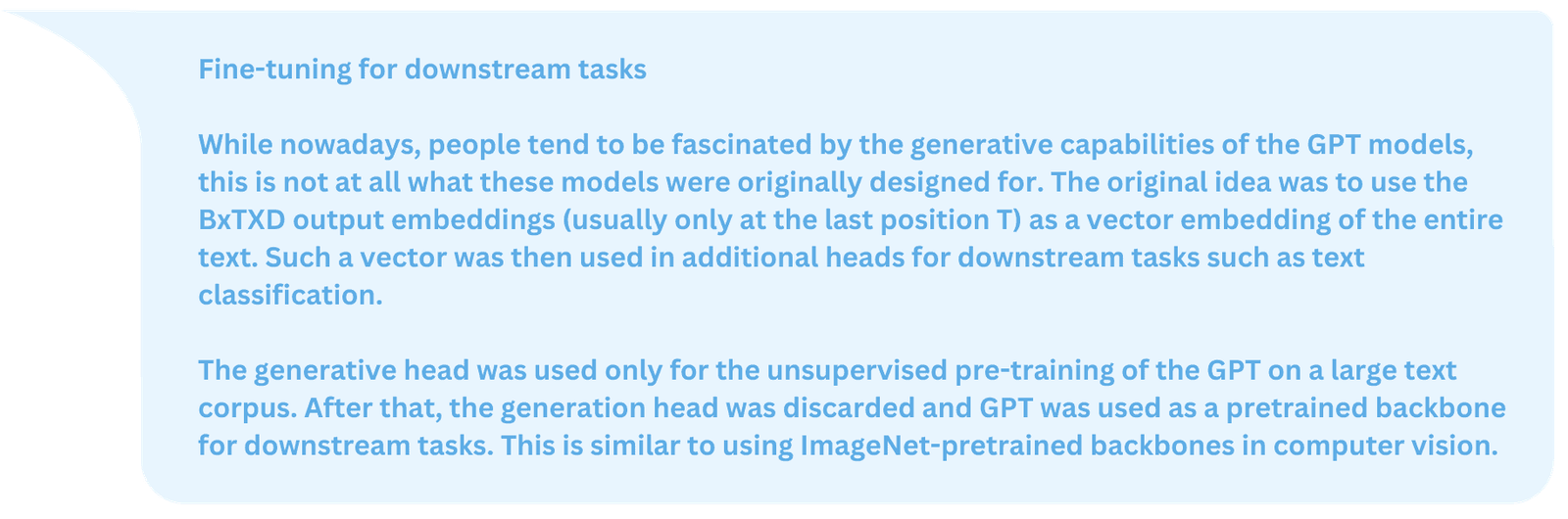
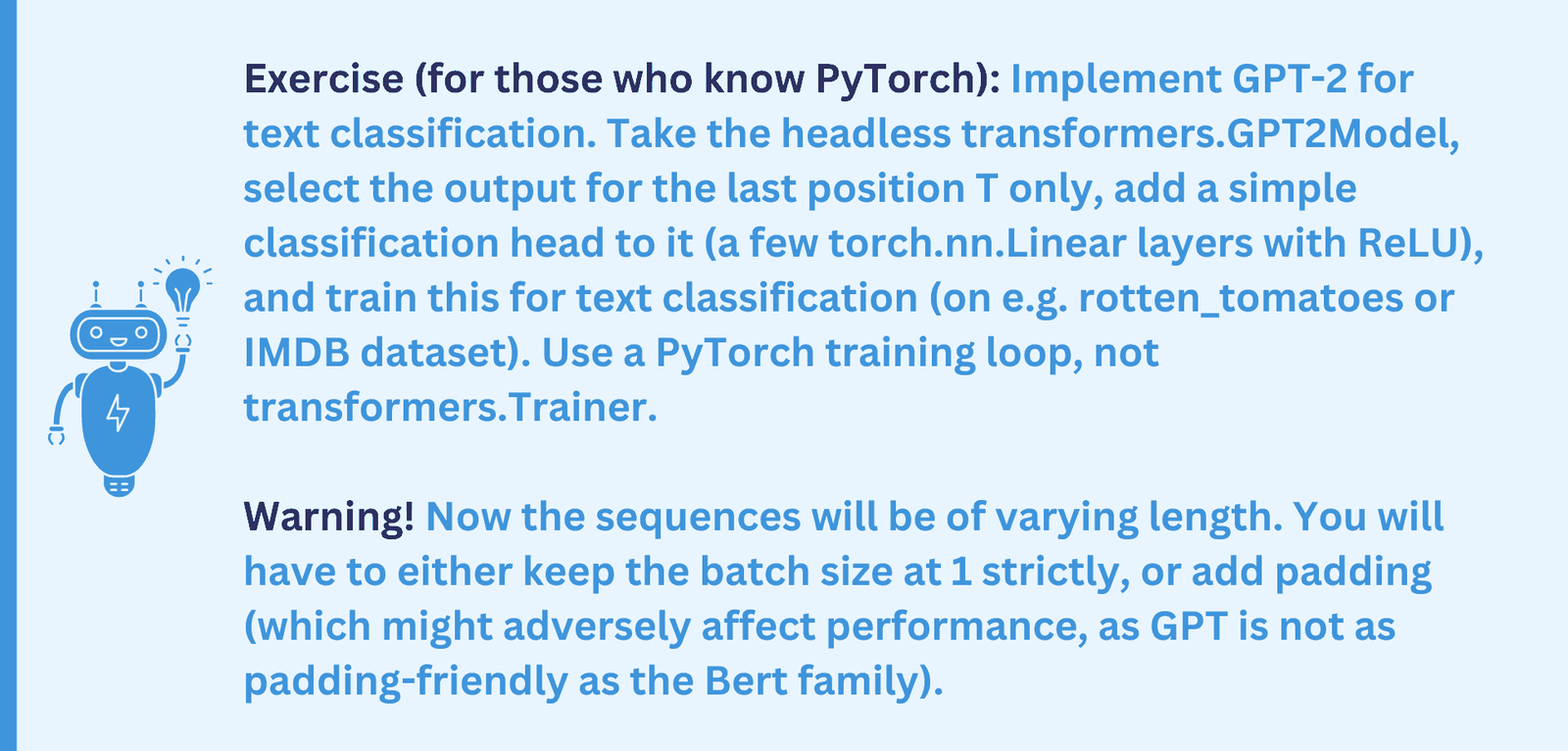
Fine-tuning the GPT-2 backbone with a new head for downstream tasks is a second kind of fine-tuning GPT-2. We’ll discuss the third possible kind of fine-tuning below in the GPT-3 fine-tuning chapter.
How to use GPT-3 with OpenAI (Python, CLI) API?
Large OpenAI models such as GPT-3, ChatGPT and GPT-4 are not publicly available and can be used only via paid OpenAI subscription, via OpenAI web sites (such as GPT-3 playground) and OpenAI API. The models themselves run on OpenAI servers. Before we proceed, please sign up for OpenAI if you didn’t already and try the GPT-3 playground. Next, generate an OpenAI API Key in your cabinet. Store it safely somewhere on your computer. This cryptographic key will allow you to access OpenAI API.
This API (see the documentation) is a web API that you can access directly via, e.g., curl utility or with various language bindings. In this article, we are going to use OpenAI Python API and command line interface (CLI). Both are installed via PIP as:
pip3 install openai
Now openai is available as both a Python package and as a shell command. Next, I recommend that you set up your API key as the environment variable. In Linux, type in the terminal
export OPENAI_API_KEY="<OPENAI_API_KEY>"
Where <OPENAI_API_KEY> is your API key. You can also put this line into your ~/.profile file.
If you prefer not to use this environment variable, you will have to use the -k <OPENAI_API_KEY> every time you run openai in terminal, or, in a Python code set
openai.api_key = key
where key is the string containing your key.
CLI API is pretty easy (though not sufficiently documented). To see all available models, type
openai api models.list
Or to get the info on one particular model
openai api models.get -i text-ada-001
Note: there are currently four main versions of GPT-3 (from small to large): Ada, Babbage, Curie and DaVinci. We are going to use the smallest (and cheapest) one, Ada (text-ada-001). To generate the text from a prompt, type
openai api completions.create -m text-ada-001 -p "The elf queen"
and see the result. To see additional options, type
openai api completions.create -h
This was the CLI API. Now, how do we do the same in Python? It’s not much harder:
prompt = 'The elf queen'response = openai.Completion.create(model="text-ada-001",prompt=prompt, temperature=0.7, max_tokens=256)print(response['choices'][0]['text'])
But what if we don’t want text generation but text embeddings? It’s also possible; however, generating embeddings is not allowed for common models such as text-ada-001. Instead, we have to use specialized models like text-embedding-ada-002. The Python code is:
text = 'The Elf queen'res = openai.Embedding.create(model='text-embedding-ada-002',input=text)emb = res["data"][0]["embedding"]print(emb)print(type(emb), len(emb))
The result emb is a Python list of length 1536, presumably the raw transformer output embedding at the last position.
How to fine-tune GPT-3 with OpenAI API?
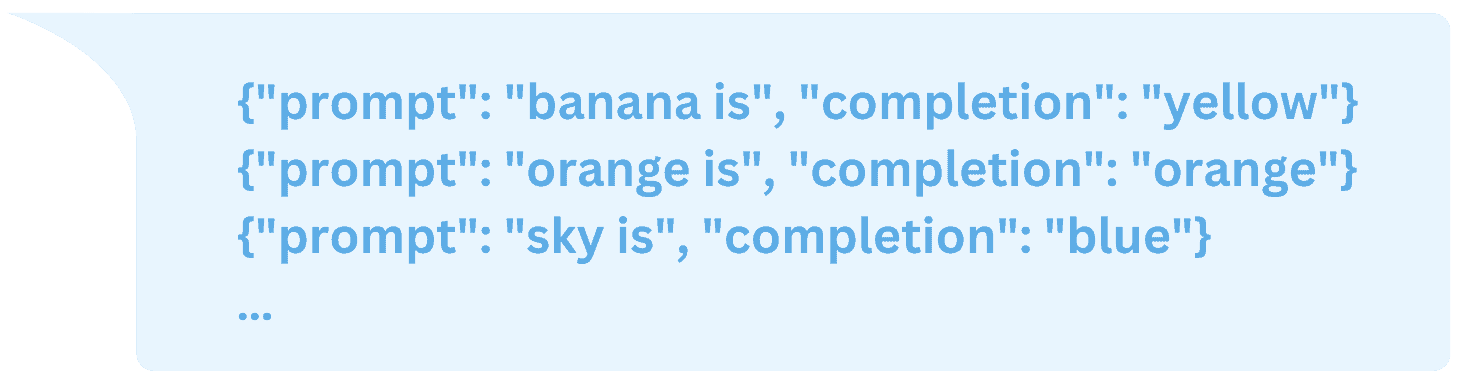
GPT-3 fine-tuning is described here. However, you are not allowed to train a model from scratch. Neither are you allowed to fine-tune on a text corpus or fine-tune with additional heads. The only type of fine-tuning allowed is fine-tuning on prompt+completion pairs, represented in JSONL format, for example:
Note: classification can be emulated by using “yes”/”no” completions. Of course, it is NOT a proper and efficient way to use GPT for classification.
How exactly is GPT-3 trained on such examples? We are not exactly sure (OpenAI is very secretive), but perhaps the two sequences of tokens are concatenated together, then GPT-3 is trained on such examples, but the loss is only calculated in the “completion” part.
Let’s try fine-tuning in action! We created a small JSONL dataset file colors.jsonl with a few pairs such as ‘banana is’ : ‘yellow’. Next, we run the (optional) utility to analyze the file and pre-process it if necessary
openai tools fine_tunes.prepare_data -f colors.jsonl
We got two suggestions from this tool:
- Add a suffix ending `\n` to all completions
- Add a whitespace character to the beginning of the completion
We said “Yes” to both suggestions and received the updated file colors_prepared.jsonl. Time for actual training.
openai api fine_tunes.create -t colors_prepared.jsonl -m ada
You can choose the model (ada, babbage, curie or davinci, without “text”) and the file to train on. The file will be uploaded into the OpenAI cloud and will get a unique ID of the form file_<ID>. You can use such a file for the subsequent fine-tunings by writing -t file_<ID> instead of the file name. You can list uploaded files with
openai api files.list
and delete an unneeded file with
openai api files.delete -i file_<ID>
Back to our training. Upon submission, your job (called fine-tune) is assigned its own unique ID of the form ft_<ID>. The client disconnects soon (with a “Stream interrupted (client disconnected)” message), but it’s OK. Your job is queued for half an hour or so and then starts training. You can check the status of all your fine-tunes (including completed ones) with:
openai api fine_tunes.list
You can check on a particular job (aka follow) with
openai api fine_tunes.follow -i ft-<ID>
Once the job is complete, you will get a detailed report of the type
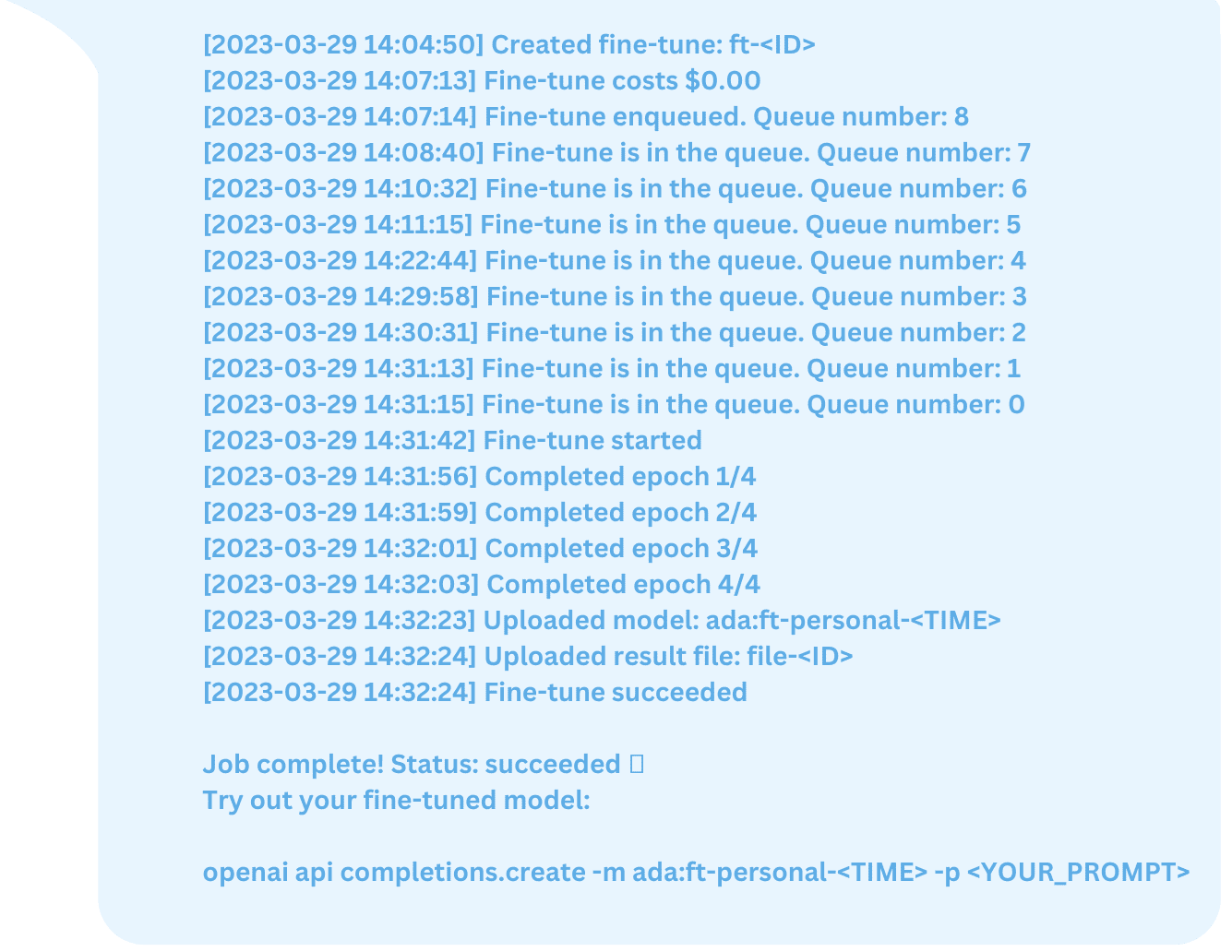
The fine-tuned model gets its own unique ID ada:ft-personal-<TIME>. You can list all your personal models with
openai api models.list | grep personal
As suggested, you can now try your model for text generation with
openai api completions.create -m ada:ft-personal-<TIME> -p <YOUR_PROMPT>
The result for me was rather ambivalent. On one hand, I succeeded in teaching the model to “think colors”. On the other hand, for some reason the model hallucinated in haikus and produced a longer output than desired, for example
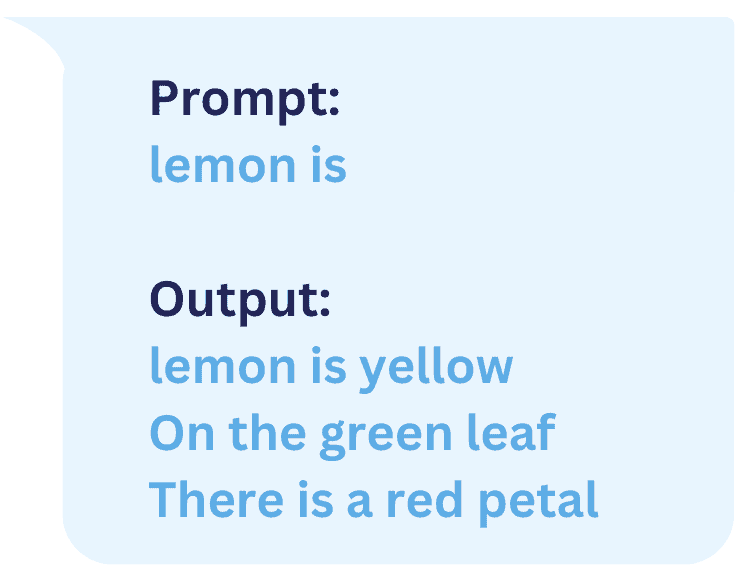
Even for a training set prompt “orange is” the result was still a three-line haiku (something we definitely did NOT train the model to do).
You can try to train GPT-3 for more epochs or on your own dataset. Enjoy GPT models!