

AI Video Generation Tools

Just over a year ago, ChatGPT became a household name, capturing the imagination of nearly everyone. Before we could fully grasp the potential of advanced language models, the world was dazzled by the emergence of visual generation models, showcasing their ability to create stunning images. And just as we were starting to understand the impact of image generation, video generation models began making waves. 3D generation is going through the same transition right now. The two fields also connect in practice: generated 3D geometry gives video models the spatial consistency that frame-by-frame synthesis struggles to maintain. Our article AI 3D Generation: From Prototype to Production covers where 3D generation stands today and what a production pipeline looks like. Despite the fact that this field is still at the relative beginning of its development (everyone remembers the meme that appeared a year ago, hence the “relative”🙂), everyone can touch the sublime and create their own spaghetti-eating bizarre character. In this blog post, we’ll explore some popular services accessible even to non-tech-savvy people, alongside sophisticated techniques for creating videos right on your personal computer:
- PixVerse
- Pika
- Gen-2
- Several open-source tools, including AnimateLCM and Stable Video Diffusion.
It’s important to note that each of these services has the potential to deliver impressive results; it often just comes down to the luck of the draw with the random seed you get. This post isn’t a ranking but rather an exploration of the services’ functionalities and versatility. We’ll delve into the img2vid and txt2vid features found across these platforms and highlight some of their unique offerings. And if you happen to end up with a static video, don’t be alarmed – it’s a common challenge in video generation, particularly with services that don’t allow you to adjust motion intensity.
Before we dive deeper, let’s talk about how we designed our experiments. We chose a captivating toad image from kc as our reference, with the negative prompt being “((human)), deformed, artifacts” and used the random seed 1239193645.

Video Generation with PixVerse
PixVerse stands out as the newest addition among the services we’re discussing. Honestly, it’s a bit behind in terms of offering control over aspects like camera movement or frame rate. However, what sets PixVerse apart is its cost-free access. Plus, it offers a choice among three predefined styles, which is a nice touch, especially when your prompts might not always yield the desired results, such as an anime-themed output.
- txt2vid
txt2vid is quite straightforward: you can send a positive and negative prompt, aspect ratio, style, and random seed for results repeatability.
|
| PixVerse text-to-video generations in realistic, anime, and 3D styles |
- img2vid
img2vid lost negative prompting and predefined styles but gained motion strength, so you won’t get a static image here. Here are comparisons of 0.1, 0.5, and 1 motion strength:
Although the outcomes might not always align perfectly with the prompts, PixVerse presents a viable option for those looking to explore video generation without spending extra money. Overall, despite some limitations, PixVerse effectively does its job.
Video Generation with Pika
Pika emerges as an intriguing, mostly free service that began its journey with Discord bots before transitioning to a more user-friendly web interface. Setting it apart from PixVerse, Pika offers a wealth of customizable options for video creation, including camera movement, frame rate, and motion intensity. It’s certainly worth exploring. The web version of Pika limits users to three free generations daily, but its Discord bots offer an economical alternative for those willing to navigate the queues alongside other VidGen enthusiasts.
- txt2vid
Unlike PixVerse, Pika lets you set the motion strength even with txt2vid, as well as the camera motion. The strength range is from 0 to 4, so here are examples with values 0, 2, and 4.
- img2vid
The img2vid results with our well-known shaman-frog with the same strength values as above:
Video Generation with Gen-2
Gen-2 positions itself as a powerhouse in video generation services, extending its capabilities far beyond just video creation. It offers a comprehensive suite of features, including text-to-image, text-to-speech, video-to-video, and even the ability to train custom models. When it comes to the degree of control over the generation process, it stands on par with Pika, further distinguishing itself with an innovative feature known as the motion brush. This tool allows users to specifically designate parts of the image they wish to animate, adding a layer of precision and creativity to the process. It also gives out a certain amount of free credits, but if you get too excited, you will have to purchase some additional credits.
- txt2vid
Motion control is available in txt2vid, too, and varies from 1 to 10. Here a some examples of the results with strengths 1, 6, and 10:
- img2vid
Let’s conduct the same experiment as with the services above:
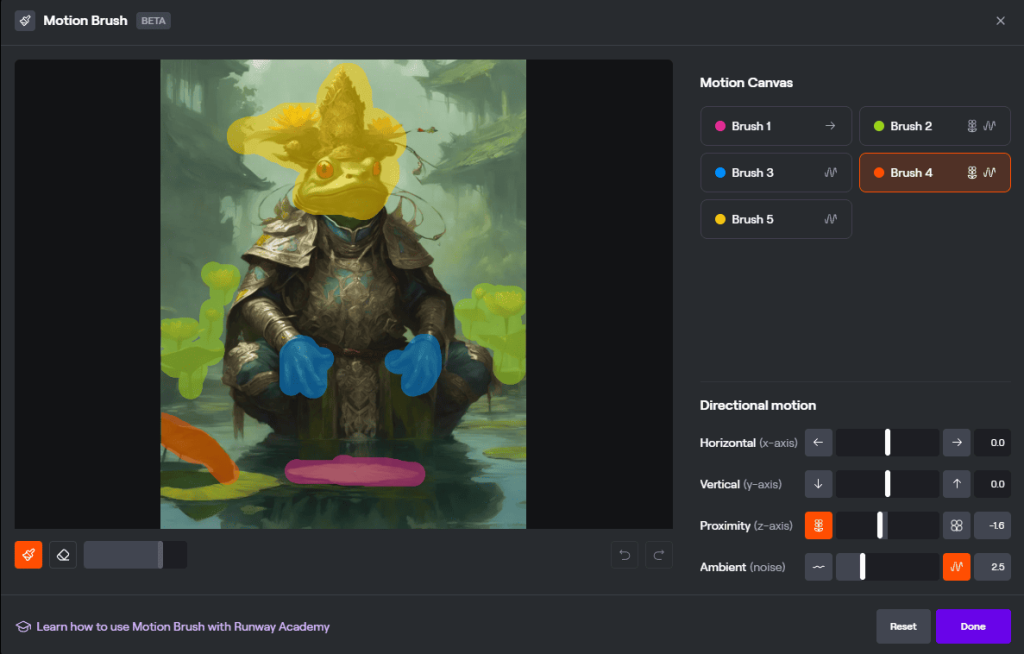
The result is incredible. And yes, you can extend this video as well:
Open Source Tools for AI Video Generation
For enthusiasts ready to dive into the technical depths of AI video generation, platforms like ComfyUI and Automatic1111 present a sandbox of nearly limitless creative possibilities. These interfaces to Stable Diffusion unlock unrestricted access to countless generations, durations, camera movements, and image styles. The key to harnessing this vast potential lies in the willingness to learn and experiment with the myriad models and methodologies available, albeit with a notable learning curve as the trade-off for not opting for more user-friendly services. You also need a powerful video card, but nowadays, this is no longer a problem with many cloud services available.
Highlighting the innovative edge of this domain, the recent unveiling of models like AnimateDiff and LCM-SDXL – each acclaimed within their respective focuses on video generation and image generation acceleration – marks a significant leap forward. When combined, these models birth AnimateLCM, a powerhouse capable of producing a 10-second video in as little as 1.5 minutes, depending on the GPU’s prowess. While challenges such as frame consistency in longer videos persist, they can be addressed through careful post-processing and the strategic selection of random seeds. Here, we used ComfyUI and this workflow to create the demo:
Of course, this blog has only scratched the surface of what’s possible with AI video generation models. You can create a much bigger and more complicated pipeline to achieve the best results with higher resolution and consistency. As much as we’d like to dive deeper into this fascinating area, the breadth of innovations and developments in generative AI extends far beyond what we’ve covered. Thus, we pass the baton to you, our reader.
Sora, Ladies and Gentlemen
As we were putting the finishing touches on this blog post, a groundbreaking development emerged, capturing our collective imagination. Its name is Sora, and it is a monumental step forward in video generation. Sora brings to the table the capability to produce long, seamless, photorealistic videos, as well as videos that boast a unique, stylized flair. Currently, OpenAI has kept Sora under wraps, without public access, leaving us to enjoy some of the videos they have posted on the model and X page. We (and our beloved frogs) eagerly await the chance to experiment with Sora. For those eager to see Sora in action, a collection of videos is available at https://soravideos.media/. As the landscape of video generation continues to evolve, we hold onto the hope that Sora will soon become an accessible tool in our creative arsenal, promising new horizons for our explorations.
We hope to have ignited a spark of interest and curiosity, encouraging you to explore further, experiment, and perhaps even contribute to the advancements in video generation technology.
