

NeRF in 2023: Theory and Practice

What Is NeRF (Neural Radiance Fields)?
In this article, we will give a brief beginner-level introduction to neural radiance fields (NeRF). We start with basic NeRF theory, followed by NeRF limitations and the possible ways to overcome them. We will conclude the article with the practical part: using NeRFStudio for training and rendering NeRF on a home computer or cloud.
NeRF (proposed in the original 2020 paper) is the technique to represent a 3D scene volumetrically (i.e., without any surfaces) as a function parametrized by a neural network to render 2D views of such a scene and to train the network on a set 2D views. Ouch, this sounds scary? Don’t worry, We will explain the idea slowly as we go along.
If you want to learn more about Neural Radiance Fields, we strongly recommend the following resources in this order:
- ECCV 2022 NeRF tutorial (Autumn 2022, not too old at the moment of writing this)
- NeRF review article (likewise autumn 2022)
- List of awesome NeRF papers
NeRF handles the view synthesis step well, but converting reconstructed views into an editable mesh with clean topology and proper materials is a separate problem. Our article AI 3D Generation: From Prototype to Production covers what that pipeline requires.
But before we continue with NeRF, let’s start with a simpler problem: 2D images.
Functional Representation in 2D
How to represent a 2D image on a computer? There are several ways:
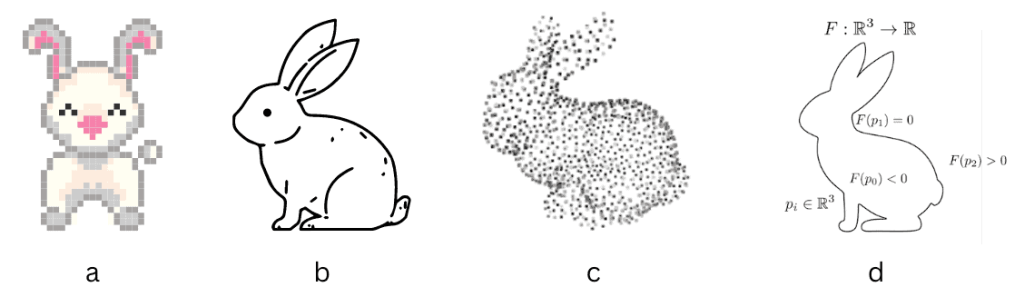
Representation of 2D images: a) – pixels , b) – vector, c) – point cloud, d) – functional
Most often, we use a pixel image, e.g., a square grid of tiny colored squares, implemented in formats like PNG and JPEG. On the other hand, a vector image is composed of geometric shapes such as lines, circles and curves. The third option is a point cloud, a cloud of geometric points, which can be represented as a list of coordinates (x, y) of each point or (x, y, c) if the points are colored.
Is this all? No, there are more ways to represent an image mathematically. Let’s look at functional representations (sometimes also called implicit). There are several ways to use mathematical functions. First, we can parametrize the color C of a point (x, y) as a mathematical function C = f(x, y). This is a volumetric representation for a 2D volume; it does not deal with any lines or curves (which are surfaces in 2D). On the other hand, we can have a surface representation f(x,y) = 0, a contour parametrized by an implicit function.
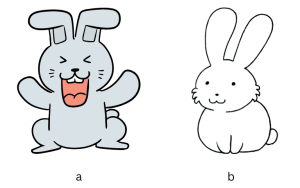
2D functional representations: volumetric (a), contour (b)
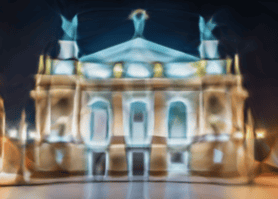
But how can we represent a complicated nonlinear function f(x, y) on the computer? In 2023 we all know the answer: deep neural networks. There is an experiment that probably every person really interested in deep learning has tried at least once (and many people came to the idea independently): approximate the function C=f(x, y) with a fully-connected neural network (also known as a multi-layer perceptron or MLP) and train it on all pixels of an image. The dataset here consists of tuples (x, y, C) for all image pixels of a single image. Once trained, we use this MLP to predict the color C for all pixels (x, y), and thus we use f(x, y) to render an image. The result typically looks like this:
 |
 |
| Original image | Rendered image |
Representation of a 2D image (Lviv Theatre of Opera and Ballet) with an MLP C=f(x, y)
It’s not particularly good, despite the neural network having more parameters than pixels in the image, why? This representation has two problems:
- The raw coordinates (x, y) aren’t a particularly good input to a neural network; it struggles to capture small details. This can be solved by positional encoding.
- The ReLU activation function can only produce piecewise linear functions; more sophisticated activations like SIREN are better.
With these two improvements, one can get a photorealistic rendered image. Importantly, here we train the neural network to represent a single image. It will not help in any way to represent other images; we’ll have to train from scratch. If you understand this experiment deeply, you will get a pretty good idea about what NeRF is. NeRF follows the same logic but in 3D.
Functional Representation in 3D: TSDF and NeRF
How to represent 3D objects digitally? 3D representations follow the same ideas as 2D ones.

3D object representations, image source
Pixels in 3D become voxels (“volumetric” in the figure). Point cloud in 3D is defined just like in 2D. Polygonal meshes can be viewed as a special case of vector graphics. What about the functional representation? Once again, we have two types of it: surface and volumetric.
Surface functional representation is about describing the surfaces with the implicit equation f(x, y, z) = 0. This family of methods is called the (truncated) signed distance function or (T)SDF. The volumetric representation is given by the formula C=f(x, y, z), giving the color C of each 3D point (x, y, z). You can think of these as “continuous voxels” or 3D translucent object made of colored jelly.

NeRF as a translucent jelly (image from presentation Birds Eye View & Background by Angjoo Kanazawa)
This is basically what NeRF is, although in order to achieve better results, the actual NeRF adds two things: directional dependence and density.
NeRF Theory: How Does NeRF Work?
There are three main components of NeRF: scene representation, renderer and the training regime.
NeRF Scene Representation and Lighting
How does NeRF represent the scene? It encodes a function with a neural network.

NeRF scene representation (image from presentation Birds Eye View & Background by Angjoo Kanazawa)
The inputs are the coordinates r=(x, y, z) and the viewing direction (θ, φ), often replaced by a unit direction vector d=(d1, d2, d3). The actual inputs to the MLP are the positional encodings of these two vectors. The output is the color C=(r, g, b) and the density σ.
But what about the lighting? The “standard” NeRF makes the following strict assumptions about the lighting:
- Every point of the 3D volume (not surface !) emits directional light with color and intensity C=(r, g, b), and there are no external light sources.
- Every 3D point absorbs light, with the absorption given by the (usually non-directional) density σ.
- There is no scattering or reflections in the model.
As a result, the lighting conditions of the scene are frozen (or “baked” in the NeRF lingo) and cannot be changed once the model is trained.
Differentiable Volumetric Rendering
As we cannot perceive a 3D scene directly, what we typically want is to render it from a certain viewpoint or view, specified by the camera parameters: intrinsic (focal length, image size) and extrinsic (camera position and direction). The result is a 2D image.
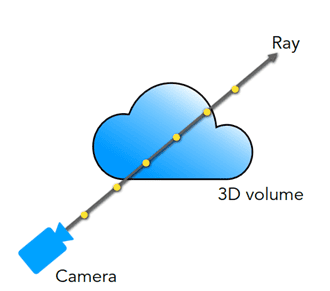
Differentiable volumetric rendering (image from presentation Birds Eye View & Background by Angjoo Kanazawa)
Each camera pixel becomes a ray in the 3D scene. The pixel color includes contributions from all points along the ray given by the sum (or rather integral, as our model is continuous) over the points along the ray

Here t is the coordinate along the ray, and t=0 corresponds to the camera. The integration limits t1, t2 are known as near and far planes. The transmittance T(t) gives the fraction of the light intensity from the point t reaching the camera (the rest is absorbed). In the rendering slang it is also called “probability of the ray reaching the point t uninterrupted”.
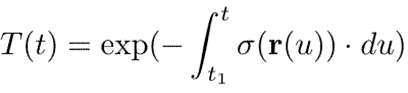
In practice, NeRF uses a set of discrete points (256 in the original NeRF) along the ray. For each point, the function C, σ = f(r, d) is calculated. The integrals are replaced by the sums giving us the value of a single rendered pixel.
Note that the rendering is volumetric, there is no such concept as “surface” involved. In practice, however, for opaque objects the result is dominated by the small region close to the surface, and the depth can be estimated by the expected depth
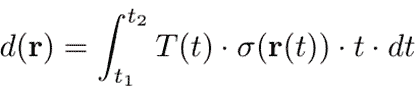
Finally the rendering is fully differentiable, which allows us to backpropagate gradients of the loss function through the renderer and train the neural network. Compare this to the polygonal mesh rendering which is fundamentally non-differentiable, and it’s very challenging to make it differentiable.

Wait, but What Problem Does NeRF Solve?
Actually, we should have started with this. Better late than never, we will now give you the answer. Strictly speaking, Neural Radiance Fields representation can be used for various 3D problems. However the most typical problem is that of 3D reconstruction.
| 3D reconstruction problem | |
| Given: | A number of views (images) of the same 3D scene |
| We want: | Camera poses of all views, and the 3D scene that we can render from a new view (a viewpoint no seen in the input views) |

3D reconstruction, image source
A traditional 3D reconstruction pipeline looks like this. It is implemented in software packages like COLMAP, OpenMVG+OpenMVS, MVE+MVS-texturing and many others.
- Structure from Motion (SfM). Find a sparse pairwise correspondences between image points (by matching SIFT keypoints or the like). Construct camera poses and a sparse point cloud.
- Find dense point cloud from image pixels
- Construct a triangular mesh model
- Texturize the mesh from the input images
For video input data, step 1 is often replaced by Simultaneous localization and mapping (SLAM), a variant of SfM specifically optimized for high speed on videos. Note that the SfM reconstructs the scene up to an unknown scale only, to get the absolute scale one needs a lidar or a stereo camera.
Steps 2-4 are known as the Multi-View Stereo (MVS) problem. It is exactly the problem solved by NeRF. In other words, we can formulate a typical NeRF problem like this:
| NeRF 3D reconstruction problem | |
| Given: | A number of views (images) of the same 3D scene and their camera poses (from COLMAP or ArKit or 3D scanner) |
| We want: | The 3D NeRF scene we can render from a new viewpoint |

How is this problem solved? Remember, our scene description is a trained neural network C, σ = f(r, d). So we train the neural network to describe a single scene. It is done using analysis by synthesis: we render all training views (with known poses) on each optimization step, calculate the photometric loss, and backpropagate the gradients into the neural network. Such a trained network describes one scene and is useless for any other scenes. There is no such thing as a “pretrained NeRF”! Once we have trained a NeRF scene, we can use it to render novel views.
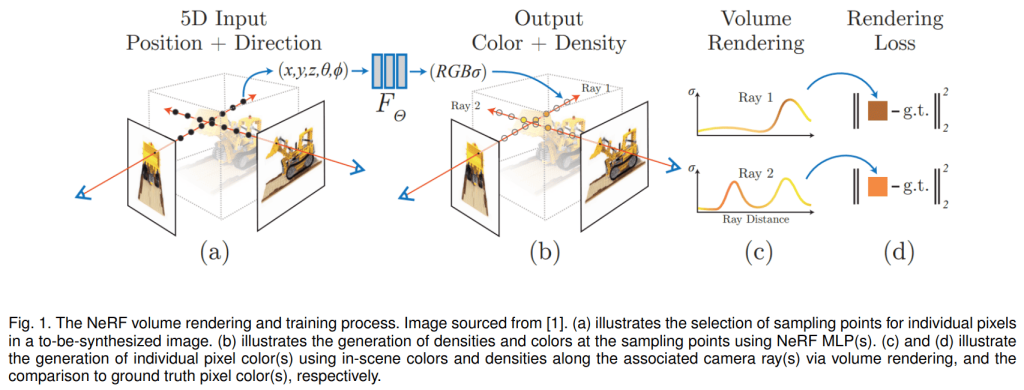
NeRF training, image source

NeRF vs Polygonal Mesh: Which Is Better?
Let us now compare NeRF to traditional MVS methods based on the polygonal mesh (such as OpenMVS). First, the strong points of NeRF:
| Mesh | NeRF | |
| Pipeline | Multi-stage pipeline (point cloud -> mesh -> texture) | Ideologically simple single-stage training |
| Topology | Sensitive to surface topology (e.g. sphere vs donut) | Volumetric, no topology |
| Small details | Hard to reproduce small 3D details (e.g. tree leaves) | No problem with small details |
3:0 to NeRF! Unfortunately, the things are not that rosy. The next point is tied in my opinion:
| Mesh | NeRF | |
| Lighting | Hard to model non-lambertial materials (specularities, reflections) and translucent objects, but easy to change lighting | Can model reflections and translucent objects, but the lighting is baked (frozen) and cannot be changed |
And now comes the “BAD” part, a long list of NeRF limitations and drawbacks. However, all is not hopeless: this list applies to the vanilla NeRF. Since then, various papers challenged nearly every bullet point from the list, with varying degrees of success. NeRF is getting better! We’ll analyze these limitations and ideas of how to overcome them in the next section.
NeRF drawbacks and limitations:
- Very slow training and rendering
- Can only be rendered with an Nvidia GPU with CUDA
- No standard “NeRF scene” file format
- Aliasing-like artifacts
- Strictly a static scene with static lighting
- Requires accurate camera poses
- Models are not editable or composable (or animatable, or deformable)
NeRF Limitations and How To Overcome Them
In this section, I’ll analyze in more detail NeRF limitations, how to overcome them, and various ideas for improving or extending NeRF.
Static Scenes With a Static Lighting, NeRF-W, Nerfies
What does it mean in practice? Imagine you are capturing an outdoor scene with a phone. You will probably take pictures sequentially, one after another. If the sun goes behind the cloud between shots, the rules are broken. If some transient objects move in the scene (people, birds, cars etc.), the rules are broken. Breaking of rules will result in bad Neural Radiance Fields artifacts. How to fix that?
NeRF-W (“in the wild”), an influential early paper, proposed two ideas:
- Exclude transient objects by training two scenes: a common static scene (shared between all views) and a transient scene (one per each view).
- Introduce a lighting latent variable, a multidimensional vector to encode the lighting conditions of each training view. At inference, you can choose it arbitrarily to generate various lighting conditions. You still cannot control the lighting directly though (like by placing a lamp object in Blender).
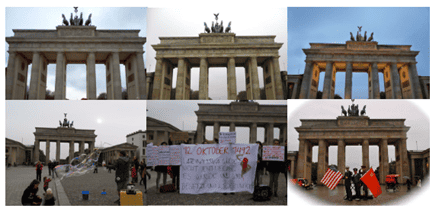
NeRF-W training images with varying lighting conditions and transient objects, image source
Various later papers addressed these limitations. For example, Ref-NeRF improved the reflections, but it still requires a static scene. There have been numerous attempts (e.g. NeRD, NeRV) to create a “relightable NeRF”.
Deformable NeRF (Nerfies, HyperNeRF, CodeNeRF etc.) allows for non-rigid scene deformations using latents to allow scene deformation between views, in the same way lighting is treated in NeRF-W. Some models use this technique for animation (Nerfies).
Miscellaneous Ideas
Conical rendering:
The idea is to treat the ray of each pixel as a narrow cone and not a line. This reduces aliasing artifacts, especially at low resolution rendering. Originally used in mip-NeRF, Ref-NeRF, RawNeRF; but now became a standard for most modern models.
Depth or point cloud supervision:
Use depths (from Lidar) or a point cloud (from COLMAP) for extra 3D supervision when training the model in order to improve quality and/or achieve faster and more stable training. Implemented in DS-NeRF, NerfingMVS, PointNeRF.
NeRF with GAN or VAE:
Some papers combined NeRF with GAN or VAE for various reasons: quality, composable scenes, scene generation etc. Examples: GIRAFFE, GRAF, π-GAN, GNeRF, NeRF-VAE.
Camera pose fine-tuning or learning:
Modern NeRF codes typically fine-tune camera poses by backpropagation, as the poses from e.g. ArKit are not accurate enough for a good reconstruction. Learning poses from scratch (replacing SfM), is a much harder task, attempted in works like NeRF-, BARF, SCNeRF, iMAP, NICE-SLAM, GRAF. In real life, however, people still mostly use traditional SfMs like COLMAP.
Neural Radiance Fields for large outdoor scenes:
Apart from NeRF-W, there are numerous other papers dedicated to large outdoor scenes. They’re optimized to work either at street-level: Urban Radiance Field, BlockNeRF; or for drone aerial views: MegaNeRF, BungeeNeRF, S-NeRF, SwitchNeRF (2023 paper).
Few-Shot Learning and Shape Priors

In other words, if some detail of a scene, however small, was occluded in all training views, NeRF will not learn it and will produce ugly blurred artifacts. NeRF never hallucinates what it didn’t see. As a consequence, you need a lot of views (hundreds) for a good NeRF reconstruction.
Many papers (MVSNeRF, PixelNeRF, NeuRay, DietNeRF, DS-NeRF) tried to overcome this limitation by making NeRF “smarter” or “more generative”, i.e. to teach it to “hallucinate the backside”. It is known as the “few-shot NeRF problem”. Typically such papers break the “fresh training for each scene” rule by training an auxiliary neural network trained on a large dataset of scenes (or sometimes on image datasets, like ImageNet). Such a network extracts high level image features which are supplied to NeRF alongside the usual inputs (r, d). They also use additional 3D concepts like either cost volume or 3D shape priors.
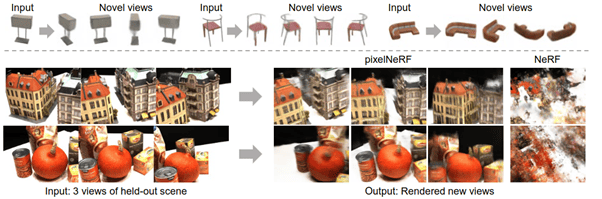
PixelNeRF vs NeRF for 3-shot learning, image source
A very closely related problem is NeRF with 3D shape priors which can be used for:
- Generic 3D objects and surfaces: Neural Surface, Neural RGB-D, UNISURF, GRAF.
- Human bodies: Neural Body, HumanNeRF, DoubleField, Animatable NeRF.
- Human faces: Nerfies, HyperNeRF, HeadNeRF.
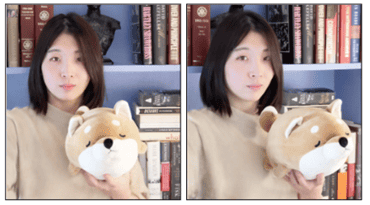
Deformable scene with Nerfies, image source
NeRF Scene Is Not Reductionistic
This is probably the biggest NeRF limitation, and it’s not radically solved (and probably will never be).
Those who worked with mesh-based 3D scenes (for example in Blender) take for granted their reductionism, and the same generally holds true for point clouds and voxels. You can take the scene apart into pieces, stick them back together, cut, paste, move and edit individual objects as much as you like. You can also animate objects, the possibility both modern games and animated movies are based on. You can also downsample and upsample the mesh, thus changing the size of the 3D model file. The whole process of designing 3D models by hand (e.g. in Blender) is inherently based on this reductionism.
This is not so for NeRF, which is holistic, like a hologram. The whole scene is encoded in a single NeRF function, and you cannot say “this part of the model is the table, that part of the model is the sofa”. Instead all model parameters encode the entire scene. It makes creating a “Blender for NeRF models” a mathematical impossibility. You cannot cut half of the scene as a new scene. Likewise, you cannot join two scenes into a combined one.
As we said, there is no radical solution, however, some papers tried to push the limits here. For example, methods like GIRAFFE construct a scene of separate objects, each with its own NeRF. Also, things like “editable NeRF” became popular recently; see below.
Rendering Requires NeRF Software (and Nvidia GPU)
Another limitation that hurts.
3D mesh models are convenient. You can create them any way you want, save them into one of the standard file formats (GLB, FBX, OBJ), and render them with any 3D software (Blender, MeshLab, Unity) or library (Open3D, ThreeJS). Moreover, all modern GPUs are specifically designed (at the hardware level) to render 3D meshes efficiently via low-level protocols like OpenGL, Vulkan, Metal or Direct3D. 3D mesh technology is very mature.
Not so with NeRF. NeRFs are neural networks typically requiring Python libraries like PyTorch (although the vanilla Instant-NGP code is pure C++). Different versions of NeRF require different software codes to render. And efficient rendering typically requires an Nvidia GPU with CUDA and sometimes CuDNN (of particular versions !) installed. This is only available on Linux or (with some limitations) Windows. Moreover, there is no “NeRF file format”, a NeRF scene is a saved neural network unique to the particular version of NeRF.
Note: For many models (Instant-NGP excluded), TPU is also an option, and even CPU, but CPU rendering is very slow. What you cannot use (at least not efficiently) is the built-in 3D rendering capacities of GPUs, like shaders.
In other words, NeRF is not yet suitable for edge devices, including common laptops and office PCs. If NeRF technology (or something like it) stays popular in the next 5-10 years, it has all chances to mature, but it’s going to be a long and arduous process requiring designing new hardware-supported GPU protocols.
Can I Extract a Mesh or Point Cloud from NeRF?
Since we cannot render a NeRF scene easily, can we transform it into a mesh with textures instead? In principle, yes. However, this is not a very natural operation, as NeRF has no inherent surfaces. Mesh extraction is typically done with TSDF-like methods. It’s time consuming and will likely result in a model of noticeably lower quality than the NeRF rendering. Moreover, it’s hard to translate the baked lighting of NeRF, with all its specularities and reflections, into a mesh texture.
In principle, it is possible to use NeRF as an intermediate link of a reconstruction pipeline (replacing traditional MVS) and export a mesh at the very end. However, it goes against the whole spirit of NeRF, and at the moment you export the mesh most NeRF advantages will be gone. If you are planning to implement such a pipeline, ask yourself a question first “Do I really have good reasons to use NeRF here?”.
Some NeRF implementations add surface normals to the NeRF model in order to allow more accurate mesh exporting with the Poisson method. This is implemented in NeRFStudio with the nerfacto model.
Why Is NeRF So Slow and How To Fix It?
NeRF Is Slow
Training one scene on a single GPU takes hours or days, and rendering one view takes up to a minute. It’s not hard to understand why. An 1920 x 1080 image has over 2 million pixels, thus you’ll have to render over 2 million rays. Each ray has a number of points (256 in the original NeRF). You’ll have to run the neural network inference 1920 * 1080 * 256 = 530841600 ≅ 530 million times. Of course, this will be batch-parallelized via CUDA, but it is not as efficient as OpenGL shader parallelization when rendering a mesh.
Original NeRF authors were fully aware of the problem. That is why they trained two networks and not one. First, 64 points along the ray were sampled uniformly and processed with the coarse network, and then 192 points were sampled smartly (where most needed, i.e. close to the surfaces) and processed with the fine network. This was not enough to make NeRF fast, but it would be even slower otherwise.
The good news is that this is the NeRF limitation that has seen the most progress in the couple of years since the original paper. Modern NeRFs can train in less than a minute on a single good GPU, and infer in real time. The bad news is that these models became technically complicated monsters and it is often hard to recognize the original NeRF idea in them.
Fast NeRF methods are subdivided into two categories: baked and non-baked methods. Warning! This “baking” has nothing to do with “baking the light” we discussed earlier, it’s a different baking, the terminology is confusing.

Baked, but not light. And not NeRF either. Image source
Baked Methods
So, NeRF is slow because we have to run neural network inference on millions of points per view. How can we optimize this? Is it possible to pre-compute the function f(r, d) on a regular grid and interpolate? This is the main idea of baked methods (“baking” here means computing the function and freezing the result). Once NeRF is trained, the NeRF function f(r, d) is computed on a large point grid and stored. At the rendering time, no neural network inference takes place. Instead, an interpolation between nearest grid points is used to estimate f(r, d), which is much faster.
Of course, things are not that easy in practice. The function f(r, d) is 5- or 6-dimensional, and sampling it naively on a regular grid will be intractable. The trick is to encode the angular dependence smartly, e.g. by using the first few spherical harmonics, leaving only three dimensions. In the three dimensions, there is no need to densely sample empty space or inside areas, but we need a lot of points in the “interesting” regions, i.e. close to the surface. Thus sparse grids like octrees can reduce the number of points a lot. These ideas have been implemented in a number of codes like SNeRG, PlenOctree, FastNeRF, KiloNeRF.
Baked models typically speed up rendering of the trained model but not training. That is why they fell in popularity compared to non-baked ones. However, in my opinion, the idea can be still relevant if we want to render a scene without using any neural networks (on edge devices).
Non-Baked Methods
Here the idea is kind of similar. Let’s decompose our function f(r, d) into two functions g, h, where f(r, d) = g(p), p = h(r, d), where p is some intermediate feature. Now, let’s apply the “cache and interpolate” trick to the feature variable p. Non-baked papers designed clever ways to cache and interpolate differentiably, thus exactly the same neural network setup is used for both training and rendering, or “non-baked”. Early papers used a 3D voxel grid for p : NSVF, AutoInt, DIVeR.
The real breakthrough came with the Nvidia Instant-NGP code, which uses hash tables and supports both NeRF and Neural SDF (surface representation). It is also written in low level C++ CUDA with no Python (and zero chances to port it to non-Nvidia hardware). It achieved unprecedented speeds like real-time rendering on a single GPU and one-minute training. Modern NeRFs like NeRFStudio nerfacto, however, achieve comparable speeds in pure PyTorch.
Do We Need NeRF at All?
Inspired by the success of both baked and non-baked NeRF methods, some authors decided to take things even further. OK, they asked, baked methods prove that smart voxels can generate NeRF-like rendering without using any neural networks at all. But cannot we optimize such a voxel representation directly, without using any NeRF?
This idea has been implemented in a number of codes like Plenoxels, DVGO and TensoRF. They achieved NeRF-like quality and a reasonably fast training time (but still slower than Instant-NGP). Strictly speaking, these methods are NOT NeRFs, but simply modern (perhaps NeRF-inspired) voxel methods, but the two groups are often confused.
Is NeRF Used in Any Commercial Projects or Products?
Very few I am aware of. NeRF has been recently used in a McDonalds commercial.
While it wouldn’t be too hard to implement, we haven’t seen any “NeRF on the server” web services more user-friendly than a cloud or colab running NeRFStudio. For now, NeRF is mostly popular in the academic community. It’s likely that companies are presently researching practical NeRF applications, but we are yet to see the results.
As explained above, NeRF typically requires a Linux PC or cloud with a good Nvidia GPU and CUDA installed, thus it is strictly back-end and excluded from edge devices and even common laptops. MobileNeRF can be seen as an exception (it can even run in a web browser), but its rendering is polygon based, at the rendering time it’s not a NeRF, not even voxels.
NeRF Beyond Multiple View Stereo
Most NeRF papers use NeRF for a static MVS problem. However, it has other possible uses.
NeRF for Videos: D-NeRF, NeRFPlayer
How to use NeRF for dynamic scenes? It seems simple, just add the time variable to the NeRF function f(r, d) so that it becomes f(r, d, t). This idea has been tried repeatedly and did not work well. To reconstruct such a function, one would need a large number of views covering the scene densely in both space and time. Also frequency characteristics of space and time variables are very different. Typically one wants to reconstruct a dynamic scene from a very sparse set of cameras, often a single camera moving around. Other ideas have to be tried.
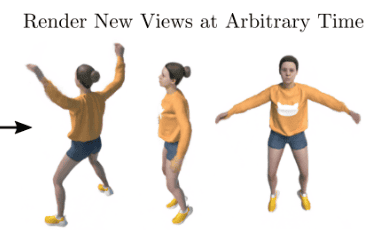
A D-NeRF dynamic scene, image source
The first paper to deal with the problem was D-NeRF, which treated the scene as deformable (i.e. objects are not allowed to appear or disappear). The time-dependent scene flow was represented by a separate neural network
 This approach is very similar to deformable NeRF methods like Nerfies. Since then numerous papers have tried NeRF for videos. Some papers used things like depth or 2D optical flow. A recent 2023 paper is NeRFPlayer, which decomposed the scene into three classes: static, deformable and new, where new means “things appearing out of thin air”. The original NeRFPlayer used a TensoRF-like approach and was not really NeRF, while the NeRFStudio implementation is based on nerfacto.

NeRFPlayer rendering, image source
So, Can We Edit NeRF Scenes or Not?
While it is impossible to edit NeRF-scenes directly Blender-style, some papers tried to create limited editing capabilities based on a sketch or a text prompt.
For example, EditNeRF implemented NeRF editing based on image sketches. It is based on GRAF (a GAN+NeRF hybrid) and utilizes concepts like object classes and shapes.
ClipNeRF allows editing with both text and image prompts. It is based on the pretrained OpenAI CLIP.
A somewhat related idea is to use NeRF for a 3D semantic segmentation (or lifting 2D semantic segmentation to 3D) and 3D scene understanding. This idea has been explored in papers such as Fig-NeRF, Semantic-NeRF and Panoptic Neural Fields.
NeRF 3D Art Generation
And finally, the most beautiful NeRF applications (for a non-specialist): 3D art generation from text prompt, sketch or other inputs, or by style transfer. It has been implemented in Dream Fields, DreamFusion, Rodin, StyleNeRF. DreamFusion uses the pretrained Imagen or StableDiffusion, 2D image generation models, for guidance, thus it might be considered “not 3D enough” by purists. Still, it produces beautiful results and you can even try it yourself in the Google Colab.
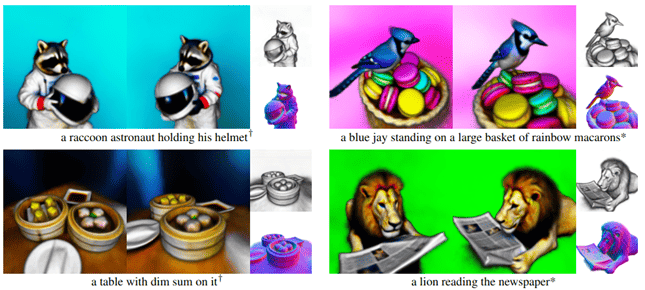
DreamFusion 3D art generation, image source
Rodin, a recent 2023 paper, is specialized in creating 3D avatars from text prompts. The authors represent the 3D volume as the “roll-out” tri-plane 2D features, and train their own 2D diffusion model.
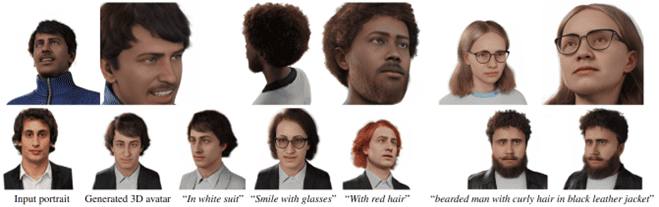
Rodin 3D avatar generation from text prompts, image source
What’s New in 2023?
Too much to cover here. At the moment of writing this (mid-April 2023), arXiv found 191 NeRF papers in 2023. You see that NeRF is still a very active field. By the time you read this, there will be many more. The most relevant papers (among the 191) were:
- LANe: Lighting-Aware Neural Fields for Compositional Scene Synthesis
- Image Stabilization for Hololens Camera in Remote Collaboration
- MonoHuman: Animatable Human Neural Field from Monocular Video
- JacobiNeRF: NeRF Shaping with Mutual Information Gradients
- PVD-AL: Progressive Volume Distillation with Active Learning for Efficient Conversion Between Different NeRF Architectures
- Neural Residual Radiance Fields for Streamably Free-Viewpoint Videos
- …
A lot to choose from.

NeRF in Practice: How Can I Try NeRF?
OK, you can now ask, I believe you that NeRF is cool, but how can I try it myself?
There is presently no truly user-friendly software for non-specialists. The most user-friendly option is NeRFStudio. Additionally, if you want to read the code, it might be easier to understand the simpler vanilla NeRF model, implemented in PyTorch, TensorFlow or JAX.
Installing NeRFStudio
First, you need a Linux (recommended) or Windows PC with an Nvidia GPU. If you don’t have such hardware, find some cloud or colab which can run NeRFStudio. On a local computer, you can use Docker (with GPU support enabled), or install NeRFStudio directly following the installation instructions on its site.
NeRFStudio is a Python package which provides Python API and also command-line interface (CLI). You will need Python and CUDA. In principle, it is installable by PIP or Conda, but a lot of things can go wrong. We encountered (and solved) two issues on Ubuntu 22.04 with CUDA 11.5 and the system Python 3.10.
-
- The current NeRFStudio (version 0.1.19) might be incompatible with PyTorch 2.x. You have to install PyTorch 1.12.x or 1.13.x by hand. Importantly, you also have to install torchvision, functorch, torchmetrics and torchtyping of the versions compatible with your PyTorch version. Otherwise, NeRFStudio will try to install those dependencies (of their latest versions), and they will try to replace your PyTorch with 2.x. Before proceeding, check that your PyTorch works with CUDA and that it is of version 1.x and no 2.x.
- CUDA has an infamous issue which popped up repeatedly for years: CUDA (especially slightly older versions) is often incompatible with the latest GCC version. In particular, in Ubuntu 22.04 the default CUDA 11.5 is incompatible with the default GCC 11.x. If you see bizarre error messages involving “_ArgTypes” while building the CUDA code, this is exactly the issue. NeRFStudio requires installing Nvidia tiny-cuda-nn (with a python wrapper) for Instant-NGP. We had to add the line
“-ccbin=/usr/bin/g++-10“,
to the base_nvcc_flags list in bindings/torch/setup.py of tiny-cuda-nn. We had to do the same with cuda/_backend.py of nerfacc. Note: It might be simpler to alias ‘nvcc’ to ‘nvcc -ccbin=/usr/bin/g++-10’ instead.
NeRFStudio in Action
If you succeeded in installing NeRFStudio, congratulations! Now, let’s try it in action. Following the official manual, let’s download the poster scene and train the nerfacto model on it:
ns-download-data nerfstudio --capture-name=poster
ns-train nerfacto --data data/nerfstudio/poster
It’s as simple as that. Nerfacto is the default NeRFStudio model; it’s a modern model which incorporates many good NeRF ideas. It’s almost as fast as Instant-NGP but uses less RAM and is written in pure PyTorch.
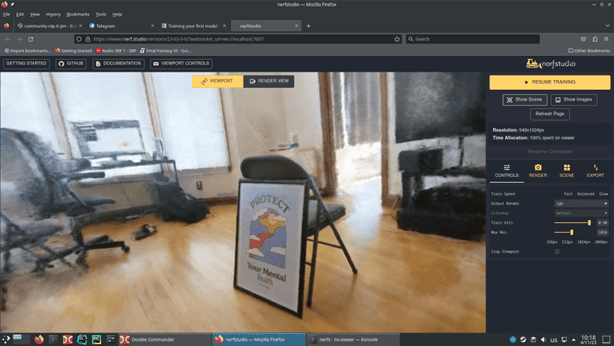
NeRFStudio web browser visualizer showing a nerfacto model trained on the poster scene
By default, NeRFStudio does visualization while training, which can be viewed in the browser. You can disable it, and also enable TensorBoard or WandB logging. For us (on a GeForce 1660) the complete training took about 40 minutes, but already after a minute or so you see a pretty good scene. When the training is finished, you can view the results with
ns-viewer --load-config outputs/poster/nerfacto/<timestamp>/config.yml
Where <timestamp> should be replaced by the name of the subdirectory containing your trained model. You can also render a video by selecting a camera path in the web viewer.
Finally, you can export a point cloud or (via TSDF) a textured mesh.
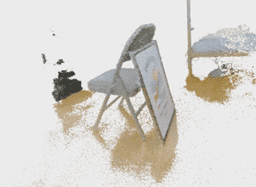 |
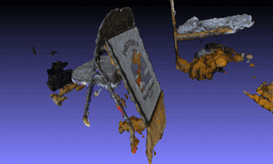 |
Exported point cloud and textured mesh
How Can I Run NeRF on My Own Images?
You need camera poses. If your images don’t have them, you’ll have to run your images through COLMAP to do SfM. But being in a lazy mood that day, we decided to test NeRF not on our own images, but on the Sceaux Castle scene (11 images), which is like a Hello World for SfM. First, we install COLMAP, then use the ns-process-data script (which is the NeRFStudio wrapper for COLMAP) to do the SfM
sudo apt install colmap
ns-process-data images --data ImageDataset_SceauxCastle/images \
--output-dir data/castle_processed --no-gpu
This command automatically creates the input data in the NeRFStudio format. Now we train as usual
ns-train nerfacto --data data/castle_processed
Unfortunately, the training was unsuccessful. What is going on? Sceaux castle is a frontal scene (i.e. visible only from one side). Such scenes in NeRF produce garbage when viewed from the back, but still should look acceptable from the front. However, the frontal character of the scene was an indirect reason for the failure.
When NeRF completely fails to converge to anything reasonable, this usually means one thing: problems with the scene geometry. The main NeRF action typically takes place in a limited 3D space, often the cube x, y, z ∈ [-1, +1]. Also the “near plane” and “far plane” parameters on the NeRF renderer matter a lot. If the scale or the “center” of the scene are very different from what NeRF expects, the training will fail. If you look carefully, you can see the coordinate axes, poses of all cameras and the [-1, +1] cube in the web visualizer.
When loading the data, NeRFStudio attempts to adjust the scene scale and center automatically. However, it assumes that the scene center is the mean of all camera positions, which is OK if we photograph a 3D object from all sides, but completely fails for frontal scenes. Instead, we should find the point which all cameras look at. This is achieved with the –center-method focus, and with this option we were able to train the Sceaux castle NeRF. Not nearly as good as openMVG+openMVS, but at least NeRF did train.
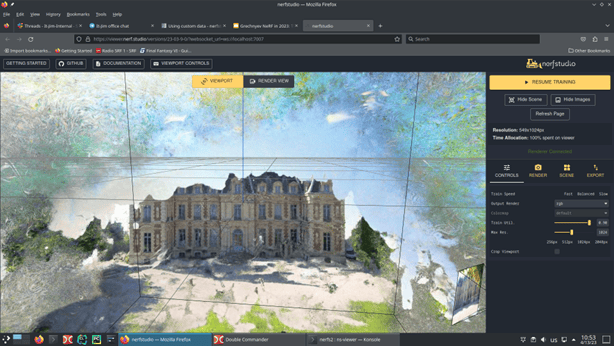
Sceaux castle NeRF scene
But Where Is the Yellow Bulldozer?
Don’t worry, we are getting to it. The yellow bulldozer which became the NeRF mascot and logo is called the Lego scene and can be downloaded from here. However the data looks different from the data we used before and it’s unclear how to use it.
NeRFStudio actually supports several input data formats (images+camera poses) via the respective data parsers (modular Python classes in the NeRFStudio code).
nerfstudio_data is the preferred format, it has a file transforms.json
blender_data is the format used in the original NeRF for synthetic scenes like Lego, it has a file transforms_train.json
Unfortunately, LLFF data, another original NeRF format used for the famous Fern scene, is not yet supported by NeRFStudio.
To train on the Lego scene, we type
ns-train nerfacto blender-data --data data/nerf_synthetic/lego
Once again, the training fails. blender_data parser is more primitive to the default one, it does not center or scale the scene. In order to train successfully, we need to adjust near and far planes. I finally succeeded with the command:
ns-train nerfacto --pipeline.model.near-plane 2 --pipeline.model.far-plane 10 \

--max-num-iterations 4000 --experiment-name bl_lego blender-data \

--data data/nerf_synthetic/lego
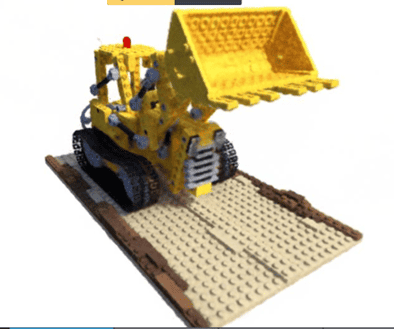
The famous Yellow Bulldozer (aka Lego scene)
Note, however, how NeRF doesn’t automatically work out of the box, it seems you need to tune parameters by hand for each scene individually.
NeRFStudio Python API
While we used NeRFStudio as a CLI so far, it’s actually a Python library. While the details of its Python API are beyond the scope of this introductory article, We will give the minimal example.
config = nerfstudio.configs.method_configs.method_configs['nerfacto']
config.set_timestamp()
config.pipeline.datamanager.data = pathlib.Path(DATA_PATH)
config.save_config()
trainer = config.setup(local_rank=0, world_size=1)
trainer.setup()
trainer.train()
What happens here? We take the default config for the nerfacto model, add input data path to it, create our model and train. Config and trainer are the highest-level NeRFStudio entities. This example is the 1-GPU version of the code used by ns-train. It produces a complete training with the web viewer and results saving.
If you want to really learn NeRFStudio, however, you have to learn lower level entities such as models, positional encodings, rays, renderer etc., which is a topic for some other time.
Conclusion
Today we told you about NeRF, the general idea, and the variants. NeRF is very beautiful but has not yet been used extensively commercially.
Next, we showed you NeRFStudio, which is more user-friendly than any other NeRF but still can be a bit too hard for non-specialists.
