

RoomPlan is Awful and it’s Great!

RoomPlan is a powerful framework from Apple designed for the fast and convenient creation of 3D models of rooms, using augmented reality (AR) technologies and LiDAR scanning capabilities. In our previous article, we reviewed the basic functions of RoomPlan, such as session setup, the structure of core components, and the specifics of output data. We explored how this tool can interact with the surrounding space to transform your rooms into a 3D model.
At first glance, RoomPlan is an impeccable tool for modeling rooms and indoor spaces. Its features might seem exhaustive for many tasks: automatic object recognition, real-time 3D model creation, and export capabilities. All this provides broad possibilities for developers, interior designers, and AR enthusiasts seeking a tool for quick and efficient work with room spaces, visualization, and presentation.
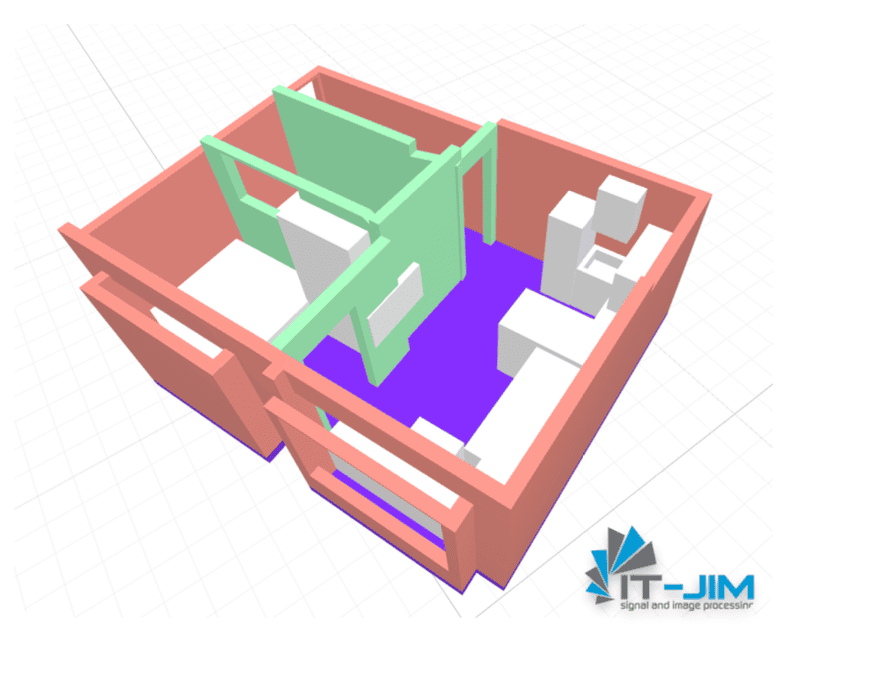
However, like many modern technologies, RoomPlan has darker sides worth considering. Despite its progressive features, this framework has several limitations and drawbacks that can significantly impact the final result and may require developers to put in extra effort to overcome them. In this article, we will look at the key issues one might encounter when working with RoomPlan and explain why this tool may not be as perfect as it appears.
Today, we’ll attempt to look beyond the mirror of RoomPlan and examine its limitations. This is an important step for everyone planning to use this tool in their projects, as understanding RoomPlan’s shortcomings will help you prepare for potential problems in advance and devise ways to address them.
Approximately correct, almost accurate
Although RoomPlan is positioned as a tool for professional spatial measurement tasks, in practice, its capabilities are limited by several important aspects that affect the final accuracy of the models.
Apple claims:
“RoomPlan outputs in USD or USDZ file formats that include dimensions of each component recognized in the room, such as walls or cabinets, as well as the type of furniture detected. (https://developer.apple.com/augmented-reality/roomplan/)”
In practice, various factors greatly distort the scanning results.
Limited Object Recognition
Although RoomPlan offers automatic object recognition, its capabilities in this area are quite limited. The tool can only identify basic interior elements, such as tables, chairs, sofas, and some household appliances.
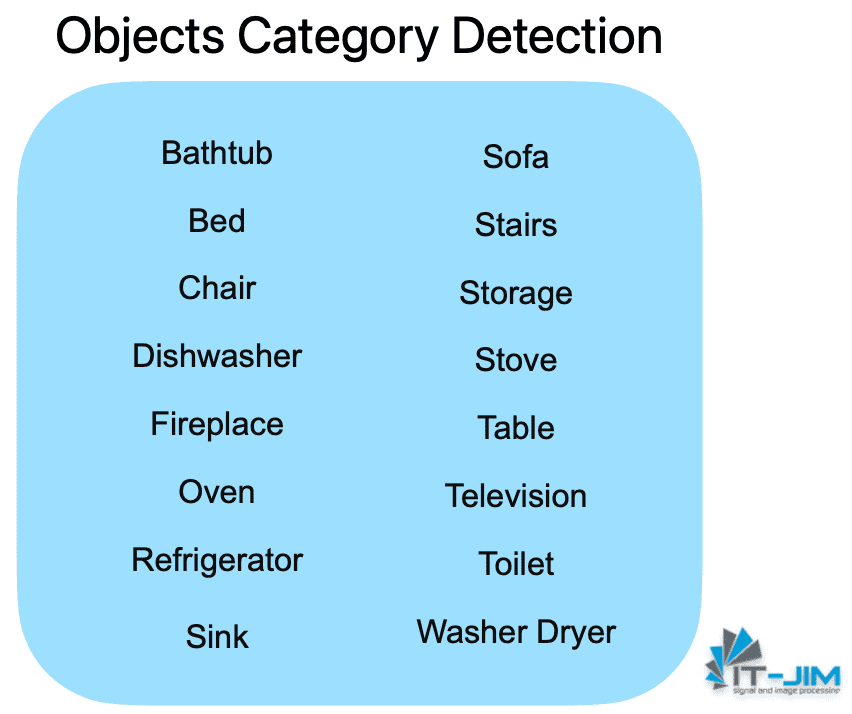
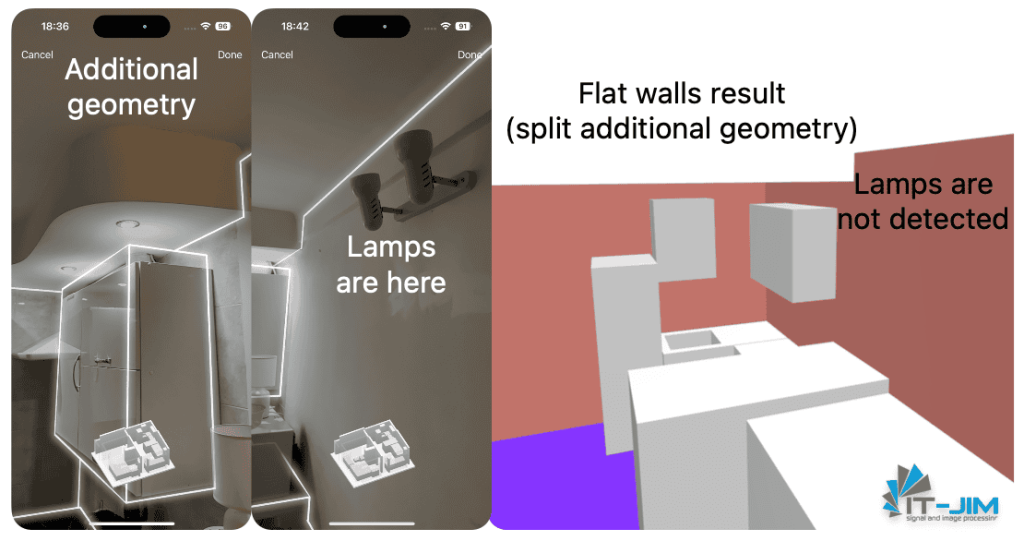
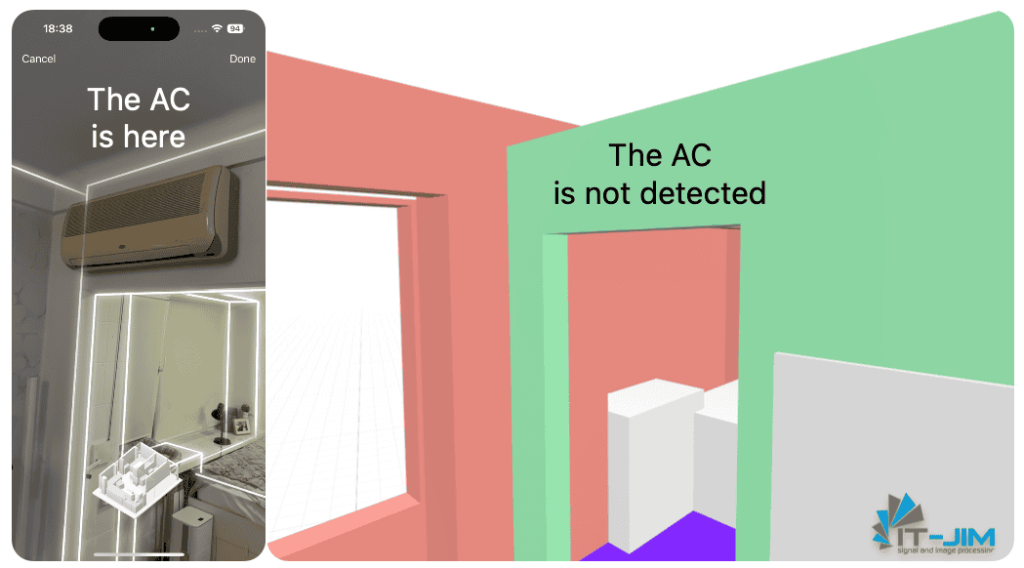
However, more complex or less common objects – like air conditioners, boilers, shelves, wall lamps, or decorative elements – remain beyond RoomPlan’s detection capabilities. Consequently, these objects simply do not appear in the model or are replaced with simplified shapes, leading to significant detail loss and affecting the overall spatial accuracy.
Rectangular Simplifications
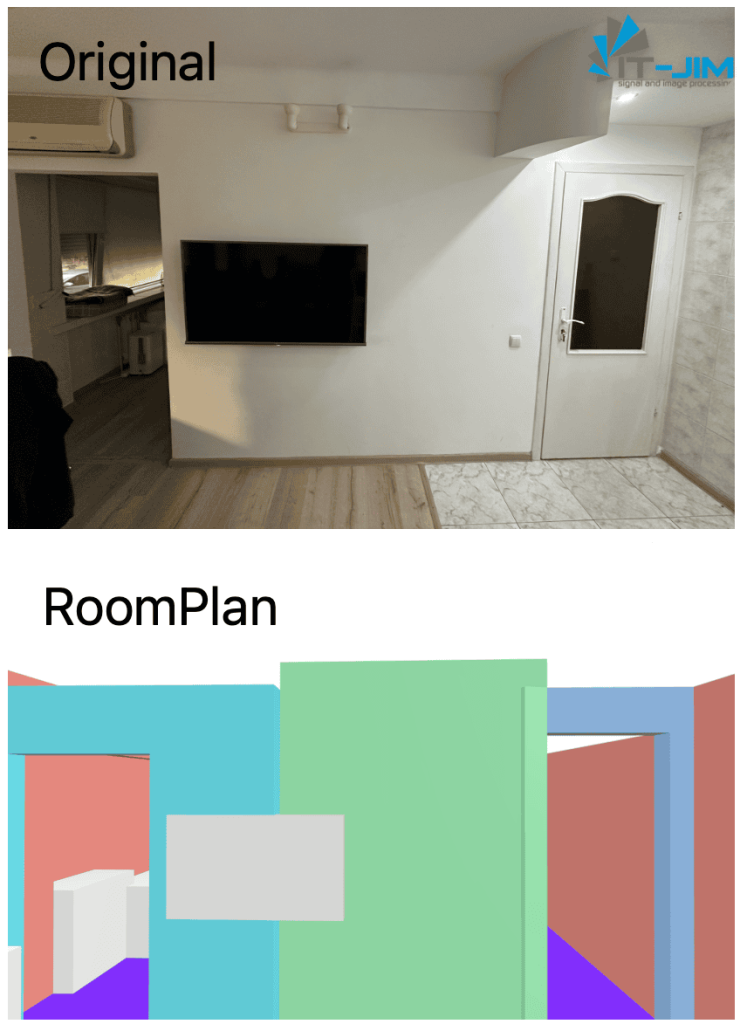
A significant limitation of RoomPlan is that the system attempts to reduce all objects and surfaces to a set of rectangles. This approach ensures processing speed but significantly impacts the quality and detail of the 3D model.
For instance, unique architectural elements, such as semicircular arches and sloped or non-flat walls, are simplified into primitive rectangular blocks, which noticeably distorts the model and reduces its actual accuracy.
Additionally, there is an issue with handling height variations, sloped ceilings, moldings, and baseboards, as these elements are almost always ignored when creating the model.
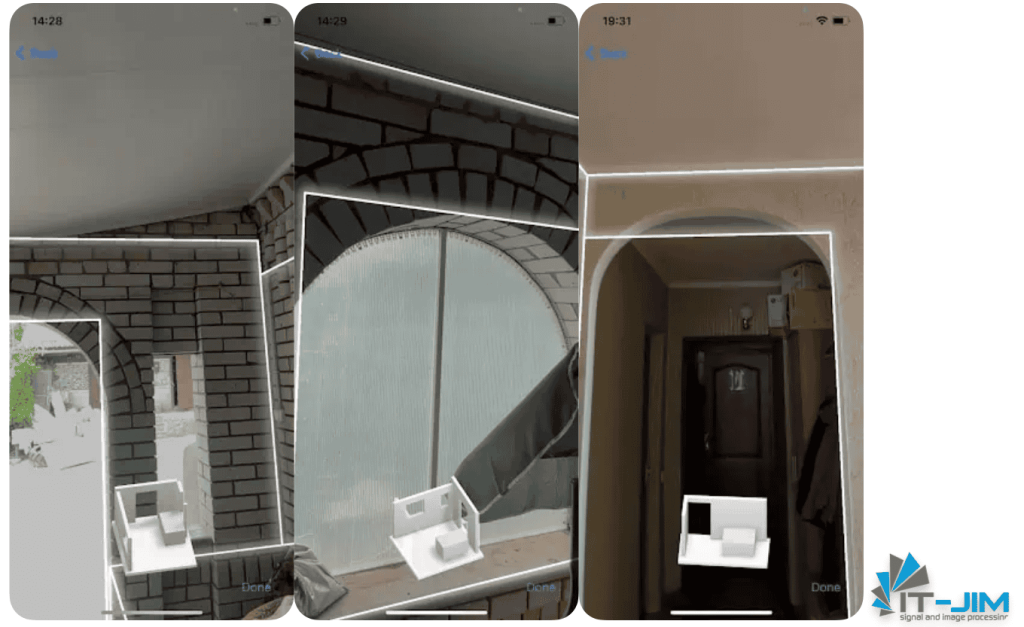
Ceilings and Skylights
RoomPlan does not capture any ceiling data, meaning you won’t be able to include ceilings in your model. This limitation is especially critical for tasks involving lighting design or calculations of room volume, as ceiling data is essential for these applications.
Furthermore, RoomPlan does not detect skylights, which are often integral to the functionality and aesthetics of attic or loft spaces. This lack of ceiling and skylight recognition further reduces RoomPlan’s applicability for projects requiring comprehensive architectural detail.
Measurement Errors
RoomPlan has accuracy issues when absolute precision, rather than relative precision, is required, resulting in dimensional discrepancies. An error of ±5 cm in a 1-meter wall may seem minor, but it’s important to remember that such errors accumulate. For example, in a space with multiple partitions, a divided bathroom, or a hallway, the deviation in each wall/window/door compounds, leading to a much more pronounced distortion overall.
In the example below, you can see the dimensions of a wall with a window embedded within it.
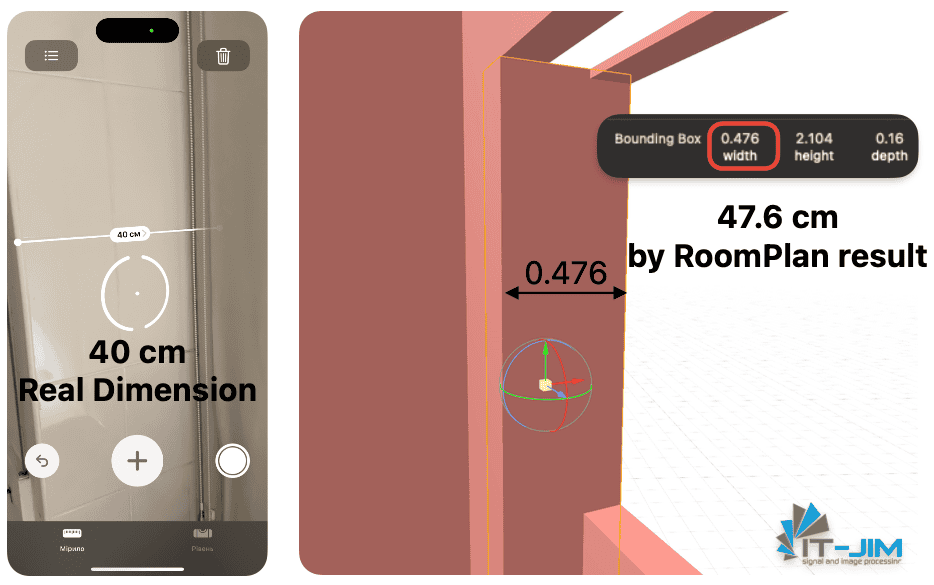
For the demo space in this article, the length deviation reached more than 37 cm, with the actual length being 6.45 meters, compared to RoomPlan’s measurement of 6.821 meters.
Incorrect Wall Thickness Representation
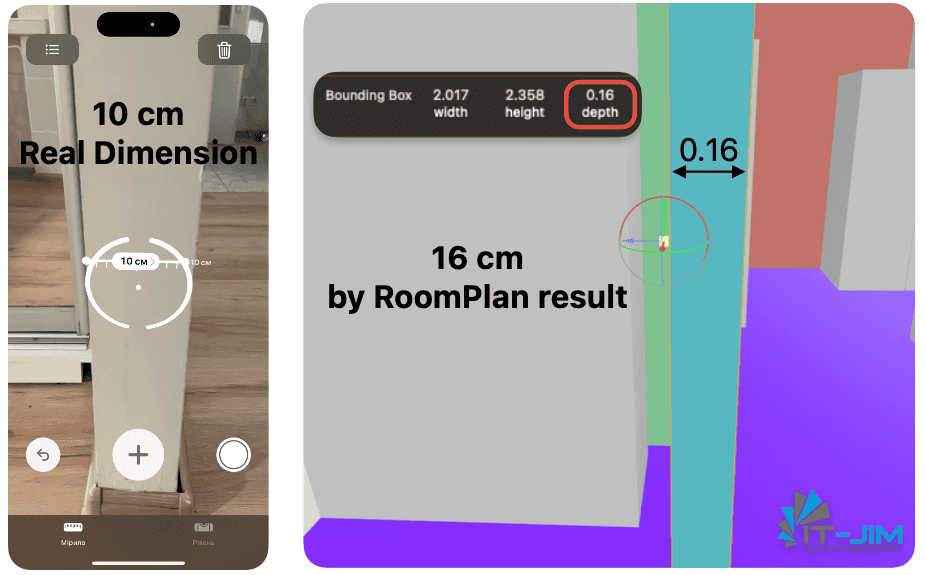
RoomPlan sometimes fails to calculate the actual thickness of walls, simplifying them to standard partitions (~16 cm), and only in cases where merging is performed can thicknesses be increased to better match the actual geometry.
Additionally, all exterior walls in your space are guaranteed to be represented as 16 cm. As a result, thick exterior or interior walls appear too thin in the model, which can distort scale and other aspects of the model critical for accurate interior planning.
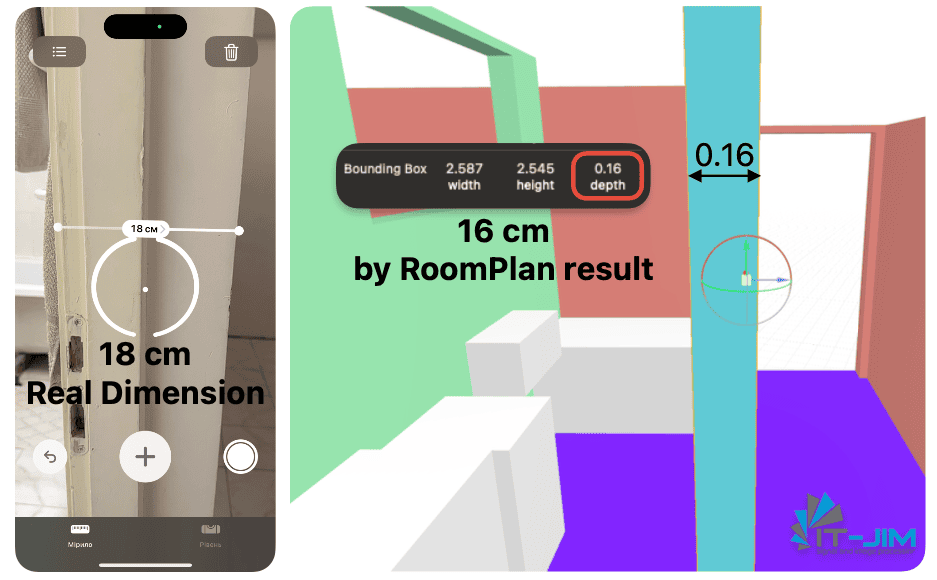
Issues with Doors and Windows
When it comes to working with doors, whether they are combined door-window units or double doors, RoomPlan may interpret them as a single plane or merge them incorrectly, compromising the model’s realism. Although RoomPlan does differentiate between doors and openings, this distinction is not visually represented in the 3D model. In 3D, an “opening” is merely a hole in the wall, while a “door” is intended to represent an actual door. However, in practice, both appear identical, offering no distinction in the data or model view.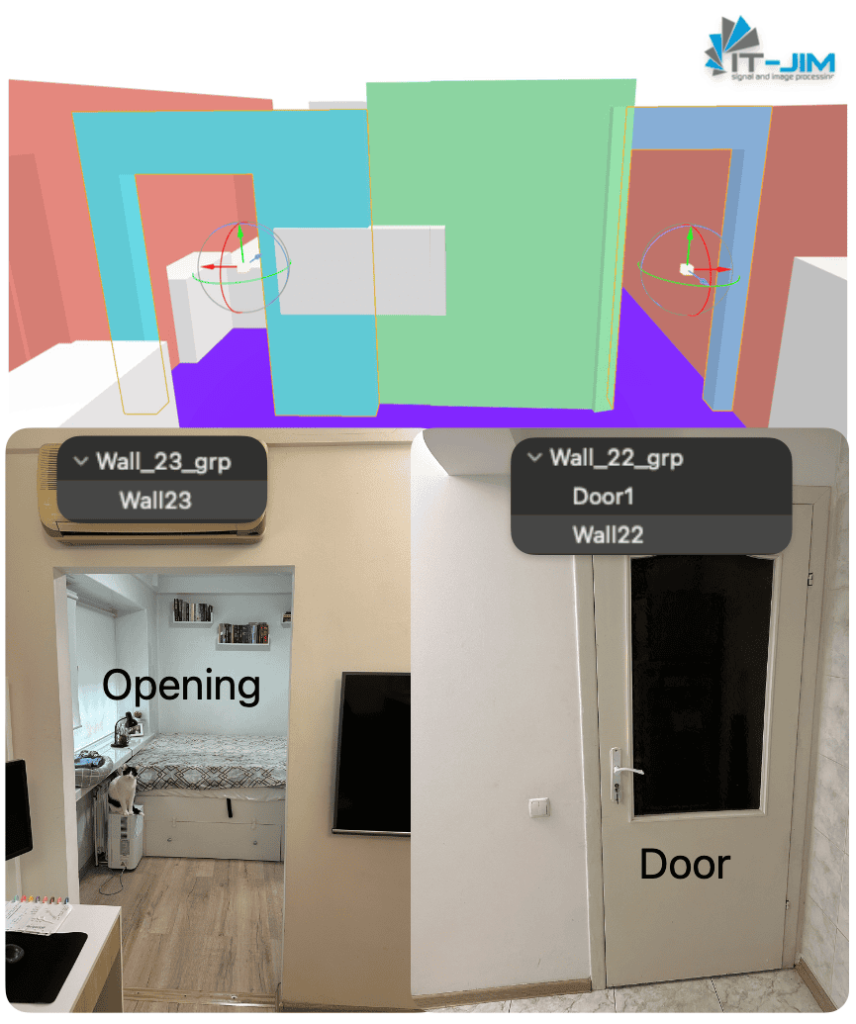
In order to get data on Openings – sizes, positions and determine the parent component, you need to work with the CapturedRoom JSON data file.
Additionally, for doors, factors such as the direction they swing open or even the exact placement within the opening are not captured. This impacts the model’s accuracy and can create mismatched expectations, as knowing the door’s orientation and position is crucial for many professional applications. The lack of this information diminishes the usefulness of the model, as the distinction between doors and openings becomes almost meaningless when there are no visual or data differences.
A further complication arises with double doors when one side is open and the other closed; in this case, RoomPlan often visualizes the closed side as part of the wall. Conversely, if both doors are open, creating a wide passage, it may register this as an opening rather than a door. This leads to inconsistencies in the representation, affecting both the visual model and spatial data.
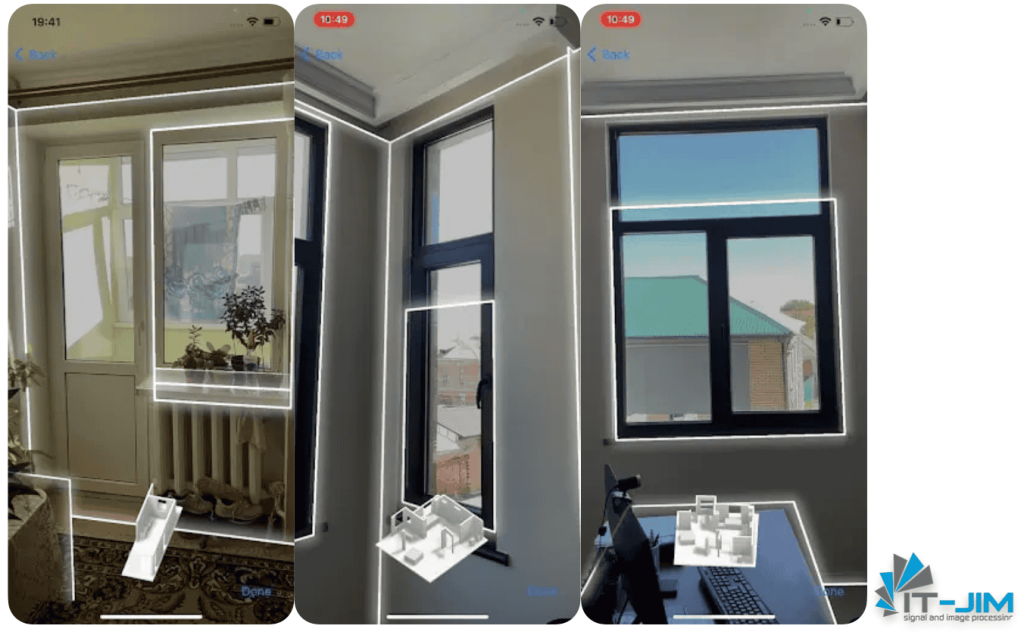
For windows, RoomPlan often trims frames if they are sectioned or multi-level.
In cases where doors have a complex configuration or non-standard design, the tool may fail to represent them accurately, adding difficulties in further work with the model.
Large Mirror Surfaces
Floor-to-ceiling mirrors and mirrored wardrobe doors pose a particular challenge for RoomPlan. Due to their optical properties, LiDAR often fails to accurately process these reflective surfaces, resulting in significant distortions or errors in the scan.
For example, large mirrors can cause “gaps” in the model, their absence (as if the wardrobe isn’t there), or the creation of phantom objects that don’t exist in the real space.
Each of these issues reduces the accuracy and reliability of models created using RoomPlan and requires developers to invest additional effort to refine and adjust the completed 3D scenes.
Walls Encroaching on Space
In iOS 17, walls in RoomPlan may encroach on the interior space, covering objects that are placed closely against them. This is especially noticeable when furniture or other items are flush with the walls.
This behavior has been improved in iOS 18, where wall boundaries are handled more accurately.
Wall Thickness Limitations
RoomPlan has a restriction on wall thickness, which cannot exceed approximately 50 cm. Walls that are thicker than this limit are treated as two separate thin walls, which can result in incorrect structural representation for spaces with very thick walls.
Inconsistent Wall Heights
Wall heights within a single room can vary, especially at corners where walls of different heights may converge. This issue is primarily seen in rooms with decorative elements, arches, or transitions near the ceiling, which cause height discrepancies.
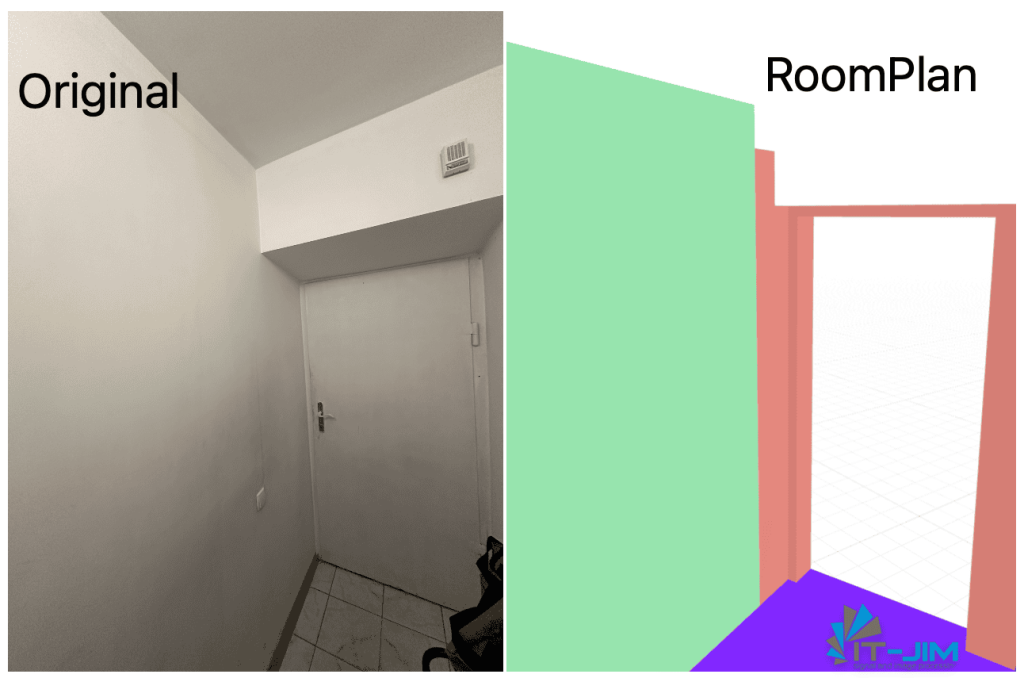
Curved Walls and Floor Gaps
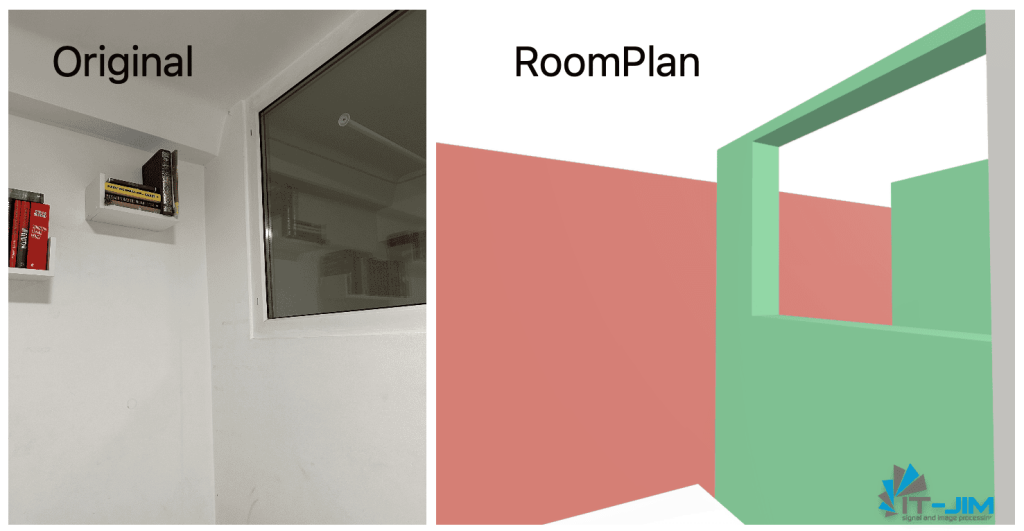
RoomPlan struggles with accurately representing curved walls. The system simplifies floors by aligning to the wall’s extreme points, resulting in gaps between the wall and the floor where a curve exists.
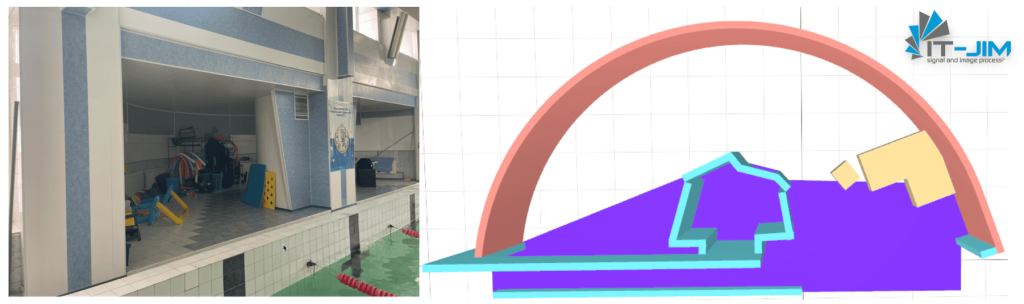
Simplification of Columns and Niches
Columns, niches, and other structural details are typically simplified or removed entirely in the RoomPlan model, which affects the accuracy of the final representation and loses critical architectural elements.
Native merge
One of RoomPlan’s features is the automatic process of merging individual elements of a room or space into a unified 3D model. However, while this function seems beneficial, in practice, it introduces considerable distortions, as RoomPlan attempts to optimize the final model’s appearance, often at the expense of accuracy. As a result, individual rooms may appear reasonably accurate and detailed after scanning, but the combined model often exhibits serious distortions. This makes the final 3D model less suitable for professional use, where precise measurements and proportions are critical.
Merging Floors of Different Rooms
RoomPlan automatically combines all floors into a single plane, which can significantly compromise the model’s realism. This merging largely depends on wall parameters and on how accurately the walls are combined into a shared space.
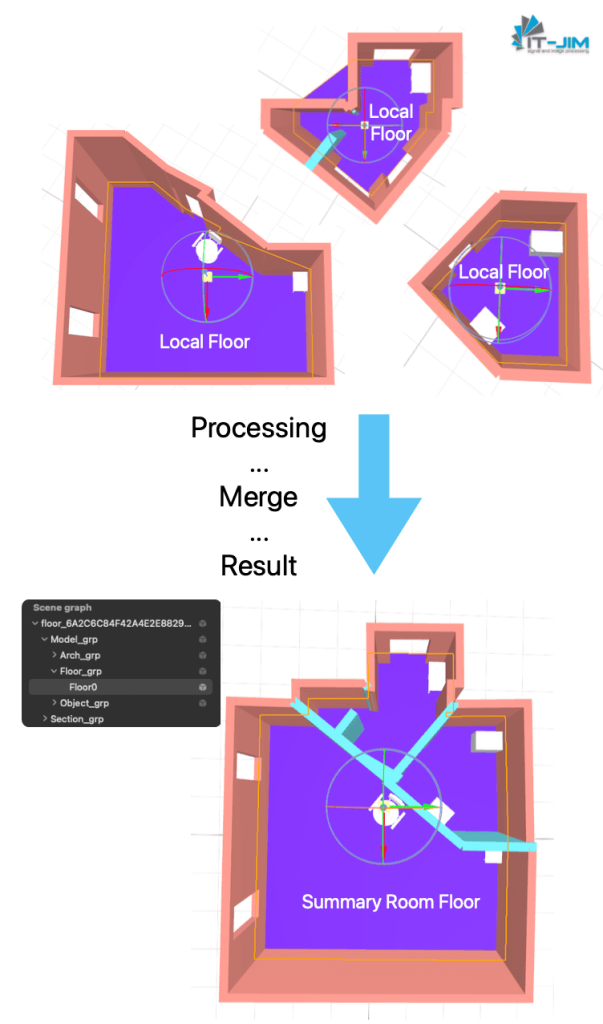
Another issue arises from how RoomPlan treats level differences—it does not account for steps or platforms within rooms. In these cases, each room may look reasonably accurate, but upon merging, all these simplifications create additional discrepancies and mismatches between the separate areas. The combined floor gives the impression that all rooms are on the same level and share a uniform appearance.
Lack of Support for Multi-level Structures
RoomPlan is limited to working within a single floor, with merging possible only within a single horizontal plane. This means that for multi-story buildings, it is necessary to create separate models for each floor, treating each as an independent model.
The inability to merge floors into a single model complicates projects where it’s essential to represent all levels of a structure. This limitation makes RoomPlan less convenient for tasks requiring an overall view or when calculating volumes across multiple floors.
Automatic Wall Angle Alignment
RoomPlan automatically adjusts wall angles to make them perpendicular if there are minor deviations, even if, in real space, the angles are not perfectly right. This optimization is aimed at standardizing the model, but it often distorts the geometry of the room. Consequently, the model loses unique architectural features that may be essential for preserving the individuality and accuracy of the space.
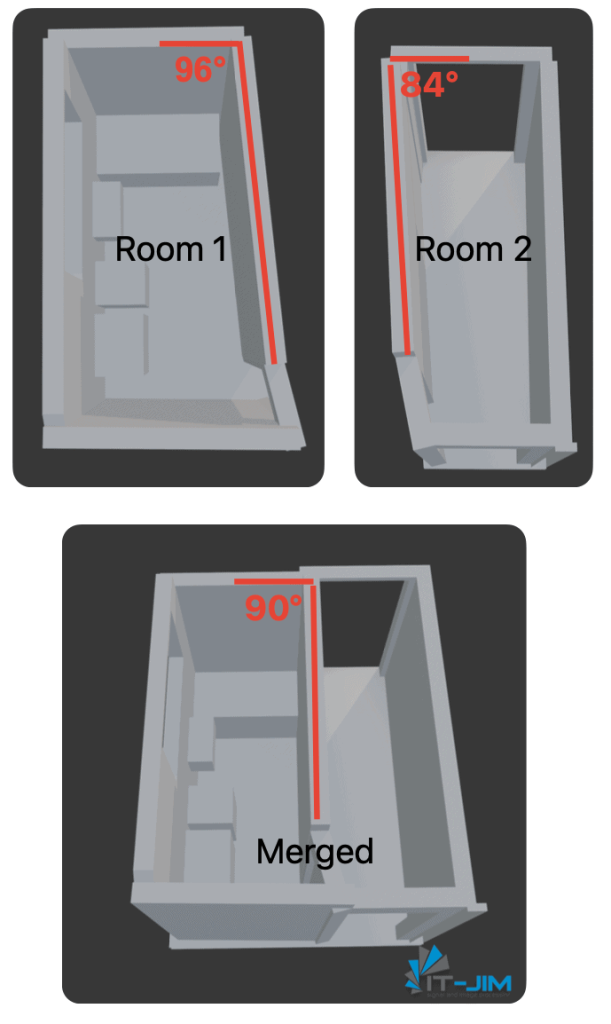
The problem becomes even more pronounced when dealing with spaces featuring complex structures or non-standard wall geometries, such as oval or slanted walls (like those in attics), where automatic angle straightening changes the room’s appearance and is not suitable.
Thus, although RoomPlan’s automatic merging aims to simplify and streamline the model creation process, in practice, it can significantly reduce accuracy. This requires users to put in extra effort to adjust the merged model so that it aligns with real conditions and architectural requirements.
Developers’ suffering
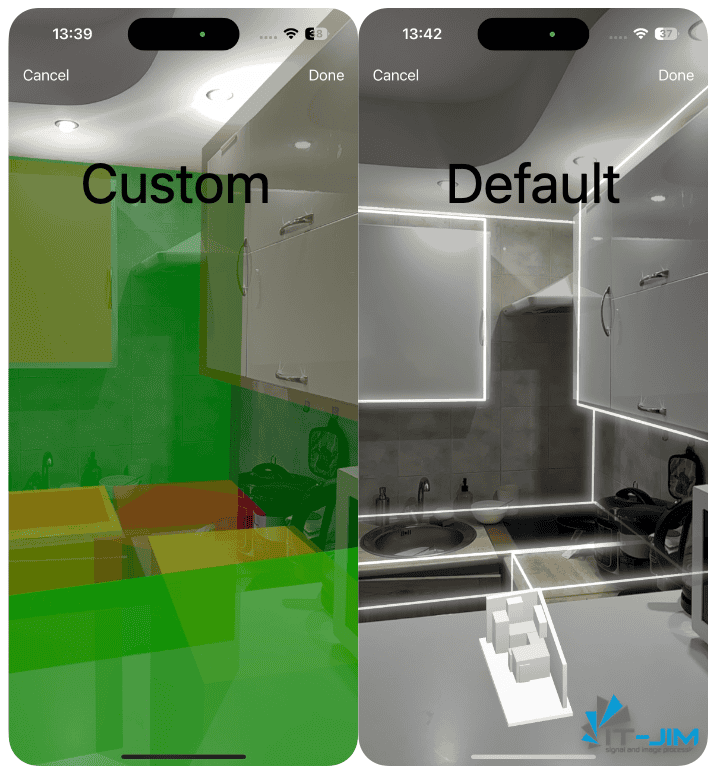
Preview Customization
RoomPlan provides a built-in preview view during scanning, but it is fixed and does not support customization. By default, you will always have an AR session with a visualization of the scanned space and a preview in the middle of the bottom. You can only add elements to the standard view, such as buttons, indicators, etc.
For real-world tasks you might want to go beyond the standard RoomCaptureView, you can create your own custom view (we’ve already presented this in a previous article) from scratch.
That is, you can completely define the appearance, corners, and colors, for example, by coloring the floor and walls separately, or ignore objects if you are only interested in the outline of the room.
Export Issues
When attempting to export data after working with RoomPlan, be prepared for potential errors if file names start with numbers, such as “1234,” or if UUIDs are used for name generation. This issue results in failed exports.
To fix this, just add any Latin letter or word to the beginning of the word, for example, *export_*.
While this bug is resolved starting with iOS 18, earlier versions still exhibit this problem, so it’s important to be cautious with file naming when exporting RoomPlan data on older iOS versions.
Custom AR Session problem
If you want to integrate a custom AR session to work with your own configurations and pass it into the RoomCaptureView initializer, you may encounter several issues once your application runs, including:
- Incorrect operation due to missing depth data
- Stuttering and lag
- Premature session termination if the app is minimized
This bug is also resolved starting from iOS 18, but it remains on earlier versions. If you need to use a custom AR session, it may be best to create a fully custom preview to ensure stable functionality.
Separate Coordinate Systems for Rooms
Each room scanned by RoomPlan has its own local coordinate system, which complicates integrating rooms within a unified space.
Developers must resort to workaround solutions to handle these transformations, making it challenging to work with multiple rooms cohesively in a single environment.
Summary
RoomPlan is an innovative framework that offers the ability to quickly create 3D models of spaces but brings with it many significant challenges. Although it is marketed as a convenient tool for design and visualization, its functions have notable limitations that should be considered.
The simplification of shapes, measurement inaccuracies, merging issues, and lack of easy customization preview support make RoomPlan less versatile than it might initially seem. For professional use, where high precision and detail are required, RoomPlan may prove insufficiently reliable and demand additional processing of the generated models or even the development of custom post-processing solutions.
Fortunately, there are ways to enhance RoomPlan’s capabilities. By combining RoomPlan’s output with raw data from iOS sensors, refining RoomPlan’s data structures through custom C++ integrations, or applying advanced computer vision algorithms, it’s possible to achieve higher accuracy and improve the reliability of the generated models. Some solutions addressing these issues are already emerging, providing a pathway for those looking to maximize RoomPlan’s potential in their applications.
It’s worth noting, however, that this tool is relatively new, and Apple continues to improve it. Even now, we see a significant difference in RoomPlan’s performance between iOS 17 and iOS 18, with the latter offering noticeable improvements. Despite current shortcomings, RoomPlan has great potential and will likely become more functional as technology advances and updates are released.
Thus, using RoomPlan today requires a thorough assessment of its capabilities and limitations, as well as a willingness from developers to adapt to its specific requirements. For those prepared to put in the extra effort, this tool may still open up new possibilities in creating interactive and rich AR experiences.
