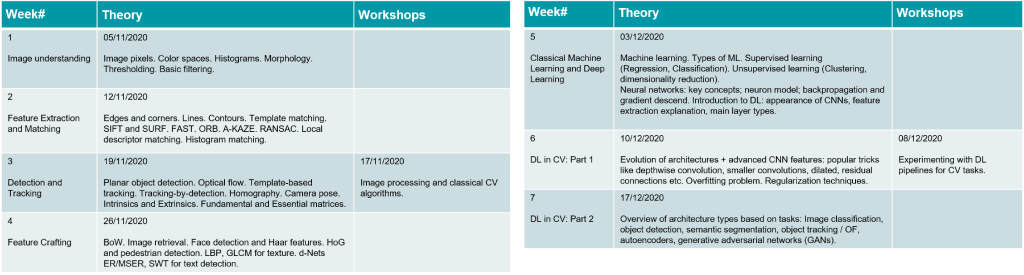
International Consumer Electronics Show – 2021

For more than 50 years, CES has been the global stage for innovation. And the all-digital CES 2021 will continue to be a platform to launch products, engage with global brands and define the future of the tech industry.

An all-digital CES 2021 will allow the entire tech community to safely share ideas and introduce the products that will shape our future.

We’re happy to participate in all the awe-inspiring moments of CES and see what experience for the tech industry they have to offer in 2021.

Winter Internship @ It-Jim

A winter internship on computer vision is coming!

  • February 1-28, 2021: one intense month of solving practical CV tasks under the supervision of It-Jim specialists
  • Full-time engagement
  • Bonus: possible employment after successful graduation


If you:

✔️have confident knowledge of linear algebra and C++/Python

✔️have pre-intermediate or higher English level

✔️want to boost skills in CV/ML,

fill in this registration form until January 10, 2021.

Winter Internship on Computer Vision: Time to Become a CV Engineer

While 2020 has shown us that new year resolutions might not work, we do not think anyone should give up making a clear vision for the upcoming year. Especially if there is a “become a computer vision engineer” on the list.

Nope, we can not tell for sure what 2021 will be like. Yet, being optimists, we promise you this: the start of the next year can be full of discoveries, exploration and even have elements of intrigue. All those things combine when it comes to research in computer vision, and with our winter internship, we are offering you to discover this exciting field for yourself.

Starting February 1, 2021, and for full 4 weeks, you are invited to work on a real computer vision project under the supervision of It-Jim experts. This is a full-time engagement and quite an intense month of diving into the CV/ML/DL world.

What exactly does internship mean?

You might have heard about our summer internships before. Unlike those activities, winter internship-2021 will not have lectures nor workshops. Instead, it will bring you a full immersion into an exciting research project with lots of experiments, deep analysis of algorithms, and their implementation. What is more, you will be guided by experienced It-Jim engineers and learn the practices from the best.

At the end of the internship, you will be asked to make a presentation to showcase your achievements throughout the month. Our vibrant team is always open to bright engineers… What if this could be the start of your career?

How do you know if this is for you?

First, ask yourself if you are eager to dive into the world of visual intelligence. Because once you start, there is no turning back – it is THAT interesting! You know how they say: once a computer vision engineer, always a computer vision engineer 😉

We do not ask much. With a confident knowledge in linear algebra and C++/Python, preintermediate+ level of English, and strong motivation to learn fast, your chances are high. Some analytical and problem-solving skills would not hurt, too.

Are you the one we are looking for? Do you want to enter the world of computer vision? We will provide you with one of the best possible platforms in Ukraine to do that.

Fill in this form: https://forms.gle/6gtvzFBurnXNGsAG7, and let’s find out. We are accepting applications until January 10, 2021. To become an intern, you will need to solve a couple of basic tasks. They will be sent out after the application submission deadline. You will have two weeks to show us what you got.

It-Jim’s winter-2021 internship in a nutshell

Should you have any questions, please contact Daryna Pesina, COO of It-Jim, at darynapesina@it-jim.com.

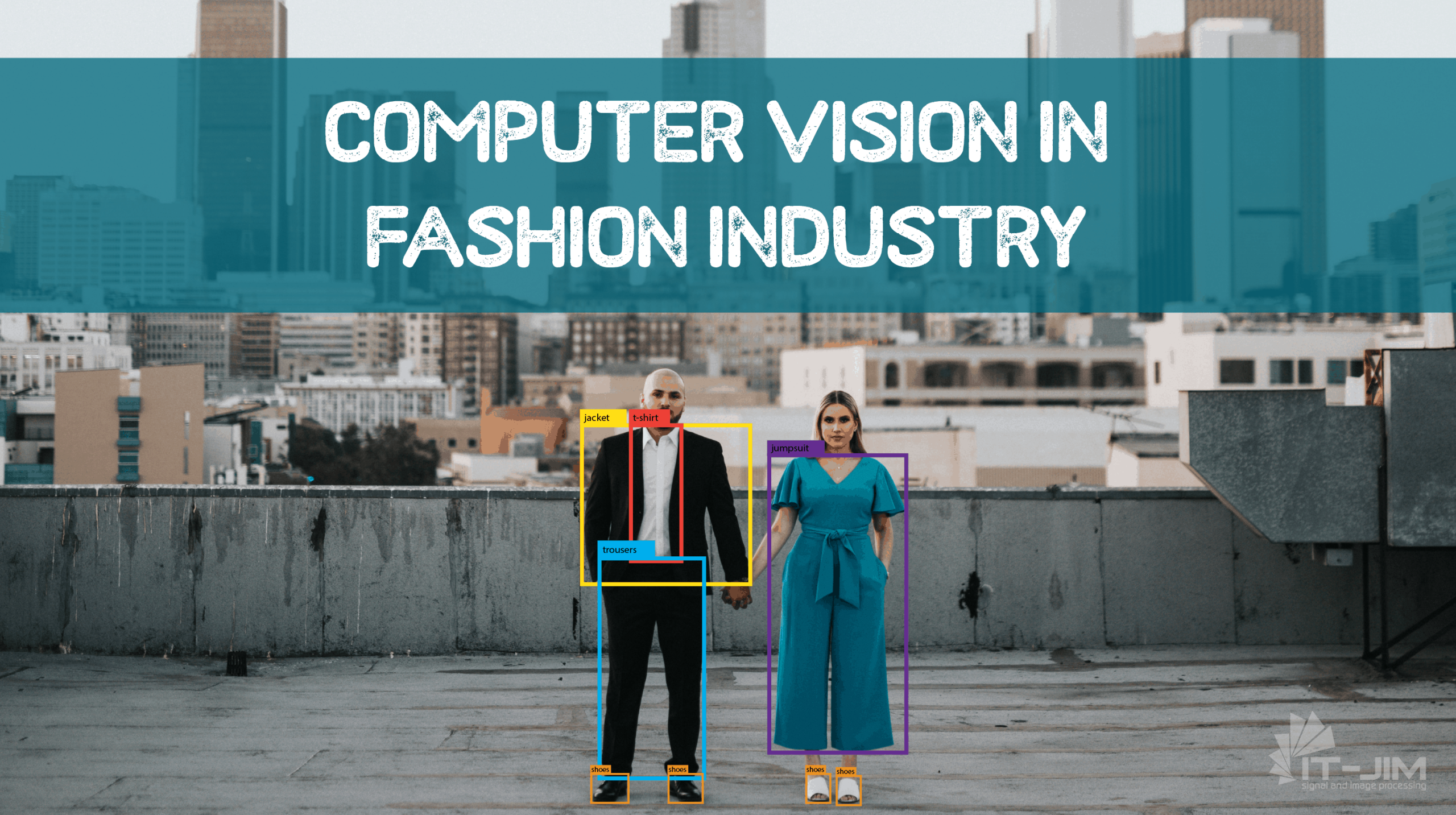
4 Ways How Computer Vision Is Deepening the Fashion Industry

What is your first thought when you hear about computer vision (CV) in fashion? Or, what is the first thing that pops into your head when you hear about deep learning fashion? Let us guess – online clothing shopping or virtual try-on applications?

Well, this might be surprising but deep fashion is not a far future anymore. What’s more, fashionably speaking, the usage of deep learning in the fashion industry seems to be already old-fashioned rather than pioneering or innovative. Many famous brands like Dior, Macy’s, Nike, Zara are already using artificial intelligence (AI) in e-commerce, and this is not only about market segments for retail clothing. There is far more than this within intelligent fashion. Most crucially, fashion is all about visuals. And where there are visuals, there is computer vision

Let’s see how exactly data analytics and AI approaches entered the fashion industry and what happens when so seemingly different fields come together.

As mentioned above, AI-powered tools have been already deeply embedded in many creative fields such as art, film, music, graphic design, advertising, and fashion. Being a multibillion-dollar global industry, fashion is what creates, sets, and sells style and image, and quite often dictates canons of beauty. 

Technically, making fashion truly intelligent is a very difficult task due to a huge variability of fashion items in style and design. Current trends on intelligent fashion are aimed at the tasks not only to detect clothing in an image but also analyze and synthesize new ones, and, hence, offer tailored recommendations. Within deep learning in the fashion industry, three main aspects appear definable: low-level pixel computation, mid-level fashion understanding, and high-level fashion analysis. The former is intended to label certain items on a picture and deals with human and cloth segmentation, landmark detection, and human pose estimation. Mid-level tasks aim to distinguish fashion images like items and styles. And finally, high-level analysis is recommendation-oriented, it includes synthesis and fashion trend forecast.

Here are the use-cases of how CV and deep learning are deepening fashion.

Try-before-You-Buy Solutions

An excellent example of CV-enabled fashion technologies is virtual fitting room applications. These allow potential customers to try on a garment or accessory using various software applications. You must admit it is great! Whether you choose glasses, watches, or hats, you are able to try on a model in real-time easily changing its color and shape.

Gap Dressing Room AR APP By Avametric – source

Such solutions are based on the pose estimation models used for landmarks detection. The deep fashion datasets might be taken from open-source libraries.

A yet harder task is to implement virtual try-on clothes. Because clothing alters its form when taking the shape of a person’s body, for proper augmented reality (AR) experience, a deep learning model should identify not only basic key points on the body’s joints but also the three-dimensional body shape.

Fashion Item Retrieval

Another benefit of using deep learning-based models is the fashion image retrieval task. For some, shopping can be enjoyable things to do, for others, could be absolutely frustrating. If you are not a shopping fan, when buying online can be even more challenging. You are just scrolling and scrolling, browsing gazillions of items, and could nohow find what you’re looking for. Or another case, imagine you saw a gorgeous Jennifer Lopez’s dress/purse/waistband (underline whichever is appropriate :)) and took fire to find something like that. Although many online retailer websites support keyword-based searches, it would be much handier if a mechanism existed which could help us to find the desired apparel based on a visual query rather than a text description alone. 

The great news is that CV may perfectly cope with this issue by finding a similar or alternative product you requested. And, most importantly, much faster than you would be searching by yourself. Still, clothing retrieval tasks based on queries by the customer’s picture is highly challenging. This is due to a significant discrepancy between the real-world photos and those captured by retailers. Another problem is that clothing items are highly deformable, and, thus, their appearance may differ dramatically.

To solve the clothing retrieval task there is a trend to create attribute-aware deep neural network architectures that may include both semantic attributes and visual similarity constraints into the feature learning stage. Some of them may exploit over-segmentation algorithms with human pose estimation to get query clothing items and to retrieve similar images from the existing galleries.

And here you can bring up a question: how does CV “know” what exactly should be retrieved?

How Computer Vision Understands Fashion

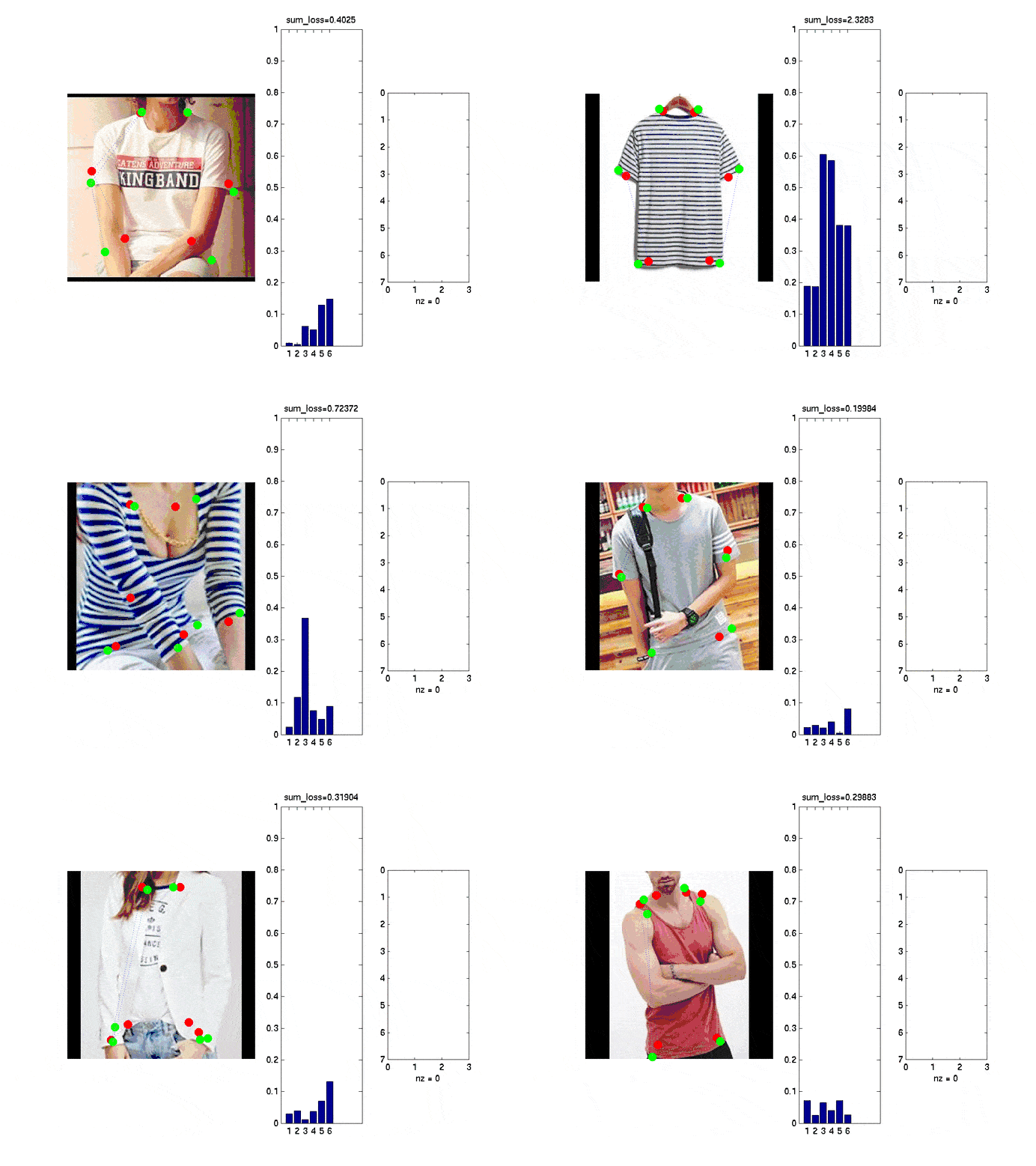
We know that CV systems are trained to “look” at the picture and generate a list of features for each detected item. This is mainly accomplished by such technology as landmark detection. The fashion landmark detection means recognition of clothing in an image and categorization of fashion items. Fashion landmarks are to define the precise location of such functional clothing regions as a neckline, hemline, sleeves and cuff. However, detecting fashion landmarks is a challenging task due to such constraints as background noise, human poses, and scales. For achieving more accurate landmark prediction, CV algorithms should be more context-aware. Besides that the landmarks indicate the key points on clothes, they also capture their bounding boxes, which helps better discriminate the design, pattern, and class of apparel.

An example of fashion landmark detection – source

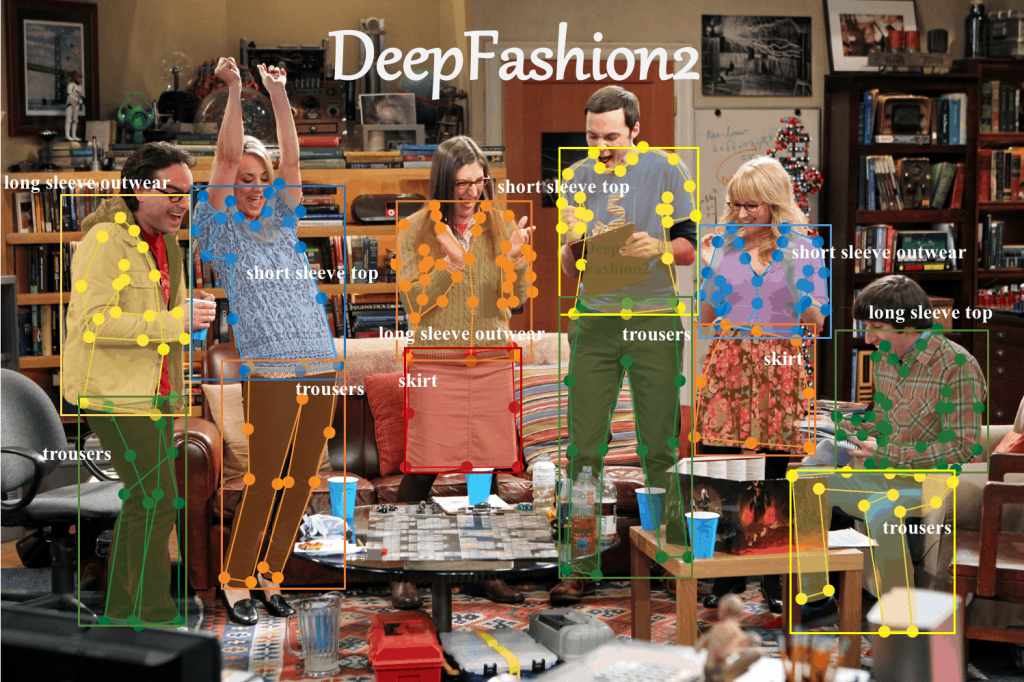
To be able to solve the above-mentioned tasks a number of clothes datasets come to the aid. One of the most widespread of them is Deepfashion2. It is a large-scale benchmark with comprehensive tasks and annotations, created by researchers from the Chinese University of Hong Kong. The dataset includes over 800K labeled into categories images with comprehensive descriptive attributes, bounding boxes, and clothing landmarks.

The Big Bang Theory series frame exemplifies the use-case of DeepFashion2 – source

DeepFashion2 allows performing a wide spectrum of tasks such as clothes detection, pose estimation, human and clothes segmentation, and clothing retrieval.

Fashion Recommendation with AI

A popular application of AI in clothing fashion is the deep learning recommendation engine. For e-commerce, it is all about categorization fashion items, clothing analysis, and help in certain style matching. Recommendation for fitting works on the concept of visual compatibility, which performs how favorable different fashion and apparel units can be matched to create a fashionable look. Also, it refers to the personalized recommendations considering such factors as preferable color, print, fabric, and outfit style. And since fashion is not only about what people are wearing but also reveals personality, fashion recommendation technology could help not only in certain cloth matching but in makeup or hairstyle suggestions. In other words, a customer benefits from the intelligent fashion-image consultant.

Another deep fashion application is a virtual assistant or chatbot. This kind of AI-powered software solution is an important part of business communication. Being an effective tool in user request analysis, it responds instantly and assists in keeping in touch with a customer throughout the whole purchase cycle.

Fashion Trends Forecasting Using Deep Learning

Given the frenetic pace in refreshment of fashion and design, retail businesses need to consistently keep up within the forefront and predict consumer preferences for the next season. Traditionally, such estimates are made based on the data from previous years. However, AI-based methods can reduce forecasting errors significantly. 

Besides obvious business interests in sales forecasting for the retail clothing market, it is also important for consumers to choose appropriate fashion goods. Deep learning models for fashion are impressively helpful in analyzing current trends and customers’ behavior. So, knowing what is and what expected to be on-trend, businesses can deliver a better brand experience and, thus, provide exactly what shoppers look for.

To sum up, today, AI methods provide multiple solutions for fashion making it more and more intelligent. CV-based deep fashion technologies come into use to handle diverse challenges, such as fashion image detection, item retrieval, analysis and synthesis, recommendation, and popularity prediction.

Computer Vision in Healthcare: Benefits & Key Applications

Computer Vision in Healthcare: Benefits, Challenges, and Use Cases

Are you interested in using new technologies such as  AI and computer vision in healthcare?

Artificial intelligence (AI) and machine learning (ML) are being increasingly used across various sectors, with healthcare being one of them. Computer vision (CV) technology is another powerful tool that helps recognize, interpret, and process visual data.

Computer vision in healthcare can transform existing patient care services by interpreting medical images and assisting in diagnostics with top accuracy. The potential applications of computer vision in the medical field are numerous, ranging from medical diagnostics and patient monitoring to treatment planning and automated health record management.

In this article, we examine the advantages of utilizing computer vision applications in healthcare and discover:

  • Understand computer vision in healthcare and how it works.
  • Reasons why computer vision matters in healthcare.
  • Ethical considerations in computer vision healthcare solutions.
  • Recent advancements in computer vision for healthcare applications.
  • Existing challenges in utilizing computer vision in healthcare.
  • Future scope and trends of computer vision in healthcare.

Let’s start by exploring what computer vision is and its impact on the medical field.

What Is Computer Vision and How Does It Work?

Computer vision, a subset of artificial intelligence (AI), empowers machines to interpret and understand visual data from the world around them. This technology aims to replicate human vision, enabling computers to perceive and process images and videos.

At its core, computer vision engineering focuses on key techniques like image recognition, object detection, and segmentation. These techniques help machines spot and categorize objects in an image, detect their boundaries, and segment different regions.

Computer algorithms learn from vast datasets, improving their accuracy and efficiency in tasks such as disease detection and medical image analysis. The use of a neural network further enhances these processes.

Why Does Computer Vision Matter in Healthcare

Experts cannot overstate the importance of computer vision in healthcare. The healthcare industry is embracing digital transformation, and integrating computer vision technology becomes essential.

AI-powered diagnostics enable healthcare providers to achieve unprecedented levels of precision, speed, and administrative relief. This allows not only to enhance efficiency but also to improve patient care and safety.

Global Market Insights estimated the global market for AI in computer vision at $14.1 billion. Analysts project that the market will grow at a 19.5% CAGR to $82.8 billion by 2034. This exponential growth reflects its critical role in the industry.

The need for more accurate and quicker analysis and healthcare operations drives this upward trend. Computer vision and AI systems are evolving and can now handle complex and varied visual data. This makes them a valuable tool in healthcare.

AI in computer vision market forecast

Additionally, computer vision techniques are revolutionizing the way researchers conduct medical image analysis. AI-driven systems analyze visual data with speed and precision. In contrast, traditional manual analysis is time-consuming and prone to errors. This not only enhances the diagnostic process but also frees up healthcare professionals to focus on direct patient care.

In addition to diagnostics, computer vision technology plays a crucial role in ensuring patient safety and quality of care. Computer vision enables automated remote monitoring systems that track patient conditions in real-time, as well as advanced computer-aided diagnosis, which aids in the early detection of diseases.

Medical professionals can now use computer vision to analyze complex images such as X-rays, MRIs, and CT scans. As a result, diagnostic errors are less likely to occur. This technology also helps ensure timely surgical interventions.

By implementing these innovations, healthcare organizations can improve patient monitoring, streamline workflows, and enhance the quality of care provided. 

The benefits of implementing computer vision in healthcare include:

  • Automate workflows, optimize resources, and speed up administrative tasks in a healthcare organization.
  • Deliver surgical assistance and improve precision and treatment outcomes.
  • Help detect anomalies in medical images and minimize diagnostic errors.
  • Enable continuous monitoring of patients (fall detection, movement tracking, condition changes).
  • Focus on patient care by handling routine tasks efficiently.
  • Interpret medical images accurately and effectively.
  • Enhance the user experience in healthcare environments.

Ethical Considerations in Computer Vision Healthcare Solutions

Ethical and privacy considerations play a crucial role in the implementation of computer vision in healthcare. Ethical considerations encompass data privacy and security, AI bias, and clinical validation.

Healthcare computer vision handles sensitive personal data, meaning it must meet industry standards and certifications. In a specific project case, consider these certifications and standards: FHIR, HIPAA, HITECH, CEHRT, ONC-ATCB, and GDPR.

EHR (electronic health records) certification builds trust among medical professionals, software developers, and patients. It ensures that the system uses data securely and adequately. EHR certification happens after a special executive board evaluates the software. For instance, in the USA, ONC and HHS are two organizations that handle this procedure.

Thus, to receive EHR certification, it is necessary to meet quality standards, mitigate the risks of unauthorized data access or hacking, establish robust data security protocols, and ensure top-notch data encryption and anonymization.

Transparency and accountability are also crucial for designing computer vision applications. Healthcare organizations must adopt transparent practices in data collection, processing, and training computer vision algorithms to ensure accurate and reliable results. Using practices that reduce bias in the training phase of deep learning models is essential for ensuring fairness and accuracy in AI-based applications.

To keep computer vision in healthcare private and secure, follow these criteria:

  • Robust software infrastructure with advanced security protocols and encryption.
  • Use of isolated servers, networks, and private cloud environments.
  • Centralized access control with unified authentication and zero-trust policies.
  • Autonomous systems that operate without human oversight.
  • On-device image processing that avoids transmitting or storing data in the cloud.
  • Local and real-time deep learning use (edge AI).
  • Transparent data handling and an easily understandable system architecture.

Fairness, transparency, and data security foster trust and encourage ethical use of computer vision technology in healthcare for everyone.

Key Applications of Computer Vision in Healthcare

The potential applications of computer vision in the medical field are multifaceted, ranging from image processing and predictive analysis to automated health record management. This improves the quality of medical services and the healthcare administration system.

Let’s consider computer vision use cases in healthcare today.

1. Computer Vision in Medical Imaging

Currently, the most widespread use of computer vision is image recognition and classification for medical purposes. AI-powered medical imaging can detect abnormalities in X-rays, MRIs, and CT scans faster than traditional analysis methods. Aided by CV and deep learning tools, physicians can inspect and interpret images in-depth, improving the accuracy of diagnosis and adjusting therapy accordingly.

Thus, medical image classification using a convolutional neural network (CNN) is employed to aid in disease diagnosis and treatment. Dealing with MRIs, for example, various CNN architectures may reveal tumors or aneurysms in the brain, and even predict the development of Alzheimer’s disease in the early stages.

Another way to use CV in medical imaging is through facial recognition and video stream processing. One of the benefits is that deep learning algorithms can be successfully trained to reveal even the slightest abnormalities. This aspect could be extremely helpful for patients suspected of developing conditions and rare genetic malfunctions that are difficult to detect in routine screenings.

Several computer vision healthcare companies have developed AI face-scanning applications. Based on ML algorithms and neural networks, they classify distinctive features in photos of patients with congenital and neurodevelopmental disorders.

2. Computer Vision for Surgical Assistance

Computer vision systems also have a great application in surgery. In this field, computer vision is a powerful tool for enhancing surgeon performance by measuring activity levels, detecting chaotic movements, and assessing working times in particular areas – ROI (regions of interest).

The technology enables training and simulation, as well as assessing surgical skills to enhance surgeon performance. This way, medical personnel can effectively prepare for invasive surgical procedures while minimizing potential complications.

Additionally, computer-aided models can accurately reconstruct surfaces and design implants for orthopedic procedures. This CV application can provide prompt and precise segmentation of bones, joints, or soft body tissues. This helps achieve higher levels of accuracy in modeling skeletons and implants for surgeries, taking into account the MRI and CT scans.

Another notable example of a deep learning system for surgical assistance is the Triton project. The system estimates real-time blood loss during and after surgery by visually analyzing blood-soaked sponges, suction containers, and other surgical tools. This tool helps determine the appropriate amount of blood to transfuse during or after the procedure.

3. Computer Vision in Early Disease Detection

Early disease detection is crucial for enhancing patient survival rates and simplifying their treatment. AI-powered systems are trained on a large volume of medical imaging data, allowing for the identification of patterns and anomalies that may not be visible to the human eye. This capability is particularly significant for conditions like lung cancer, where early detection can lead to more effective treatment and a more favorable prognosis.

Additionally, mobile devices equipped with convolutional neural networks can facilitate early diagnosis in dermatology, allowing patients to monitor their skin health more easily. This feature aids in skin cancer detection by analyzing images of skin lesions, enabling timely intervention and reducing the risk of skin cancer progression. 

Similarly, AI-driven screening tools enhance preventive care by identifying patients at high risk. These tools are handy to diagnose diseases such as Alzheimer’s disease, cardiovascular disorders, and diabetic retinopathy.

4. Tumor and Cancer Detection with CV

One of the most significant applications of computer vision in healthcare is the detection and segmentation of tumors. Deep learning technologies have significantly enhanced the accuracy of detecting those, allowing for earlier cancer diagnosis and treatment.

Segmentation techniques such as Mask R-CNN are used to provide accurate and detailed outlines of tumors or melanomas. This automation streamlines the detection process, making it less time-consuming and tedious, and allowing radiologists to focus on their vital tasks. 

Moreover, deep learning models have achieved physician-level accuracy in cancer detection, highlighting the potential of computer vision to augment human expertise. For instance, a recent study on breast cancer reveals the successful application of AI and deep learning methods, achieving a model accuracy of 97.18%.

Another key aspect of tumor detection is characterizing tumors based on their morphologically relevant features, such as roundness and aspect ratio. These features help in analyzing the shape and structure of tumors, leading to more accurate diagnoses and personalized treatment plans.
An example of medical imaging enhanced by computer vision techniques, demonstrating tumor detection.

5. Automated Health Monitoring with Computer Vision

Another example of a successful CV application is the real-time tracking of vital signs and fitness characteristics. This application can prevent acute neurological and cardiac events, such as strokes and heart attacks.

Computer vision has shown promise in remote patient monitoring, enhancing care for chronic conditions and post-surgery, particularly among elderly individuals. Additionally, by utilizing AI-driven technology, personnel can make clinical decisions more quickly for emergency care prioritization and optimal timing for surgeries.

6. Infection Prevention & Control of Pandemics

Artificial intelligence and deep learning solutions can become a valuable method for controlling and preventing pandemics.

For instance, the open-source community COVID-Net was the first to develop a convolutional neural network for detecting coronavirus cases from CXR images. It is possible to reveal the infected part of the lungs and diagnose COVID-19 with 92.4% accuracy.

The research is available to the general public to design a highly accurate and practical solution for detecting COVID-19 cases and improving treatment plans.

Thus, CV imaging data helps prevent disease spread by detecting masked faces, screening for germs, and using thermography to reveal temperature differences in a body or object.

7. Hygiene Compliance at Hospital with CV

Computer vision is a powerful tool for maintaining hospital hygiene and ensuring compliance with safety protocols. Automating the inspection of patient rooms and surfaces can detect dust, dirt, and other contaminants that pose health risks to both patients and medical staff. Utilizing artificial intelligence and deep learning, these systems assess surfaces for cleanliness, monitor disinfection activities, and pinpoint areas that require attention.

Computer vision can also track human behavior. It can detect if hospital staff forget to sanitize their hands or if visitors enter restricted areas without proper protective gear. By automating these checks, hospitals can respond quickly to hygiene lapses and enhance overall patient safety.

8. Healthcare Research & Drug Discovery

Computer vision can serve as a valuable tool for interpreting complex medical imaging and making more informed decisions.

CV algorithms can monitor patients participating in clinical trials. When integrated with electronic health records (EHRs), it enables seamless access to patient data and promotes effective collaboration across multidisciplinary healthcare teams.

This system enhances patient selection, recruitment, and retention throughout the trial process. It also helps reduce the overall cost of clinical trials and accelerates the FDA approval timeline for new drug therapies.

The technology also has its application in new medicine development. Creating a new drug is a highly time-consuming, complex, and costly process, and takes around 10-15 years. Failures are common and carry significant financial consequences. AI-driven drug discovery offers an innovative approach that may save time and financial resources in the development of new medicines.

9. Computer Vision for Enhancing Administrative Processes

Finally, by utilizing a CV in the healthcare system, numerous manual administrative processes can be easily automated. Among them are patients’ health records that should be reviewed and updated by doctors, protocol recordings, insurance documentations, and similar.

Another benefit of computer vision in healthcare is the reduction in workload. Traditional image analysis is time-consuming and labor-intensive. However, computer vision applications can optimize this process, enabling medical workers to focus on more complex cases. 

A graphic illustrating the importance of computer vision in healthcare, highlighting its benefits for patient safety and diagnostics.

Computer vision technology enhances the efficiency and accuracy of healthcare workflows, significantly reduces costs, and improves patient care and treatment outcomes.

Radiology, cardiology, dermatology, orthopedics, ophthalmology, telemedicine, and pharmaceutical research are the primary application areas. On the other hand, computer vision technology for healthcare systems may assist in multiple areas:

  • Provide more accurate diagnosis and health monitoring.
  • Develop personalized medicine.
  • Detect illnesses and conditions that are difficult to identify.
  • Create infrastructure for future research and clinical trials.
  • Enhance decision-making and support the prescription of appropriate treatment.
  • Optimize medical administrative tasks (generating automated protocols and reports).

CV Applications in Healthcare: Technical Challenges and Limitations

While the potential of computer vision in healthcare is immense, several technical challenges and limitations must be addressed.

CV and image processing can encounter failures when devices malfunction due to software bugs or viruses. Additionally, differences in an object’s size, angle, or distance from the camera can impact how it appears, causing distortions and inconsistent recognition.

Here we’ll outline the key challenges associated with applying computer vision in healthcare settings.

1. Data Privacy and HIPAA Compliance

Data privacy is one of the primary barriers to integrating deep learning algorithms. Healthcare datasets contain the most sensitive information, making it crucial to implement secure frameworks and infrastructure that comply with HIPAA or similar regulations.

Overcoming these obstacles and ensuring that patient data is secured and protected against unauthorized access opens up numerous possibilities for utilizing artificial intelligence.

2. The Need for Datasets to Train AI Models

A significant amount of healthcare data is necessary to train computer vision and deep learning systems. Healthcare computer vision requires datasets with accurate annotations of medical imaging, which can be challenging to obtain due to the diversity, privacy, and sensitivity of healthcare data.

Only when sufficient high-quality data is available is it possible to develop a robust AI-based system that recognizes patterns and abnormalities. Bias in training data is also a significant challenge for data scientists. Computer vision algorithms can hold existing biases if the training data is not diverse and representative of the population.

Thus, all healthcare entities should unite forces to collect, assemble, and unify anonymized datasets that contain information on health conditions and various demographics, thereby improving model accuracy.

3. Integration with Legacy Medical Systems

Integration with legacy systems presents another barrier to the broader adoption of healthcare computer vision. Many healthcare organizations rely on established systems that may not be compatible with new AI-driven solutions.

Overcoming these integration challenges often requires a step-by-step approach tailored to cover the needs of existing systems within a healthcare setting. Additionally, it is essential to offer post-launch employee training programs to optimize the benefits of artificial intelligence utilization.

To conclude, another significant obstacle to CV and digital health is the lack of AI and ML professionals with the necessary practical experience and knowledge to ensure the systems function properly and fully utilize computer vision systems.

Future Scope of Computer Vision in Healthcare 

The primary goal of computer vision in healthcare is to develop systems that can understand, interpret data, and act in a manner similar to humans in the medical domain. 

CV technology can help doctors analyze health vitals and fitness measures for more informed, precise, and quicker diagnosis. For instance, AI-powered software can convert images into interactive 3D models to aid in evaluating health conditions and diagnoses.

A futuristic depiction of computer vision applications in healthcare, showcasing potential advancements.

These are a few aspects that define the evolution of CV technology in healthcare:

  • The manufacturing of more powerful graphics processors and video adapters continues to increase processing power, enabling real-time image classification and recognition to occur significantly faster.
  • A growing number and quality of health databases, combined with the advancement of deep learning algorithms, will further facilitate the development of CV-enabled applications with higher accuracy and a greater level of detail.
  • More CV-enabled apps will move to the edge, meaning that the solution will operate locally, on terminal devices. This way, apps can deliver instant replies to medical image analysis, eliminating the need to wait for cloud data processing.
  • Convolutional neural networks and machine learning algorithms provide automated, accurate medical image analysis and reporting. This results in considerable time savings, output maximization, and the removal of human mistakes.

Also, regulatory acceptance of AI/ML technologies is growing. The FDA has approved numerous AI/ML-enabled medical devices, indicating a wider adoption of computer vision technologies in the healthcare domain.

To conclude, the future of computer vision in healthcare appears promising and is poised to play a significant role in transforming the industry. Artificial intelligence, machine learning, and computer vision are advancing patient care, diagnostics, and treatment.

Concluding Thoughts on Computer Vision Technology in Healthcare

The journey towards a more advanced and efficient healthcare system is just beginning, and computer vision is at the forefront of this exciting transformation. 

The availability of large digital data volumes plays a crucial role in leveraging CV-based software in healthcare. This factor ensures high-quality medical services and an optimized administration system. 

Computer vision in healthcare is revolutionizing by enhancing diagnostics, patient monitoring, surgical assistance, and pathology analysis. The technology improves patient care and treatment, laying the foundation for a more efficient and accurate healthcare system.

To summarize, the computer vision for healthcare systems may assist in:

  • Providing more accurate diagnoses and health monitoring.
  • Developing personalized treatments and medicine.
  • Detecting diseases and health conditions that may be difficult to find in early stages.
  • Creating infrastructure for future research and clinical trials.
  • Enhancing decision-making and facilitating the prescription of appropriate treatment.
  • Optimizing medical administrative tasks.

At It-Jim, we invite you to explore how computer vision can enhance your healthcare practice. We can help with a custom CV and AI solution development, meeting your requirements. By embracing these technologies, you can achieve better care quality, enhance patient safety, and deliver improved patient outcomes.

Let’s build the project together and explore opportunities to integrate the latest technologies.

Applications of Artificial Intelligence in Automotive Industry

A century ago, the very thought of machines being able to think, make complicated calculations, and come up with effective solutions to pressing problems was more of a figment of science fiction writer’s fantasy rather than a foreseeable reality. Still, as we move into the third decade of the 21st century, we cannot imagine our life without manufacturing robots, marketing and stock trading bots, virtual travel agents, smart assistance, and other things that wouldn’t have come into existence without the achievements in artificial intelligence and machine learning. The role of artificial intelligence and machine learning in the automotive industry is also difficult to underestimate. According to recent reports, the global automotive AI market is poised to grow to $15 billion within the next five years, and for good reason. With AI driving bringing more applications to the automotive industry, more companies decide to deploy AI and machine learning models in the production environment. In today’s article, we’re going to take a closer look at the ways artificial intelligence is transforming the automotive industry and serves its current needs.

A Few Words about Artificial Intelligence

Want to learn more about artificial learning and deep learning in the automotive industry? Let’s first take a closer look at the definitions and main objectives of these branches of computer science. 

Artificial Intelligence science along with its well-known machine learning and deep learning branches pursue concrete goals, which can be inferred from its very name. AI aims to enable machines to carry out the functions and complete the tasks which are normally performed by humans. In essence, AI is a machine with the ability to solve problems hitherto solved by us, humans with our natural intelligence. To evolve to strong AI machines need to learn. When machines can extract meaningful conclusions from large volumes of data sets, they start to demonstrate the ability to learn deeply. Deep learning requires artificial neural networks that operate similarly to biological neural networks in humans. The three technologies now help scientists and analysts interpret tons of data and are hence indispensable for the field of data science. And now it’s high time we discussed the significance of artificial intelligence and data science in the automotive industry.    

Artificial Intelligence and Production of Vehicles

AI is having a large impact upon the automotive sector. We see AI as part of Industry 4.0 initiatives driving up efficiencies in manufacturing plants by improving overall equipment effectiveness, reducing defects, and improving automation on the line. AI is a value-add to data. This means that the manufacturer needs to have a good data environment or a route to a good data environment. Most of the data collection software installed in the last 20 years will have a good set of sensors on them. The collection of data, as well as data science applications in the automotive industry, is extremely important from a holistic point of view. Presently, lots of companies that provide AI services enable automotive businesses to improve their data environment to reach the state where they can leverage AI and realize the value from their data. The automotive sector can also benefit from good AI solutions capable of acting in advance of real time. This can help companies reduce costing, shipment, and robotic weld defects significantly. Automating visual inspection with the help of AI can in turn go a long way in reducing human error in the process and improve traceability. 

Self Driving Cars

When speaking of automotive machine learning projects, it’s impossible not to mention self-driving car solutions. Major technology companies like Lift and Waymo, as well as the automakers like Toyota and General Motors, have spent billions of dollars developing self-driving cars. Autonomous buses and shuttles are currently being deployed in cities and airports, driverless trucks are already delivering goods long distances, and even autonomous flying taxis seem to be our near future. And there’s a good reason for this rapid integration of machine learning in the automotive industry

First of all, self-driving cars will greatly reduce transportation costs for consumers. And by using autonomous fleets of shared electric cars we’d only need ten percent of cars on the road currently, which can help to significantly reduce CO2 emissions. When that shift happens, people will be able to redesign cities and create a safer environment for everyone. The data from the National Highway Traffic Safety Administration indicate that more than 90 percent of car accidents are caused by human error. This means self-driving cars have the potential to save more lives than airbags, seat belts, and stability control combined. 

Although implementing ML in the automobile industry is an expensive technology, there’s definitely room for startups in this space that can create software and collect data needed to scale autonomous vehicles globally. They aim to make these cars safer by gathering data from human drivers. And there’s a big space to combine blockchain technology with fleets of these cars to create even more autonomous systems which Porsche has started trying out to increase the transparency of the decisions made by driverless cars. 

Lots of people wonder how driverless cars can recognize potential threats and react to the environment in real time. Probably, you’ve heard of self-driving cars using neural networks, specific algorithms that power autonomous vehicle perception. Exactly these neural networks enable driverless vehicles to orient themselves on the street and avoid collisions.   

  • Computer Vision

Self-driving vehicles have five core components that help them navigate and maneuver through street traffic. Computer vision is the first step in that pipeline. Whereas humans rely on eyes and brain to handle the steering wheel, whereas out driverless counterparts take advantage of computer vision. Driverless cars use computer images to find lane lines and track other vehicles on the road. The majority of autonomous vehicles utilize lots of cameras to monitor the environment in the most effective way. Tesla, for example, equips its cars with eight surround cameras that provide 360-degree visibility of the area about 490 feet around the car. There are so many tasks that cameras enable, like lane finding, road curvature estimator, obstacle detection, stop sign classification, traffic light detection, and much more. 

  • Sensor Fusion 

Now that we’ve learned so much about computer vision in the automotive industry, it’s about time we took a look at other components. As good as cameras are, there are certain measurements like distance and velocity at which other sensors excel. And some sensors can work better in adverse weather. By combining all other sensor data, we get a better understanding of the world. There are different sensors for different use cases. Thus, radar is good for determining how far away the object and how fast it’s going. Lidar, in its turn, emits an array of laser beans creating a 3D-point cloud and serves as an effective media between a camera and radar. Ultrasonic sensors, on the other hand, have a small sensing distance which makes them useful for lateral movements like parking. 

  • Localization

Localization is how driverless cars figure out what their position in the world is. Our phones are equipped with GPS, so they help us orient ourselves in the unfamiliar terrain. For cars, more sophisticated algorithms are used, though. They help a car localize itself in a given map with the accuracy of 3, 93 inches by matching the point cloud it sees to the point cloud that the map has. 

  • Path Planning

The car charts a trajectory through the world to get to where it wants to go. First, it needs to predict what the other vehicles around it will do to decide which maneuver to take in response to the situation. Lastly, the trajectory is built to execute the maneuver safely. 

  • Control 

Once the car has a trajectory, it has to turn the steering wheel and hit the throttle or brake accordingly to follow that trajectory. When we have an idea of the path we want our cars to follow, we try to control it. At times, controlling a vehicle can be quite tricky, like attempting a hard turn at high speed. This is something race car drivers are good at, and computers now try their best not to fall behind. 

With more industries acknowledging the importance of AI, more self-driving car projects using machine learning are being created on a daily basis. It’s a rare person who would deny the fact that artificial intelligence in car systems is a perfect tool for more than making machines smarter and predicting their failures and malfunctions. Even though challenges still exist, different fields within the automotive industry are already harnessing the potential of the aforementioned techs and seeing increased efficiency and optimization of processes. 

Real-Time Video Pipelines: Techniques & Best Practices

Practical Guide to Real-Time Video Pipelines: Tools, Techniques & Optimization

Video is an extremely popular way to represent information. Indeed, sometimes, it is enough to watch a short clip instead of listening to a podcast or reading about complicated technical concepts.

Businesses also strive to gain a competitive advantage by integrating innovations like video analytics, streaming services, robotics, and AR/VR apps. To get valuable insights from raw video data, you need to design and implement efficient video pipelines.

From a user’s point of view, a video is simply a sequence of images displayed one after another with a very short inter-frame interval. Typically, it has around 30 frames per second (FPS). However, many things are left inside the box.

In this article, we focus on how to build an efficient video streaming pipeline and explore:

  • What is a video pipeline from a technical perspective.
  • Essential elements of video pipelines.
  • Ways to design and develop efficient video pipelines.
  • Share our It-Jim experience and best practices for building a video pipeline.
  • Tools, frameworks, and technologies for building video pipelines.

Let’s explore what a video pipeline means and how it is utilized in computer vision, compared to traditional image processing methods.

Understanding Video Pipelines

So, what is a video pipeline?

At its core, a video pipeline is a sequence of processing steps that takes raw video from cameras or sensors and turns it into output or actionable insight for the end user. This technology is used in computer vision systems for object detection, tracking, and monitoring.

The primary goal for developers is to maintain high video quality while optimizing storage, scalability, and seamless playback across various devices and networks.

The main components of a video pipeline are input sources, transcoding servers, content delivery networks (CDNs), and processing tools. Once these video pipeline components are aligned to work together, the system delivers a smooth viewing experience and is a reliable analytics tool.

Traditional image processing works with single, static images. There’s no pressure to process them quickly, so it’s often done offline without time constraints.

In contrast, video processing pipelines work with a stream of frames. Each frame arrives in rapid succession and is connected to the ones before and after it. For many use cases, such as live streaming, surveillance, or AR/VR, each frame must be processed in real-time or near real-time to ensure smooth playback and timely analysis.

Real-time pipelines differ from non-real-time ones in that they are designed to operate with minimal delay, often under hardware constraints. Real-time video pipelines process frames as they arrive, prioritizing low latency and smooth playback for live applications.

Non-real-time pipelines handle pre-recorded video, allowing slower, more complex processing without time constraints. Both types share the same components but differ mainly in timing and performance requirements.

In summary, either system requires a real or non-real-time video pipeline setup; the process can be complex and costly. Next, we will outline the key aspects of its careful planning and implementation.

How Video Pipelines Work

A video pipeline consists of several phases, including capture, processing, and encoding. Here is the workflow of a standard video pipeline:

  • Capture raw video through a camera.
  • Process the video (apply filters, AI models, or CV algorithms).
  • Encode it for storage or streaming.
  • Repackage frames for storage or transmission.
  • Deliver output to the user or system.

The first steps in a video pipeline are capturing raw video, uploading it to a server or cloud storage, and extracting metadata from the original video.

Whether you’re building a smart surveillance system, a robotics platform, or a live video analytics service, your video pipeline has a direct impact on the accuracy and performance of your solution.

Key Components of Video Pipelines

The main components of a video pipeline are video sources, transcoding servers, Content Delivery Networks (CDNs), and various processing tools.

Thus, most of the video pipeline consists of the following:

  • Video sources – these can include a camera, video files, or a live stream.
  • Encoding and decoding – the process of converting video into different formats for storage and transmission.
  • Transcoding – convert video from one format to another, also for different platforms or devices.
  • CDN integration – distribute video content through a network of servers to reach users faster.
  • Display elements – prepare the video for playback on various devices (e.g., TVs, computers, mobile phones).

A well-tuned video pipeline seamlessly integrates all its video pipeline components. A good understanding and implementation of the components can make a big difference to the efficiency and reliability of your video pipeline.

Next, you can check out an example with code samples on how to build a video pipeline.

Building Efficient Real-Time Video Pipelines

Have you ever written your own video player? What about a media server? Or a real-time video processing pipeline?

For most people in the world, the answer is “no”. Probably even among the readers of this blog.

Our experience suggests that many people underestimate the difficulties involved and are in for unpleasant surprises when attempting to implement computer vision (CV) in real-time.

 “Real-time” refers to the process of receiving frames from a camera or network stream, as opposed to a pre-recorded video file.

Novice computer vision engineers typically learn their craft on individual images. In rare cases, when the time dimension is required (e.g., tracking, optical flow), they usually work on pre-recorded videos.

Then they think: What can go wrong with real-time? I just get frames from the camera and apply the fancy computer vision that I usually do?

A schematic C++ code they imagine looks like this:

cv::VideoCapture cap(cv::CAP_ANY);
while (true) {
cv::Mat frame;
cap.read(frame);
process_somehow(frame);
send_somewhere(frame);
}

Is it how a good real-time computer vision system works? No! Let’s dive deeper.

Where is the Frame Loss?

When junior CV engineers try to do something with a camera, our first question is, “Where is the frame loss here?”

This question usually surprises people: “No, I do not want to lose any frames”. This is wrong. If your camera produces 30 FPS, few CV algorithms (and especially not neural networks) can process a frame in 33 milliseconds.

Then, you typically want to stream, display on screen, or record the result somewhere. This also takes time. Even if your computer is fast enough, there are always slower devices (such as embedded ones) or computers overloaded with some background tasks.

So, frame loss is inevitable. And because of the frame loss, you can never rely on a steady FPS from a camera.

Pop Quiz: Where is the frame loss in the piece of code above? Think before reading the answer.

Now, here is the answer: the frame loss is at the line “cap.read(frame);”. This is a synchronous waiting call “give me the next frame when ready”. If you take too long processing frame 1, the subsequent frames will be lost until you reach the read() call again.

Luckily for us, OpenCV VideoCapture does not try to keep multiple frames in a buffer. You can guess what would happen if it did.

Hint: Nothing good.

Again, frame loss means that there is no reliable fixed frame rate (FPS) and that the difference between the timestamps of two subsequent frames varies.

It does not matter if your CV algorithms process each frame individually. It is usually not critical for optical flow either.

However, if you perform signal processing in the time domain or use parameterized motion models, then frame loss becomes critical.

What is the solution?

You must record the original timestamp of each frame. If you need a signal with a regular frame rate (FPS), resample the original video to a desired regular timestamp grid.

Threads and Buffers to the Rescue

Does the code above work correctly? Yes. Is it efficient? Definitely not.

Note how it does all operations strictly sequentially. This includes an input (get a frame from the camera) and output (visualize the result on the screen, write it to a file, or send it to the network).

Such a sequential pipeline does not utilize (or at least does not utilize efficiently) multithreading on multiple CPU cores (and possibly a GPU also).

But the sequential pipeline has an even more striking defect.

Imagine for a moment that you want to process your frame in the cloud, and then send the result back to the edge device. Processing on the server can be very fast, but the internet connection has a lag, sometimes up to half a second or more (in two directions).

With a sequential pipeline, you will wait for half a second for the answer from the server before processing the next frame. The result is 2 FPS or less, whereas with a proper pipeline, you can achieve 30 FPS with in-cloud processing.

Figure 1: Car assembly line

Figure 1. Car assembly line (© www.freepik.com)

This is similar to a car assembly line, as shown in Figure 1.

As you can observe from the sequential pipeline in Figure 2, this means that only one car is being assembled at a given time.

Imagine an almost empty factory building with one very lonely car traveling the assembly line. Only when this car is finished can the next car start. That would not be an efficient assembly line. But we all know that is not how car factories work in real life.

In reality, multiple cars move along the assembly line, one after another. The same principle applies to serious real-time computer vision, as shown in Figure 3. Different stages in the pipeline (“actions”) take place in different threads, running on different CPU cores or possibly on a GPU.

Simple video pipeline

Figure 2. A sequential pipeline. A frame from the camera travels through the pipeline (actions 1, 2, and 3) and is finally sent to the “Output” (e.g., visualization on the screen). When this frame processing is finished, we can receive the next frame from the camera. 

Frames travel along the pipeline like cars on the assembly line, from thread to thread. While thread 3 processes frame 7 (for example), thread 2 can process frame 8 at the same time, and thread 1 can process frame 9.

The “actions” include different computer vision operations that are executed sequentially, for example, object detection and rendering of some graphics. This also includes video encoding and decoding, BGR <-> YUV conversions, CPU <-> GPU data transfer, etc.

There is, however, a subtle difference.

On the assembly line, cars travel at a fixed speed (throughput), and each assembly operation takes a standard “one step” time (or less).

In video pipelines, maintaining a consistent FPS can be challenging, and computer vision operations may take varying times on different frames. 

So, what is usually done? 

The threads on the pipeline are connected by buffers (queues). The buffers have a maximal size that they are not allowed to exceed. If the buffer is overfilled, the frame is lost (something that we would not want on a car assembly line).

Thus, if we have a bottleneck in the pipeline (thread with extended processing time), the frames are automatically lost in the buffer just before this thread. This basic pipeline architecture (threads connected with buffers) is found behind the hood in every media player or server, in YouTube, Zoom, Skype, and Netflix.

And if you want your video pipeline to work correctly, you should implement this architecture as well. Alternatively, you can use a ready-made tool (see below).

Note that buffers introduce latency. On the other hand, they ensure smooth playback. There is always a trade-off between smoothness and latency; you cannot have both.  If you want a low-latency real-time pipeline, keep your buffers as small as possible.

A multithreaded buffered pipeline

Figure 3. A multithreaded buffered pipeline. Threads are connected via buffers.

One thing is essential. Never build an unlimited buffer without a size limit. It will grow infinitely (while generating a rapidly increasing lag), fill all RAM, and eventually crash your computer.

This is not a purely theoretical possibility. Frame loss is the safety valve in your pipeline, preventing it from exploding like an overheated steam engine. When using higher-level libraries and frameworks, be aware that they may implement their buffers.

Always understand how the library functions work, and read the documentation carefully.

For example, the read() method of cv::VideoCapture provides the next camera frame, but what exactly does it mean? It is a combination of grab() and retrieve(). grab() grabs the last camera frame (or waits for the next one), while retrieve() decodes it to the BGR format if needed.

There is no buffer anywhere. Lucky for you, you cannot shoot yourself in the foot with OpenCV. But suppose some other hypothetical camera library implemented an unlimited buffer; what would then? Then, we would crash the computer by grabbing frames too slowly.

Note: The often-used logic “Send frame to the engine if the engine is available. If the engine is busy, drop the frame” can be viewed as a very rudimentary buffer with a maximum size of 0. The proper buffers are more flexible than that.

A Note on Asynchronous Programming

Asynchronous programming is a popular trend nowadays, especially in web programming, as well as in mobile and desktop GUIs.

What does it mean?

A synchronous operation means that you request some action and wait for it to finish. For example, the above-mentioned read() method of cv::VideoCapture waits for the next video frame to arrive.

An asynchronous operation means that you request something and provide a callback function that will be called when the operation is finished. This is like your boss telling you, “Do something, then text me when you are ready”. Of course, your boss will not wait for you to finish; he will do some other work.

In particular, in web and mobile, cameras and video streams typically work this way. You have to provide a callback cb(), which is called when the next frame arrives.

What does it mean?

Attentive readers may notice that this logic is mathematically not well-defined. What happens if frame 2 arrives when frame 1 is still being processed (callback did not return)?

Different libraries behave differently. Always understand how yours does. The library may lose a frame; this is good.

Or it can implement its own buffer.

Or, the callback for frame 2 will be called anyway in another CPU thread, while frame 1 is still being processed.

The last option is interesting. Many CV algorithms (optical flow, tracking, etc.) require frames to arrive purely sequentially, one after another. The algorithm will go crazy if you try to run it for two frames simultaneously in different threads, crashing, throwing an exception, or, worse, behaving erratically.

Even single-frame algorithms (like object detection neural networks) will eventually crash your device if you try to run many frames simultaneously in different threads. Such a situation happens all the time in real life when some web or mobile developer simply puts your algorithm in a callback without thinking about pipelines or buffers at all.

The correct solution is to put a buffer between the callback and algorithms. The callback should simply put a frame into the buffer, a fast operation (in general, callbacks should NOT contain any heavy operations).

At the same time, the CV algorithm in another thread reads frames from the buffer. It ensures the proper sequence of frames, and of course, the buffer should have a maximum size and frame loss, as usual. You have to implement the buffer yourself.

Decoding, Encoding and YuV

How to decode and encode videos?

At least in Linux, there are different libraries for different audio and video codecs (libx264, libvpx, etc.) with different obscure APIs.

Is there a unified approach for all codecs? Yes, there are a few options.

OpenCV uses ffmpeg under the hood and can handle simple cases, but it is vastly insufficient for serious projects. FFmpeg and GStreamer are two principal choices, at least on Linux and cross-platform. Of course, they also exist on Windows, macOS, and mobile devices. You should master these two libraries if you do video pipelines.

Most video codecs do not work with BGR or RGB images. Instead, they use various versions of YuV, including YuV420p, NV12, and NV21. If you want RGB, you will generally have to convert it yourself.

OpenCV can handle a few versions of YuV, and libswscale (a part of FFmpeg) can handle them all.

Note that YuV<->RGB conversions are pretty expensive, especially on 4K images.

You should avoid them if possible. For example, if your CV algorithm processes grayscale images, you do not need RGB and can work on YuV directly (as the grayscale frame is always a part of YuV frame).

What about hardware-accelerated encoders/decoders, such as those available on Nvidia GPUs (including the Jetson Xavier, but excluding those in laptops) and Raspberry Pi?

FFmpeg and GStreamer can generally handle those, but sometimes it requires building the library from source (e.g., FFmpeg on Raspberry Pi, which is a significant pain). 

There are also native APIs for Nvidia (NVENC/NVDEC) and for Raspberry Pi (MMAL, OpenMAX). You may encounter issues with hardware encoders and decoders.

For example, in one project, we figured out that the Nvidia H264 decoder produces only NV12 (and not the regular YuV420). Also, some hardware encoders do not repeat PPS/SPS packets (headers) of H264, which causes bad issues with streaming.

Let us cheat!

Despite your best efforts, you may find that your pipeline’s output looks ugly in terms of throughput (FPS), latency (lag), and stability.

For example, if some neural network takes 0.5 seconds per inference, you will get a 2 FPS video with over 0.5 seconds lag. Ouch.

Then, how come all commercial products, including mobile, browser, and embedded apps, all look so beautiful? First, they optimize everything that can be optimized. Second (and we are revealing to you the biggest secret in the industry), they cheat. Everybody does. By “cheating,” we mean an optimization that radically changes the entire pipeline logic to produce a visually pleasing output. 

1. Show every frame (keep full FPS), process only some of them.

In the example above, the output video of 2 FPS is very ugly. So, send only 2 frames per second to the slow neural network (which can do, e.g., object detection), but send every single input frame (30 FPS) to the output video.

This is essentially a pipeline with branches as opposed to a sequential one. A massive frame loss happens on the detection branch (as the detector is slow) but not on the visualization branch. 

But how do we visualize detected objects in every frame, when detection happens only twice per second? You can use the last detected position. Or, better, look at cheat # 2.

2. If detection is slow, interpolate, smooth or track.

When doing cheat #1, you can interpolate/extrapolate object locations between the “detection” frames or apply some kind of smooth motion models with velocity parameters. Even when detection is fast, a good motion model provides a much smoother visual representation of object motion.

Accurate tracking involves using optical flow and similar approaches to track each object as soon as it is detected.

3. Prefer zero lag and compensation.

Visible lag makes things ugly. If the camera feed on your smartphone’s screen is 0.5 seconds delayed, people tend to notice this.

Thus, when using cheat #1, it is better to visualize the frame immediately, rather than waiting for the results of object detection.

Most real-time apps, especially on mobile, work like this. Of course, this kills the synchronization between the frame and the detection result. You might notice that detection results are lagging half a second behind the frame, since they were detected on an earlier frame.

Bad. But this is a necessary evil. If the entire camera video lags, it is visually much worse than if a little bounding box lags.

What you can try is to compensate for the lag. If you have some motion model for the object, you can just go 0.5 seconds back in time. This works reasonably well, but only when the object moves predictably and not when a new object is just detected.

When you think that your app looks poor compared to existing ones, remember that true computer vision professionals are masters of cheating.

Tools and Frameworks for Video Pipeline Development 

Building a video pipeline requires using the right tools and libraries that cover different aspects of video processing.

Here are some of the most commonly used tools:

  • GStreamer: Modular, real-time streaming and processing.
  • FFmpeg: Powerful CLI/media processing toolkit.
  • OpenCV: Offers tracking, filtering, and vision utilities.
  • Nvidia DeepStream: Optimized for GPU-accelerated inference.
  • Jetson APIs, MediaPipe, VAAPI: Platform-specific hardware acceleration.

1. GStreamer

This is a multimedia framework for building graphs of media-handling components. GStreamer supports real-time audio and video processing. The tool is best for live streaming and conferencing solutions with support for custom plugins, codecs, and protocols.

2. FFmpeg

This open-source library supports video encoding, decoding, transcoding, streaming, and other related tasks. The tool supports a wide range of file formats and codecs (e.g., H.264). FFmpeg is typically used for video format conversion, frame extraction, or video compression.

3. OpenCV 

OpenCV (Open Source Computer Vision Library) focuses on real-time image and video processing. The tool is used for frame capturing, object detection and tracking and is valuable for vision-intensive tasks such as motion tracking or AR in video pipelines. 

4. Nvidia DeepStream

This is an AI streaming toolkit designed for Nvidia GPUs and real-time analytics. The technology enables high-performance deep learning inference (e.g., object detection and classification). Nvidia DeepStream is best suited for scalable, low-latency pipelines with advanced AI capabilities.

5. Hardware APIs

In addition to software libraries, hardware APIs provide access to specialized encoding and decoding capabilities to improve performance and reduce latency. For example, you can use  Nvidia’s NVENC and NVDEC or platform-specific APIs like OpenMAX. Using these APIs can greatly improve throughput and efficiency in video pipelines, especially for high-resolution or real-time applications.

Before selecting video processing tools, consider the following aspects:

  • Scalability and performance for your project.
  • Compatibility with devices to keep pipeline performance.
  • Scalability and maintenance via cloud storage solutions.

6. Integrating AI and Automation

Adding Artificial Intelligence to your video pipeline makes it more efficient, streamlines processes, and reduces manual work. AI and machine learning can:

  • Automate video indexing.
  • Generate captions or subtitles.
  • Detect inappropriate content.
  • Optimize video quality in real-time based on user preferences.
  • Improve accuracy and consistency in video processing tasks.

AI-driven techniques provide a more responsive and adaptive video pipeline that delivers high-quality content in real-time.

By using these tools, you can build efficient, scalable, and feature-rich video pipelines for your project.

Video Pipelines: Best Practices and Industry Techniques

Building a video pipeline that’s efficient and reliable requires a mix of technical knowledge, practical experience, and industry-proven methods.

Here are some best practices used in the field from real-world examples and companies like Netflix and computer vision experts like It-Jim:

  • Frame skipping and interpolation: to prevent overloads in video pipelines, process or display key frames selectively. This way, you can have smooth playback even under heavy processing loads.
  • Progressive rendering: deliver a lower-quality version of the video quickly. Then you can progressively improve the quality as more data is processed, reducing perceived buffering times.
  • Adaptive bitrate streaming: adjust video quality based on network conditions to minimize buffering, ensure smooth playback and enhance viewer’s perception of performance.
  • Preloading and caching: use preloading strategies and cache frequently accessed video segments at edge servers or CDNs to reduce latency and speed up playback start times.

You can avoid some common pitfalls in building a video pipeline by following these recommendations:

  • Managing frame loss: design real-time video pipelines to handle frame loss by recording original timestamps and resampling frames to maintain temporal consistency.
  • Buffer size control: buffers should strike a balance between latency and smooth playback. Implement strict size limits on buffers to prevent memory exhaustion and system crashes.
  • Efficient format conversions: minimize expensive video format conversions (e.g., YUV to RGB) to reduce processing overhead.
  • Multithreading and asynchronous processing: use multithreading to leverage multiple CPU cores. You can also employ asynchronous programming to avoid blocking operations and reduce latency.
  • Microservices architecture: break the pipeline into decoupled microservices to improve flexibility, scalability, and maintainability, and to speed up feature development and troubleshooting.
  • Hardware acceleration: use hardware encoders and decoders (e.g., Nvidia NVENC/NVDEC) and platform-specific APIs to reduce encoding and decoding latency and CPU load.
  • Comprehensive monitoring and analytics: implement detailed logging, quality metrics, and monitoring tools to quickly identify bottlenecks, failures or quality degradation.
  • Security: integrate security measures like Digital Rights Management (DRM) early in the pipeline to protect content without compromising performance.

By applying these best practices, engineers can build video pipelines that deliver high-quality, low-latency video experiences at scale. At the same time, these approaches enable the mitigation of typical challenges faced in production.

Efficient Video Pipelines Summary

  • Do not use sequential single-thread pipelines
  • Frame loss is inevitable
  • There is no stable, predictable FPS; if you need one, resample
  • Build a pipeline with threads and buffers
  • Never do an unlimited buffer/queue
  • Do not put heavy operations into asynchronous callbacks
  • Asynchronous callbacks must not run sequentially
  • Use FFmpeg, GStreamer, or other software for encoding/decoding
  • Codecs always use YuV, and many versions of it
  • Avoid costly YuV<->RGB conversions if possible
  • Don’t reinvent the wheel, use GStreamer!
  • Or Nvidia DeepStream for a GPU-only pipeline, which can run out of GPU RAM
  • Cheat #1: Show every frame (keep full FPS), process only some of them
  • Cheat #2: If detection is slow, interpolate, smooth, or track
  • Cheat #3: Prefer zero lag and compensate

Final Word on Video Pipelines

We have addressed some practical aspects of video processing pipelines and shed light on people who might think that this is a trivial process.

When developing video pipelines, engineers must find a proper balance between speed, accuracy, and usage of available software and hardware resources. Solutions often involve queue buffering, multithreading, and modular design of the video pipeline.

Also, incorporating AI into video pipelines can automate repetitive tasks, significantly enhancing workflow efficiency. In any case, the key to success lies in careful planning, choosing the right tools, and optimizing workflow.